
Preview







Description
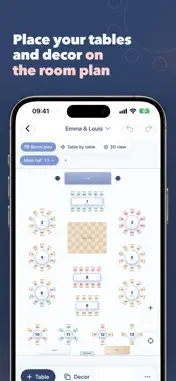
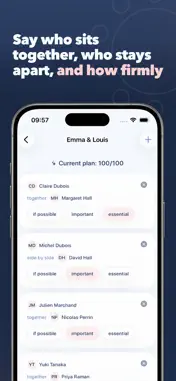
The seating plan, minus the three hours of sticky notes. You enter your guests and your rules: who belongs together, who should stay apart. Tablee builds the floor plan and leaves you the final say on every seat. WHAT ACTUALLY CHANGES • You describe, the app seats. "These two together", "definitely not those two", "children at one table". Tablee looks for the arrangement that honours the most rules. • It tells you what it gave up. When two rules contradict each other, it doesn't choose in silence: it shows the trade-off and lets you decide. • A last-minute cancellation breaks nothing. Remove a guest, run it again: the plan recalculates while moving as few people as possible. Anything you placed by hand stays put. • You keep control. Drag someone with a finger, pin them, run it again. What you fixed is never undone. • Your guest list arrives in one go. Paste a spreadsheet, import an Excel, CSV or PDF file, pick from your contacts, or type names with Quick add: "Emma & Louis Martin" makes a household. Households, groups, meals, allergens and replies all come through, and each group can be gathered or spread out, as you choose. • A room to your measurements. Dimensions to the tenth of a metre, seven table shapes, stage, dance floor, bar, buffet, entrances, pillars. And several rooms: drinks in the garden, dinner in the barn. ON YOUR IPHONE, AND ON YOUR COMPUTER IF YOU LIKE Everything works without an account on iPhone and iPad, even offline. An optional, free Tablee account brings your plans to your computer, in the web app at app.tablee-app.com, and back again. Sign in with Apple, or with a six-digit code sent by email. On your computer, a QR code signs the app in with one scan of your camera. THE PLANS Free: one event, up to 5 tables The full editor and the full seating engine: this is not a trial. Documents carry a "Made with Tablee" line. This event: one-time payment Up to 200 tables on the event of your choice, and every document without a watermark. No subscription, no renewal. This is the wedding plan. You pay once, for your day. Tablee Pro: yearly subscription Unlimited events and tables, watermark-free documents everywhere. Built for caterers, venues and wedding planners running one event after another. With an account, your purchases count on iPhone, iPad and computer. You pay when you create the event, right after picking your plan. FOUR DOCUMENTS READY TO PRINT • Service sheet: covers, meals and allergens counted table by table • A3 floor plan to scale, then one page per table • Alphabetical list, to find someone in three seconds • A2 entrance poster, "Find your table" Plus a backup file, to open on another device or on your computer. YOUR DATA Without an account, everything stays on your device: the plan is computed there, even offline. If you use iCloud, your events sync between your own devices, in your private space and encrypted. With an account, your account's events are stored on Tablee's servers so they can follow you to your computer. Your guests' allergens and reduced mobility only go there with your consent, which you can withdraw at any time. You can delete your account from the app. No ads, no trackers. Terms of Use (Apple's standard EULA): https://www.apple.com/legal/internet-services/itunes/dev/stdeula/ Privacy Policy: https://tablee-app.com/confidentialite Tablee Pro is a yearly subscription; its price depends on your country and is shown before you buy. It renews automatically at the end of each period unless cancelled at least 24 hours beforehand. Payment is charged to your Apple Account when you confirm the purchase. You can manage or cancel your subscription in your Apple Account settings.
What's New
Version 1.3.0 2026-10-29
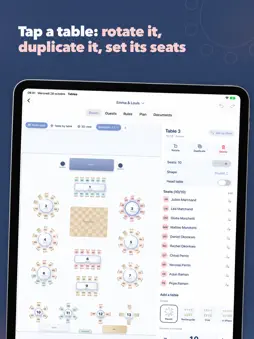
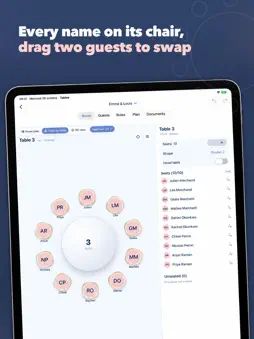
A new room editor, a 3D view, and a Trash so nothing gets lost. ADD A TABLE Pick the shape, then the number of people. A preview shows the table and the space ...A new room editor, a 3D view, and a Trash so nothing gets lost. ADD A TABLE Pick the shape, then the number of people. A preview shows the table and the space it takes. "× n" places several identical tables in a row, in one go, and undoes in one step. TABLES THAT LOOK LIKE TABLES The plan draws set tables: tablecloth, chairs, a plate at every seat, a drop shadow. Stage, dance floor, bar and buffet each get their own material. "Table by table" gets the same style. 3D VIEW The room in three dimensions, every guest in their chair. Rotate, zoom in, tap a table to see who sits there. On iOS 18 and later. ON IPHONE A bar at the bottom of the Room to add a table or a decor element. Tap a table: a card to set the seats, rotate, duplicate, delete, and seat unseated guests with a single tap. IPHONE DUO AND IPAD The Room opens as a two-page spread: the plan on the left, every tool on the right. Folded, iPhone Duo keeps your work right where it was. A 30-DAY TRASH A deleted event goes to the Trash with its guests, its plan and its unlock. Undo it right away from the banner, or restore it within thirty days. ALSO • Guest search is back on iOS 27. • On a wide screen, the lowest zoom shows the whole room. • Speakers and pillars show their name underneath. Technical Analysis
Package Overview Basic metadata
Bundle ID
com.teddy.Tablee Current Version 1.3.0
Minimum iOS 17.0
Package Size App Store Size
Package Metadata 0 / 0 version records
Detailed binary, privacy manifest, framework, and Info.plist results have not been indexed for this package yet. The verified App Store and archive metadata above remains available.
Developer Information
Known Version Records
0 version records with stored package metadata
Stored metadata does not guarantee a package is currently available to download.
| Details | Version / IDs | Version date | Action |
|---|