Preview






Description
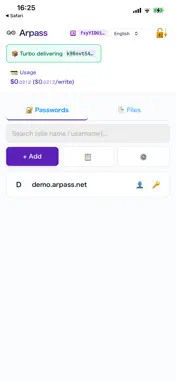
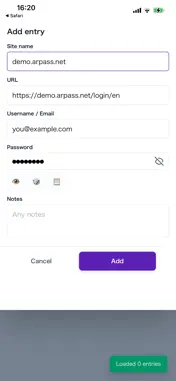
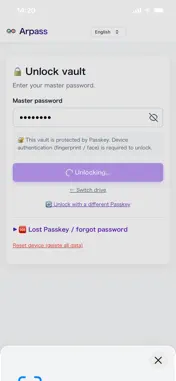
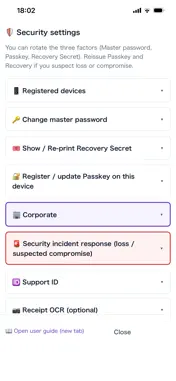
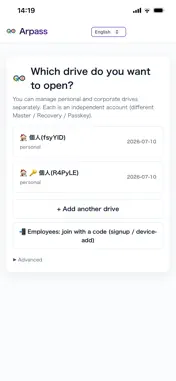
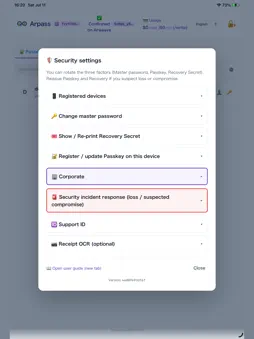
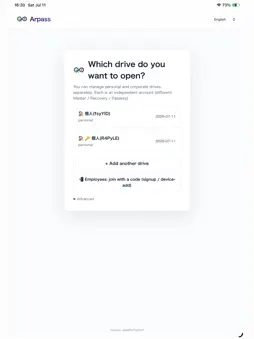
Arpass is a next-generation password manager and file vault built so your data stays forever. Highlights ■ Permanence — Stored on Arweave, a decentralized blockchain storage network. Even if Arpass shuts down, your data stays on the network. ■ Zero-knowledge encryption — All encryption happens in the client (app). A 2-of-3 scheme (Master password × Passkey × Recovery Secret) means we can never see your contents. ■ Autofill — Fill your saved passwords directly into other apps' and websites' login screens. ■ Two-factor codes — Register the two-factor secret of Google, GitHub, your bank and more, and see and copy the 6-digit code right next to the password. Nothing is lost when you change or lose your phone, and even if Arpass shuts down, the emergency restore tool lets you move the secrets to another authenticator app. ■ No monthly fee — no subscription. Reading and copying are always free. Only saves add a few cents (linked to the AR token price) to your usage, paid after use. ■ Receipt & file storage — Store not only passwords but also receipts, invoices, and contract PDFs or images, all encrypted. ■ OCR auto-entry — Automatically extract date, amount, and payee from a receipt image with AI. Bring your own AI API key (BYO-key). ■ Built for bookkeeping — Searchable by date/amount/payee, an append-only audit trail for edits and deletions, and CSV export — designed to meet Japan's Electronic Bookkeeping Act (National Tax Agency) requirements. Who it's for ・Anyone worried about what happens to their data if the password service they use shuts down ・People who find password-manager subscriptions (¥5,000+/year) too expensive ・Sole proprietors and SMBs who want to digitize receipts and streamline accounting ・Anyone who values data sovereignty and wants a service that cannot read their contents ・Users with multiple devices who want robust management with Passkey + Recovery ・Anyone tired of moving two-factor codes to a new authenticator app every time they change phones Security ・2-of-3: Master password × Passkey × Recovery Secret (with a hardware key such as YubiKey, you can unlock without a master password) ・Argon2id master-password protection (resistant to GPU/ASIC attacks) ・AES-256-GCM vault encryption ・WebAuthn / Passkey (FIDO2) required ・3-tier KEK (Key Encryption Key) architecture ・Only encrypted blobs live on Arweave; we hold no personal data ・Two-factor secrets are encrypted on your device too; once saved, the app never shows or exports them Pricing ・Free trial: up to 4 saves (create your drive + passwords + one file) ・One-time registration: about $2 (no monthly fee afterwards) ・Then pay only for what you use, after use: a few cents per save, linked to the AR token price at the day's rate ・Settle in-app anytime in small increments Privacy Arpass uses a zero-knowledge architecture; we cannot view the contents of your passwords or files. See arpass.io/privacy.html. Support ・Guide: arpass.io/help.html ・FAQ: arpass.io/#faq ・Contact: [email protected] Company Developed by Technoblest, Inc. — Japan — arpass.io
What's New
Version 1.1.0 2026-11-14
Open without the Master (quick unlock): right after you open your drive with the Master, the app asks once whether this iPhone may open without it. It also asks...Open without the Master (quick unlock): right after you open your drive with the Master, the app asks once whether this iPhone may open without it. It also asks once right after you create a drive. If you turn it on, both the app and AutoFill open with Face ID alone; they share this setting. Each time, Arpass’s server also confirms it. If you lose your iPhone, remove it from another device in Settings → Devices that open without the Master. Up to 10 devices can be added. Business employees can use it too, unless their company admin has turned it off. You still need the Master to recover your data if the service ever ends, so keep it on paper. New drives get an 8-word Master: for a new drive, the Master is now 8 words picked at random on your device (dice words). Passwords people make up are easy to guess with leaked password lists and AI. The words are shown in your language, and you write them on paper. You can reorder the words so they are easier to remember, and replace a word you don’t know with another one. Typing the Master: in the app and in AutoFill, the Master screen now shows 8 boxes with suggestions first. If your Master is from before, switch to “Type as text” and type it as usual. Technical Analysis
Package Overview Basic metadata
Bundle ID
io.arpass.app Current Version 1.1.0
Minimum iOS 18.4
Package Size App Store Size
Package Metadata 0 / 0 version records
Detailed binary, privacy manifest, framework, and Info.plist results have not been indexed for this package yet. The verified App Store and archive metadata above remains available.
Developer Information
Known Version Records
0 version records with stored package metadata
Stored metadata does not guarantee a package is currently available to download.
| Details | Version / IDs | Version date | Action |
|---|