Preview





Description
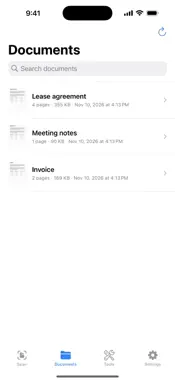
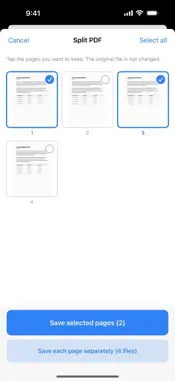
PDF Angel turns PDF to JPG, makes an ID card copy with front and back on one A4 page, and compresses PDFs with three levels. Add page numbers or a watermark, merge, split and sign. Everything runs on your device. SCAN • Point the camera at a receipt, contract, ID card, note, book page or whiteboard. The page is found automatically and the perspective is corrected for a clean, flat scan. • Scan several pages in a row and save them as one PDF. • Choose a look while scanning: color, grayscale or black & white. • Import photos from your library and turn them into a PDF. DOCUMENTS • All your scans in one list with thumbnails, page count and size. • Search by name, rename, share, delete. • Open any PDF in the built-in viewer and zoom with a pinch. • Save a copy of any PDF to the Files app, on your iPhone or in your cloud storage. • Open PDFs from Mail, Safari or other apps in PDF Angel and add them to your Documents. PDF TOOLS • Images to PDF: turn photos into a single PDF file. • PDF to JPG: save every page of a PDF as an image in Photos. • Add page numbers: number every page at the bottom (1 / 10 or 1). • Add watermark: stamp a text such as CONFIDENTIAL across every page. • ID card copy: front and back of a card on one page at its real size, from the camera or two photos. • Merge PDF: combine several PDFs into one. • Split PDF: pick the pages you want and save them as a new PDF, or save every page as its own file. • Rotate pages. • Compress PDF: choose light, balanced or strong and see the size before and after. • Password protect: encrypt a PDF, or remove a password you know. • Extract text (OCR): recognize the text in a PDF or image, then copy or share it. • Sign PDF: draw your signature with your finger, then drag and pinch to place it on any page. Your signature is kept for next time. PRIVACY • Scanning, OCR and every PDF tool run entirely on your iPhone. Your documents are never uploaded. • No account, no sign-up and no page limit. The app never puts its own mark on your scans. • One small banner line is shown at the bottom. At first launch iOS asks whether ad partners may track you; the app works the same whatever you answer. Available in 31 languages. REMOVE ADS (OPTIONAL) An optional monthly subscription removes the banner. Every tool works the same with or without it. Payment is charged to your Apple ID; the subscription renews automatically every month unless it is cancelled at least 24 hours before the end of the current period. Manage or cancel it in your Apple ID settings. Terms of Use: https://www.apple.com/legal/internet-services/itunes/dev/stdeula/ Privacy Policy: https://tanzsoft.com/docscanner/privacy.html
What's New
Version 1.6.0 2026-11-15
• New tool: Organize pages. Open a PDF, drag pages into a new order, turn a single sideways page, or remove pages you do not need, then save it as a new PDF. Yo...• New tool: Organize pages. Open a PDF, drag pages into a new order, turn a single sideways page, or remove pages you do not need, then save it as a new PDF. Your original file stays as it was. You can also start it from a document's menu. • Documents and Tools: cleaner lists with more room at the bottom. • Scan, Settings and open PDFs now use the whole screen. Technical Analysis
Package Overview Basic metadata
Bundle ID
com.tanzsoft.docscanner Current Version 1.6.0
Minimum iOS 15.0
Package Size App Store Size
Package Metadata 0 / 0 version records
Detailed binary, privacy manifest, framework, and Info.plist results have not been indexed for this package yet. The verified App Store and archive metadata above remains available.
Developer Information
Known Version Records
0 version records with stored package metadata
Stored metadata does not guarantee a package is currently available to download.
| Details | Version / IDs | Version date | Action |
|---|