
Preview


Description
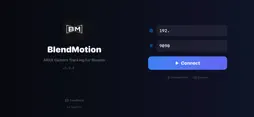
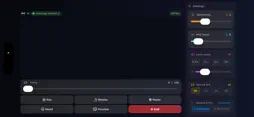
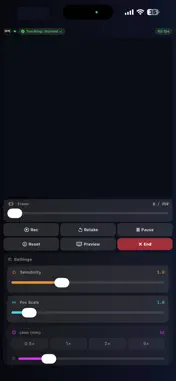
BlendMotion turns your iPhone into a wireless camera controller for Blender. It streams real-time 6DoF motion tracking data directly to Blender over your local Wi-Fi network — no cables, no extra hardware required. Simply install the free Blender addon, enter your computer's IP address in the app, and start moving. The Blender camera follows your iPhone's every movement in real time. This app requires the free BlendMotion Blender addon (a desktop plugin for Blender) to function. Download it for free at github.com/skettchdev/BlendMotion/releases. FEATURES • Full 6DoF tracking — position and rotation • Rotation Only mode for tripod-style shots • 5 Cinematic Presets: Handheld, Dolly, Crane, Cinematic, Raw • Record keyframes at 24, 25, 30, or 60 FPS • Real-time sliders: Sensitivity, Smoothing, Position Scale • Preflight Checklist — auto IP detection, camera, port, FPS verification • Smooth Keyframes and Bake to World post-processing tools • Artificial horizon indicator for real-time orientation feedback • Low latency UDP communication over local Wi-Fi REQUIREMENTS • Blender 4.0 or later with the free BlendMotion addon installed • iPhone XS or newer (devices with LiDAR recommended) • iOS 17.6 or later • Both devices on the same Wi-Fi network
What's New
Version 4.0.0 2026-11-10
BlendMotion 4.0 • Joystick Mode – fly your Blender camera like a drone. The phone aims the camera, an on-screen move pad flies it forward, back and sideways, a...BlendMotion 4.0 • Joystick Mode – fly your Blender camera like a drone. The phone aims the camera, an on-screen move pad flies it forward, back and sideways, and an Up/Down control raises or lowers it. Use both thumbs at once. Perfect for small rooms or shots you can't walk. • A fresh, camera-style design in portrait and landscape: the live preview fills the screen and the controls float over it, just like the Camera app. End is always visible, with a confirmation. • Pinch to zoom and quick lens buttons (0.5×, 1×, 2×, 5×). The exact focal length is shown between presets. • Saved Computers: connect to your Blender PC from a list – no more typing the IP. Edit a computer's name, IP or port any time. • Starts in the right orientation, even with Portrait Orientation Lock on. • Sharper preview with correct colours, smoother preview reconnects and automatic tracking resume after Wi-Fi drops (with the free Blender add-on 4.0.11). • Fixes: lens and frame-rate menus now apply your choice; the IP keyboard has a real dot key; a wrong IP shows a clear message; lighter, smoother interface. Please update the free BlendMotion Blender add-on to 4.0.11 (GitHub Releases) – app and add-on 4.0 work together. Technical Analysis
Package Overview Basic metadata
Bundle ID
com.BlendMotion.app.BlendMotion Current Version 4.0.0
Minimum iOS 17.6
Package Size App Store Size
Package Metadata 1 / 4 version records
Detailed binary, privacy manifest, framework, and Info.plist results have not been indexed for this package yet. The verified App Store and archive metadata above remains available.
Known Version Records
1 version record with stored package metadata • 4 known version records
Stored metadata does not guarantee a package is currently available to download.
| Details | Version / IDs | Version date | Action |
|---|---|---|---|
| 999.0 KB | v3.3.0 App Store ID: 885832640Build: 3.3.0 | 2026-07-29 04:44:52 | Paid / Arcade |
| Not archived | App Store ID: 885255387 | Unknown | Paid / Arcade |
| Not archived | App Store ID: 884449130 | Unknown | Paid / Arcade |
| Not archived | App Store ID: 883073288 | Unknown | Paid / Arcade |