
Preview


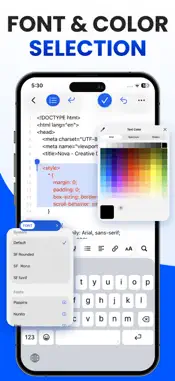


Description
Text Editor - QuickEdit brings text editing, code editing, note-taking, and document formatting together in one convenient app. Write documents, organize notes, edit source code, and clean up text with useful tools for everyday work. Whether you're a student, writer, professional, or developer, manage your writing, documents, and programming files in one easy-to-use editor. KEY FEATURES CODE EDITOR Write, view, and edit code with line numbers for easier navigation. Supports popular programming languages including Python, HTML, CSS, JavaScript, Java, C, C++, C#, PHP, SQL, Swift, Go, Rust, Ruby, Kotlin, Dart, and more. Edit JSON, XML, Markdown, CSV, LaTeX, Shell/Bash, Dockerfile, and other source files. Quickly find languages using the searchable language picker. TEXT EDITING & NOTES Create notes, write documents, edit plain text, and manage your content in one place. Search saved notes and easily continue previous work. RICH TEXT FORMATTING Format documents with bold, italic, underline, and font options. Add links, create lists, and adjust text alignment for better readability. OFFLINE TEXT EDITING Write and edit locally stored text without an internet connection. Work on notes, drafts, and documents anytime. CASE CONVERTER Change text between multiple styles: • Sentence case • Title Case • UPPER CASE • lower case • Alternating Case • Inverse Case • snake_case • dot.case • hyphen-case • Capitalized Case TEXT CLEANER Clean and format text by removing: • Line breaks and blank lines • Extra spaces • HTML code • Punctuation • Diacritics • Special characters FIND & REPLACE Quickly search and replace words, phrases, or characters without manually editing each occurrence. IMPORT & EXPORT Import documents for editing and export notes or text in TXT, PDF, RTF, or HTML format. Name, save, and share your files. NOTES & FILE MANAGEMENT Find recent documents, search files, and access Recents, Shared, and Browse views. Reopen saved files whenever needed. QUICK EDITING ACTIONS Copy text, clear content, undo changes, and share your work with simple editing controls. From everyday notes and rich text documents to Python, HTML, and JavaScript code editing, QuickEdit keeps your essential writing and coding tools together. Privacy Policy: https://talharehman.com/privacy Terms of Use: https://talharehman.com/terms
What's New
Version 1.4.2 2026-10-23
Thank you for using Text Editor - QuickEdit! What's New in This Update: • New Code Editor – Write and edit code in Python, HTML, CSS, JavaScript, Java, PHP, a... Technical Analysis
Package Overview Basic metadata
Bundle ID
com.texteditor.documenteditor.wordchanger Current Version 1.4.2
Minimum iOS 17.0
Package Size App Store Size
Package Metadata 1 / 7 version records
5.0 / 5.0 (5 ratings)
Detailed binary, privacy manifest, framework, and Info.plist results have not been indexed for this package yet. The verified App Store and archive metadata above remains available.
Developer Information
Known Version Records
1 version record with stored package metadata • 7 known version records
Stored metadata does not guarantee a package is currently available to download.
| Details | Version / IDs | Version date | Action |
|---|---|---|---|
| 62.51 MB | v1.1.3 App Store ID: 888667358Build: 1.1.3 | 2026-09-15 16:07:20 | Get Version |
| Not archived | App Store ID: 887634380 | Unknown | Request Version |
| Not archived | App Store ID: 885862739 | Unknown | Request Version |
| Not archived | App Store ID: 884364016 | Unknown | Request Version |
| Not archived | App Store ID: 874392366 | Unknown | Request Version |
| Not archived | App Store ID: 874360550 | Unknown | Request Version |
| Not archived | App Store ID: 874048033 | Unknown | Request Version |