
Preview



Description
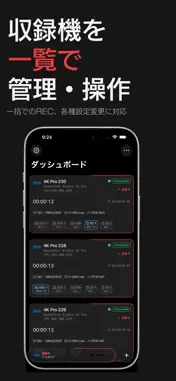
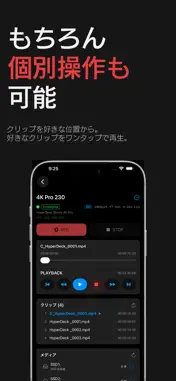
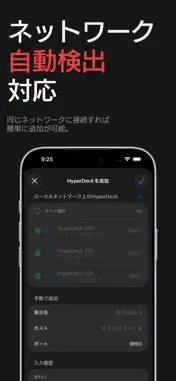
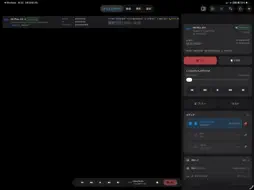
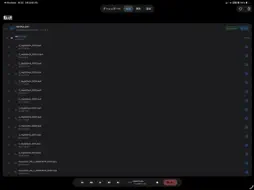
DeckCtrl is an unofficial controller for Blackmagic Design HyperDeck disk recorders. It connects over your local network and lets you run several decks at once from an iPhone or iPad. It was built for multicam shoots, where walking between front panels and web setup pages takes time you don't have. One dashboard shows every deck's recording state, timecode and remaining media, and you can send record, stop, format and file name changes to all selected decks in one go. DASHBOARD - Every connected deck on one screen, in a grid or a list - For each deck: recording time, timecode and TC setting, input format, codec, audio channels, remaining time on each slot, reference lock and auto record trigger - On iPad, deck details open in a panel next to the dashboard - Tap a deck's icon to flash its front panel and find it in the rack CONTROL ALL DECKS AT ONCE - Record, stop, play and pause every selected deck - Previous and next clip, rewind, fast forward, and preview/output switching - Set the record slot, recording format, audio channels, file name prefix, timecode, reference and auto record on all selected decks - Format media on several decks in one step, with a confirmation before anything is erased TIMECODE - Set each deck's TC source and drop or non-drop frame, one deck at a time or all together - Daisy chain setup: pick a master and its source, and the other decks are set to receive it as External automatically PLAYBACK - Jump to any timecode with an HH:MM:SS:FF wheel - Cue to the start or end of a clip or the timeline, or step by 1 or 10 seconds - Frame-by-frame jog, and shuttle up to ±50× with a curve that keeps slow speeds precise - Loop, single clip and stop frame display options FILE TRANSFER - Browse the clips on each deck's SD, SSD and USB slots and download them over FTP - Downloads go into a folder per deck, with duplicate names renamed automatically, progress for each transfer and a transfer history - Play downloaded clips with Picture in Picture SLATE METADATA - Read and write clip information (reel, scene, take, shot type, good take), project information (project name, camera, director, camera operator) and lens information (lens type, iris, focal length, distance, filter) - View the metadata of downloaded clips ALSO - Finds HyperDecks on your network automatically, or add one by IP address - Live Activity shows recording and transfer status on the Lock Screen and in the Dynamic Island - REC indicators drawn brighter than white on HDR displays (can be turned off) - Haptic feedback (can be turned off) - Four app icons to choose from - English and Japanese REQUIREMENTS - iOS or iPadOS 26 or later - HyperDeck Ethernet Protocol (TCP 9993) and FTP (TCP 21) enabled on the deck - The HyperDeck and your iPhone or iPad on the same local network - Local network access allowed when the app asks on first launch - Remote (REM) turned on on the HyperDeck so it accepts commands SUPPORTED MODELS HyperDeck Studio HD Plus, HyperDeck Studio HD Pro, HyperDeck Studio 4K Pro, HyperDeck Studio Mini, HyperDeck Shuttle HD and other models that support the HyperDeck Ethernet Protocol. PLEASE NOTE - DeckCtrl is not affiliated with or endorsed by Blackmagic Design. Blackmagic Design and HyperDeck are trademarks of Blackmagic Design. - Formatting erases all data in the selected slot. The app asks you to confirm, but check the target before you go ahead. - The HyperDeck Ethernet Protocol is not encrypted. Use the app on a local network you trust, not over the internet. PRIVACY DeckCtrl only talks to your HyperDecks. It sends no data anywhere else and includes no analytics or tracking.
What's New
Version 1.1.3 2026-11-05
- DeckCtrl is now available in English. The app follows your device language: Japanese on devices set to Japanese, English everywhere else. You can also change ... Technical Analysis
Package Overview Basic metadata
Bundle ID
ti9611.deckctrl Current Version 1.1.3
Minimum iOS 26.0
Package Size App Store Size
Package Metadata 1 / 1 version records
Detailed binary, privacy manifest, framework, and Info.plist results have not been indexed for this package yet. The verified App Store and archive metadata above remains available.
Known Version Records
1 version record with stored package metadata
Stored metadata does not guarantee a package is currently available to download.
| Details | Version / IDs | Version date | Action |
|---|---|---|---|
| 21.45 MB | v1.1.1 App Store ID: 885687953Build: 1.1.1 | 2026-09-18 16:57:28 | Get Version |