
Preview


Description
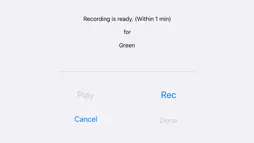
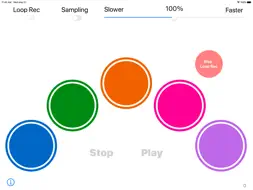
Sample Tap Loop! provides: 1. You can sample a sound from the microphone on your device. 2. You can tap the color pads and play with the sampled sounds. 3. You can make a loop with the sampled sounds. There is no specific usage, so please enjoy this app on your own way! Find your unique way to use it! (Instructions) Sampling - Turn on the "Sampling" switch and tap a color pad that you choose. - On the recording view, press "Rec" button to record a sound from the microphone on your device. (Within 1 minute) - If you press "Done" button, the sound that you sampled will assigned to the color pad. - If you press "Cancel" button, the assigned sound won't change. Tap - Tap the color pads, then you can play the sounds that you sampled. You can play as you like. Loop - Practice the pattern that you want to make a loop. - Turn on "Recording" switch and when you tap any of the color pads, the recording of the loop will begin. - Press "Stop Rec" button to stop recording the loop. You have to be careful of the timing to press. (Or the recording will stop automatically after 10 minutes)) - If you press "Play" button, then you can play the loop you made. - To stop playing the loop, press "Stop" button. - If you adjust the speed of the loop, you can change the value of the slider bar on the top-right of the view.
What's New
Version 1.1 2020-05-28
Fixed the issues regarding iOS13 compatibility. The app is now reflect the system dark mode setting. The instruction of the app is added. Technical Analysis
Package Overview Package analysis available
Bundle ID
com.tubesoft.SampleTapLoop Current Version 1.1
Minimum iOS 13.0
Package Size App Store Size
Package Metadata 1 / 3 version records
FBLPromises
org.cocoapods.FBLPromises v1.2.8iOS 8.0+131.83 KB
GoogleUtilities
org.cocoapods.GoogleUtilities v6.6.0iOS 8.0+194.57 KB
nanopb
org.cocoapods.nanopb v1.30905.0iOS 8.0+95.6 KB
0.0 / 5.0 (0 ratings)
Known Version Records
1 version record with stored package metadata • 3 known version records
Stored metadata does not guarantee a package is currently available to download.
| Details | Version / IDs | Version date | Action |
|---|---|---|---|
 3.81 MB | v1.1 App Store ID: 836159902Build: 1.1.04 | 2020-05-27 10:55:38 | Get Version |
| Not archived | App Store ID: 821675988 | Unknown | Request Version |
| Not archived | App Store ID: 821264151 | Unknown | Request Version |