
Preview



Description
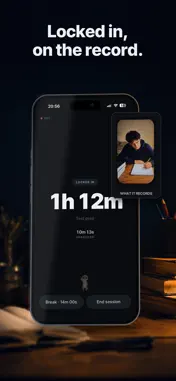
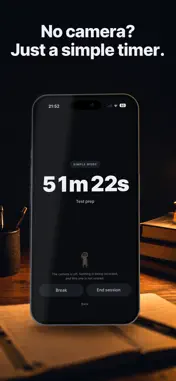
Prop your phone up and study. Kept counts the time you were actually at the desk — and hands it back as a 15-second video you can post. HOW IT WORKS 1. Type in what you're working on, or don't. 2. Prop the phone up and point the front camera at your chair. 3. Tap Lock in, and study. 4. When you stop, you get your score, a ring showing exactly where the hours broke, and a timelapse with all of it burned in. WHAT THE RING SHOWS The ring is the session. Amber is time you were at the desk. The gaps are where you left. A notch is where you picked the phone up. Every session comes out as a full circle, whether it ran 25 minutes or four hours — the number in the middle is the part that changes. THE CAMERA NEVER LEAVES YOUR PHONE Every frame is analyzed on the device itself. Nothing is uploaded, nothing is kept on a server, and there is no account to create. Faces in the exported video are blurred automatically, and that is on by default. NO CAMERA? USE THE SIMPLE TIMER The Simple Timer is a plain study timer with no camera and no score. It does not make a video. It is free, and there is no limit on it. WHAT'S FREE Kept is free to use. On the free plan you get two scored sessions a week, and your videos carry a KEPT.STUDY watermark. Free clips can be shared the day you make them; keeping them is part of Kept Pro. KEPT PRO Kept Pro takes the KEPT.STUDY watermark off your videos and opens up the rest of the app. • Yearly — $44.99 per year, after a 7-day free trial • Monthly — $7.99 per month, no free trial Payment is charged to your Apple Account when you confirm the purchase. Subscriptions renew automatically unless auto-renew is turned off at least 24 hours before the end of the current period. Your account is charged for renewal within 24 hours before the period ends. You can manage your subscription and turn off auto-renew in your Apple Account settings after purchase. If you buy a subscription during a free trial, the unused part of that trial is forfeited. FOR PARENTS Kept is a study timer. The camera does one job: it tells whether the student is sitting at the desk. All of that happens on the phone. No video, image or frame is ever uploaded, there is no account, no messaging and no feed. Faces are blurred automatically in anything the app exports. That blur is on by default; it can be turned off in the app. IF YOU ARE ASKED TO APPROVE A PURCHASE Kept Pro is the same study timer. It removes the KEPT.STUDY watermark, lifts the two-scored-sessions-a-week limit, and lets clips be kept on the phone instead of clearing at the end of the day. It does not add an account, a feed, messaging or uploads — where the video goes does not change. You can cancel any time in your Apple Account settings. Terms of Use: https://www.apple.com/legal/internet-services/itunes/dev/stdeula/ Privacy Policy: https://kept.study/privacy
What's New
Version 1.2 2026-10-13
Focus: your focus at a glance, now on its own tab. Kept Pro shows how your longest run and your phone pickups are changing, and where your hours go by subject. ... Technical Analysis
Package Overview Basic metadata
Bundle ID
study.kept.app Current Version 1.2
Minimum iOS 16.4
Package Size App Store Size
Package Metadata 0 / 0 version records
Detailed binary, privacy manifest, framework, and Info.plist results have not been indexed for this package yet. The verified App Store and archive metadata above remains available.
Developer Information
Known Version Records
0 version records with stored package metadata
Stored metadata does not guarantee a package is currently available to download.
| Details | Version / IDs | Version date | Action |
|---|