
Preview



Description
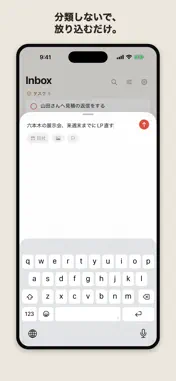
A link to read later. A task you can't forget. An idea that just popped into your head. Do you keep each of these in a different app? ThinkCapture is one place to drop all three. You don't pick where things go: whether it's a link, a task, or a passing thought, the AI on your device reads it and files it. You never classify. You never tag. You just write. ■ Three apps, in one - Links to read later — send a URL from the share sheet; it's saved with a headline and thumbnail. - Things to do — write "reply to Sam" or "buy milk" and the AI treats it as a task; add a due time and it reminds you. - Ideas and notes — thoughts, things you've learned, and what happened today all go in the same field, and they stay. ■ Why keep them together Storing things separately means deciding, every time, which app this belongs in — enough friction that you often don't write it down at all. Put it all in one place and it becomes impossible to find. Make sorting the AI's job and both problems disappear — and since the sorting never leaves your device, you can pile up anything without worrying. ■ What you can do - Instant capture — write in a single field; saving finishes at once, without waiting for the AI. One tap from Siri, Shortcuts, widgets, or Control Center. - On-device sorting — each note becomes a task, idea, knowledge, reference, journal, waiting, or someday item. Override any result; when it isn't sure it says "unclassified" instead of guessing. - Full-text search — find anything by keyword or tag name, completed items too. - Today — no cluttered inbox. Just today's tasks and your recurring habits. - Calendar — see the days you wrote on, and overlay events from your device's calendar (iCloud, Google, and more). Events are displayed, never changed. - Tags and priority — add your own tags on top of the AI's categories, and set high, medium, or low priority. - Due dates and reminders — set one in a tap; add a time and you get a notification. Recurring reminders too. - Photo attachments, plus a grid layout like paper in a notebook. - Home Screen widget — check today's tasks and capture without opening the app. - Backup and restore — export everything as JSON or Markdown anytime and import it back; restoring merges, never deletes. - iCloud sync (optional, off by default) — only about where data is stored; sorting still runs on device. ■ Pricing Writing, sorting, searching and exporting are free, with no limit on how much you capture. Everything above stays free and unlimited. ThinkCapture Pro is an optional subscription for how the app looks and where it lives: color themes (green, blue, purple), a board view that flips through your Inbox column by column, and a Lock Screen card for checking off today's tasks. In Japan it is ¥2,500 per year (about ¥208 a month, roughly 48% less than monthly) or ¥400 per month; your region's price is shown in the app. The yearly plan starts with a 14-day free trial for people new to the subscription. Both plans renew automatically unless cancelled at least 24 hours before the period ends, and you can cancel anytime under Settings > your Apple Account > Subscriptions. Without Pro, nothing is locked away and nothing stops you from writing more. Terms of Use (Apple standard EULA): https://www.apple.com/legal/internet-services/itunes/dev/stdeula/ Privacy Policy: https://docs.google.com/document/d/172RyaTDqcAQElhyr3hXf6zCRFwCoLHf895k01GYDFvI/ ■ About privacy ThinkCapture's AI sorting uses Apple's on-device AI (Apple Intelligence / Foundation Models). What you write is never sent to an outside server to be classified, and no account is required. Saving a link fetches only that page's public headline and thumbnail. ■ Requirements Automatic sorting requires iOS 26 or later on an Apple Intelligence–capable device. On other devices you tap the classification badge to pick a category by hand — it still works as an ordinary notes and tasks app. Don't classify. Don't organize. Just write.
What's New
Version 1.2.0 2026-08-19
ThinkCapture 1.2. Still zero sorting — now much stronger at finding, reviewing, and keeping at it. - Full-text search Find any note by keyword or by the tags...ThinkCapture 1.2. Still zero sorting — now much stronger at finding, reviewing, and keeping at it. - Full-text search Find any note by keyword or by the tags you added. Completed items and old records are included, so nothing gets lost as your notes grow. - Photo attachments Attach images to your notes. - Priority and tags Set high, medium, or low priority on tasks, and combine it with tags to review things your own way. - Grid and snapping board A new grid view takes in your whole Inbox at a glance. You can also flip through your notes column by column in board view (board is Pro). - Home Screen widget See today's tasks from your Home Screen and capture right from there. - Lock Screen card Keep today's tasks on your Lock Screen and check them off on the spot (Pro). - Grid paper design and color themes A refreshed grid layout, like paper in a notebook, plus a choice of accent colors (colors other than coral are Pro). - Calendar integration Overlay events from your device's calendar (iCloud, Google, and more). They are only displayed, never changed. - English support - Introducing ThinkCapture Pro (subscription) Unlocks color themes, board view, and the Lock Screen card. ¥2,500 per year in Japan (about ¥208 a month, roughly 48% less than paying monthly) or ¥400 per month; your region's price is shown in the app. The yearly plan starts with a 14-day free trial for people new to the subscription. Both plans renew automatically and you can cancel anytime. Writing, sorting, searching, and exporting have no limits without Pro. Don't classify. Don't organize. Just write. Technical Analysis
Package Overview Basic metadata
Bundle ID
dev.takish.thinkcapture Current Version 1.2.0
Minimum iOS 18.0
Package Size App Store Size
Package Metadata 0 / 0 version records
Detailed binary, privacy manifest, framework, and Info.plist results have not been indexed for this package yet. The verified App Store and archive metadata above remains available.
Known Version Records
0 version records with stored package metadata
Stored metadata does not guarantee a package is currently available to download.
| Details | Version / IDs | Version date | Action |
|---|