
Preview






Description
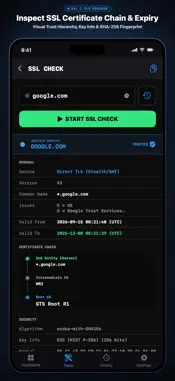
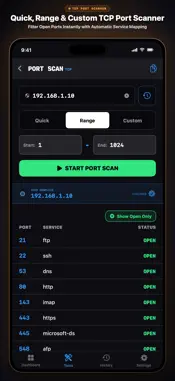
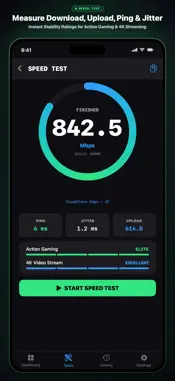
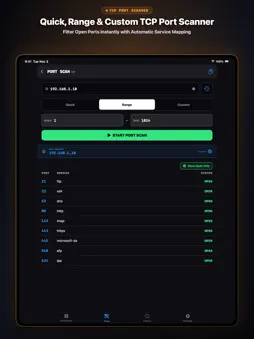
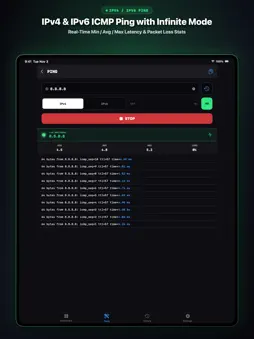
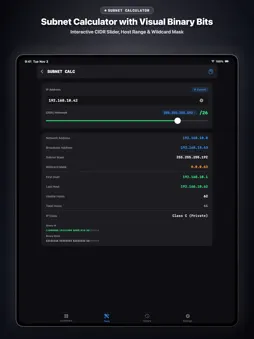
Pro-Grade Network Diagnostics in a Modern UI. Built by and for network engineers, OniNetwork delivers reliable, field-ready network diagnostics and real-time telemetry in a clean iOS and iPadOS app. [ Overview ] 1. Field-Ready Deep Data Go beyond basic pings. Run real-time Path Ping (MTR) and Multi-Host Pings with live jitter and packet loss tracking, view ASN and ISP names in Traceroutes, inspect full SSL certificate chains, and fingerprint device types and hardware vendors in your LAN. 2. Modern, Developer-First UI Built with a high-contrast dark and neon theme to reduce eye strain during long troubleshooting sessions. Interactive charts, visual latency range bars, and one-tap report copy make incident reporting effortless. 3. Privacy First & Secure All scan results, target history, and network logs are stored strictly locally on your device. No unauthorized tracking or external server uploads—safe even for strict enterprise environments. [ Toolkit (11 Pro Tools) ] - Speed Test & Dashboard: View Global IP (IPv4/IPv6), Local IP, Subnet Mask, ISP, and SSID. Run an edge-powered speed test (Download, Upload, Ping, Jitter) with one tap. - Path Ping (MTR & Multi-Host Ping): Combines Ping monitoring with Traceroute path visibility. Monitor Gateway, ISP, and Target in 3-Hop mode, inspect up to 20 hops in Full Path mode with ECMP detection, or ping up to 20 hosts concurrently in Multi-Host mode. Tracks 7 live metrics (Loss%, Sent, Last, Avg, Best, Worst, Jitter) with real-time charts and mtr-compatible report copy. - Ping & Traceroute: Full IPv4/IPv6 support. Ping measures packet loss and min/avg/max latency with custom or infinite counts. Traceroute resolves PTR hostnames, ASN, and ISP names for each hop. - LAN Analyzer (Fast & Deep Scan): Rapidly discover Wi-Fi devices. Combines mDNS/Bonjour, SSDP, HTTP headers, and open ports to fingerprint device types (Router, NAS, Printer, etc.) and hardware vendors. - Port Scanner: Supports Quick, Range, and Custom scans, mapping open TCP ports to standard service names. - DNS Lookup: Query A, AAAA, MX, NS, TXT, CNAME, SOA, SRV, and CAA records, plus reverse PTR lookups. View AUTH flags, SPF/DMARC tags, and response times across custom or preset DNS servers (Google, Cloudflare, Quad9). - Whois (RDAP & Raw): Supports structured RDAP lookups and raw TCP port 43 queries with automatic referral chasing. - SSL Certificate Check: Analyze SSL/TLS certificates for any domain or IP. View full certificate chains, expiration countdown, SANs, signature algorithms, and public keys, with CT log fallback. - Wake on LAN (WOL): Send magic packets to saved MAC addresses with automatic broadcast IP calculation. - Subnet Calculator: Slide the CIDR (/0 to /32) to calculate Network/Broadcast addresses, Wildcard masks, and host ranges with a color-coded binary view. - History Archive & CSV Export: Automatically log results locally. Reproduce past charts, re-run tests with one tap, or export logs to UTF-8 BOM CSV files. [ Privacy Policy & Terms ] We do not collect or upload your diagnostic data to external servers. (Note: The free version uses Google AdMob, which may collect device identifiers per Google's Privacy Policy). The Pro version is a one-time lifetime unlock. Use this app only on networks and devices you own or have permission to test. --- Privacy Policy & Terms of Use: https://pu-labs.web.app
What's New
Version 1.1.6 2026-11-12
[NEW] Path Ping (Real-Time MTR & Multi-Host Ping) • 3-Hop Mode (Free): Simultaneously monitor your Gateway, ISP boundary, and final Target to instantly isolate ...[NEW] Path Ping (Real-Time MTR & Multi-Host Ping) • 3-Hop Mode (Free): Simultaneously monitor your Gateway, ISP boundary, and final Target to instantly isolate where latency or packet loss begins. • Full Path Mode (Pro): Full mobile MTR up to 20 hops with live RTT timeline charts, hop-by-hop min/avg/worst range bars, 7 standard telemetry metrics (Loss%, Sent, Last, Avg, Best, Worst, Jitter), and automatic ECMP load-balancing detection. • Multi-Host Mode (Pro): Ping up to 20 IPs or domains concurrently on a single screen with one-tap Gateway + Popular DNS presets. • Full IPv4 & IPv6 support, live PTR/ASN resolution, mtr-compatible wide report copy, History Archive reproduction, and CSV export. [Improvements] • Enhanced IPv6 address resolution across Ping, Traceroute, and Path Ping to strictly filter out IPv4-mapped addresses (::ffff:) for accurate AAAA diagnostics. • Refined Tools & History grid layout for faster access during field troubleshooting. Technical Analysis
Package Overview Basic metadata
Bundle ID
com.pu-labs.OniNetwork Current Version 1.1.6
Minimum iOS 17.6
Package Size App Store Size
Package Metadata 1 / 5 version records
Detailed binary, privacy manifest, framework, and Info.plist results have not been indexed for this package yet. The verified App Store and archive metadata above remains available.
Developer Information
Known Version Records
1 version record with stored package metadata • 5 known version records
Stored metadata does not guarantee a package is currently available to download.
| Details | Version / IDs | Version date | Action |
|---|---|---|---|
| Not archived | App Store ID: 890911863 | Unknown | Request Version |
| Not archived | App Store ID: 889599149 | Unknown | Request Version |
| 13.34 MB | v1.1.1 App Store ID: 883395441Build: 1.1.1 | 2026-09-08 14:36:21 | Get Version |
| Not archived | App Store ID: 883342808 | Unknown | Request Version |
| Not archived | App Store ID: 883179356 | Unknown | Request Version |