
Preview






Description
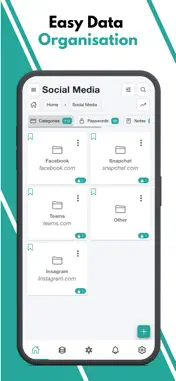
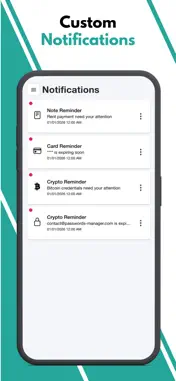
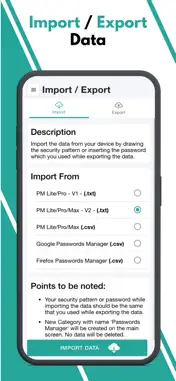
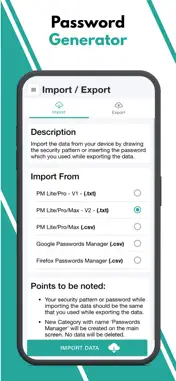
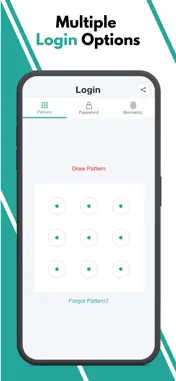
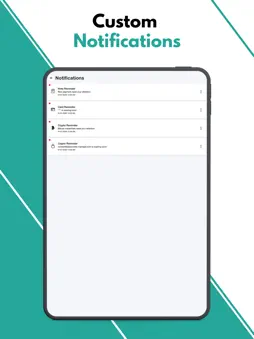
PM Lite: Password Manager is a 100% offline password management application that enables users to store, organize, and manage their passwords, notes and other sensitive information locally on their devices without relying on cloud-based services. Highly Secure Offline Passwords Manager Application: This application is 100% offline without even having the internet connection in this application. It stores data only on the user's device and encrypts it using AES-256 bit encryption, ensuring high security and privacy. Multiple Login Types: The application offers users the flexibility to choose from three different login types: Pattern, Passwords, and Biometric. Malicious Login Detection: The app locks itself temporarily for a specified period of time after multiple failed login attempts, protecting against unauthorized access and brute-force attacks. Category-wise Data Organization: The application offers a hierarchical organization system, allowing users to categorize their data using multi-level categories. This means that users can create nested categories to structure their information effectively. Within these categories, users can store passwords, notes, and other relevant data. Password Generator: The application includes a Password Generator tool that assists users in creating highly secure passwords. Weak & Repeated Passwords Alert: To enhance password security and assist users in managing their passwords effectively, the application provides a dedicated feature that lists all repeated and weak passwords separately. Multiple View Types: The application incorporates a user interface (UI) and user experience (UX) feature that allows users to choose between two different views for displaying their data: tile view or list view. Multiple Color Themes: At present, this application provides support for two distinct color themes: "Dark" and "Light." Users have the option to choose between these two themes based on their preference and visual comfort. Multiple Language Support: At present, the application provides support for a wide range of languages, surpassing 14 language options. Export Data: Since the Passwords Manager application operates entirely offline, transferring data to a new device requires a manual export of their data from the current device and securely stores it somewhere before uninstalling the application. File Import Data: Passwords Manager allows users to effortlessly import their passwords from various file formats. Whether it's a Google CSV file, a Passwords Manager (.txt) file, or a Passwords Manager (.csv) file, the application provides the flexibility to import data from other sources. Bookmark: The application provides users with the ability to bookmark their most frequently accessed data, enabling quick and convenient access whenever needed.. Auto Logout Application: This functionality ensures that if the application is left unattended or unused for a specified period, it will automatically log out to protect sensitive information from unauthorized access.
What's New
Version 13,0 2026-09-23
Performance improvements and bug fixes. Technical Analysis
Package Overview Basic metadata
Bundle ID
com.codingtrickshub.passwordsmanager.free Current Version 13,0
Minimum iOS 15.6
Package Size App Store Size
Package Metadata 0 / 17 version records
Detailed binary, privacy manifest, framework, and Info.plist results have not been indexed for this package yet. The verified App Store and archive metadata above remains available.
Developer Information
Known Version Records
0 version records with stored package metadata • 17 known version records
Stored metadata does not guarantee a package is currently available to download.
| Details | Version / IDs | Version date | Action |
|---|---|---|---|
| Not archived | App Store ID: 889119437 | Unknown | Request Version |
| Not archived | App Store ID: 886236388 | Unknown | Request Version |
| Not archived | App Store ID: 882381956 | Unknown | Request Version |
| Not archived | App Store ID: 882013563 | Unknown | Request Version |
| Not archived | App Store ID: 878074354 | Unknown | Request Version |
| Not archived | App Store ID: 872914031 | Unknown | Request Version |
| Not archived | App Store ID: 872717303 | Unknown | Request Version |
| Not archived | App Store ID: 863790767 | Unknown | Request Version |
| Not archived | App Store ID: 863352941 | Unknown | Request Version |
| Not archived | App Store ID: 863213323 | Unknown | Request Version |
| Not archived | App Store ID: 862105263 | Unknown | Request Version |
| Not archived | App Store ID: 862074367 | Unknown | Request Version |
| Not archived | App Store ID: 861756167 | Unknown | Request Version |
| Not archived | App Store ID: 861709273 | Unknown | Request Version |
| Not archived | App Store ID: 861704442 | Unknown | Request Version |
| Not archived | App Store ID: 858339649 | Unknown | Request Version |
| Not archived | App Store ID: 857614273 | Unknown | Request Version |