
Preview



Description
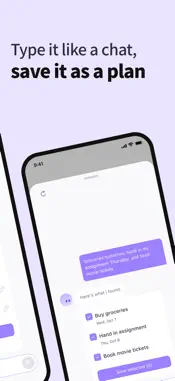
Know what you need to do but can't get started? Untangle is a planner that turns what's on your mind into tasks and breaks a big task into first steps you can do right now. Tangle, the AI assistant, does the sorting with you. You can start right away without signing up. Untangle is built by a small team for anyone who finds it hard to start, with or without an ADHD diagnosis. Break big tasks into small steps Pick a task you keep putting off and ask Tangle to break it down. Tangle asks when it is due and splits it into steps that fit your deadline. Check the steps, edit them, and save them as subtasks. Type it like a chat, save it as a plan Write "groceries tomorrow, hand in my assignment on Thursday, book movie tickets" in one message. Tangle turns it into separate tasks with dates, and you choose which ones to save. See all your tasks in one list Tasks with a time, tasks for later and finished tasks are in one list. Swipe a task to move it to another day or delete it. Plan your day on a calendar timeline Place tasks on the day's timeline and drag a block to change its time. Tasks without a set time wait in the Anytime row at the top. Start a focus timer and finish one thing at a time Start a 25-minute Pomodoro or a stopwatch with no time limit. Check off subtasks as you go. Your focus time is saved with each task. Get a reminder when it is time Set a reminder time for any task. Tap the notification to open that task directly. See today's tasks without opening the app The home screen widget shows today's remaining tasks, and you can check them off from the widget. Who it is for - People whose to-do list keeps growing but who struggle to start - People who put things off until the last minute - Adults with ADHD or ADHD traits who find it hard to set priorities - Students and working people whose study or work plans keep falling apart FAQ Q. I don't have an ADHD diagnosis. Can I still use it? A. Yes. Anyone who tends to put tasks off can use Untangle. Q. How is it different from other to-do list apps? A. Most to-do apps help you write tasks down. Untangle also helps you choose what to do first, break big tasks into steps and start with a timer. Q. Do I need an account? A. No. You can start without signing up or logging in. Q. Is it free? A. Yes. Untangle is free to use. Q. Where is my data stored? A. What you enter in the app, such as tasks and chats with Tangle, may be sent to and stored on our servers to provide app features. Data is encrypted in transit, and you can request deletion. See the privacy policy for details. Please note - AI answers may not always be accurate. You can report an inappropriate answer in the app. - Untangle is not a medical device and does not replace ADHD diagnosis or treatment. - Contact: Settings > Contact us in the app
What's New
Version 2.3.1 2026-11-03
[Widgets and Shortcuts] • Redesigned Home Screen widgets for today’s plan and undated tasks. See today’s remaining tasks in start-time order and mark them compl... Technical Analysis
Package Overview Basic metadata
Bundle ID
untangle.ai.kr Current Version 2.3.1
Minimum iOS 17.0
Package Size App Store Size
Package Metadata 0 / 0 version records
Detailed binary, privacy manifest, framework, and Info.plist results have not been indexed for this package yet. The verified App Store and archive metadata above remains available.
Developer Information
Known Version Records
0 version records with stored package metadata
Stored metadata does not guarantee a package is currently available to download.
| Details | Version / IDs | Version date | Action |
|---|