
Preview





Description
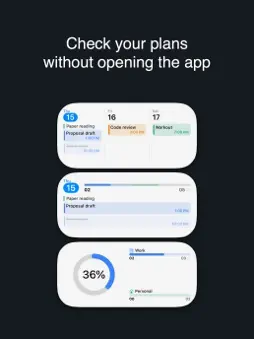
Apportion is a personal time-budget planner. It keeps the plans of each part of your life apart — work, study, your own projects — and then adds them together, because the day they share is the one thing that cannot be stretched. TWO KINDS OF WORK, ONE SCREEN A meeting sits on the timeline at its hour. "Three hours of writing" sits in the list as an amount you owe the day. Most planners handle one or the other. Apportion holds both, and measures them against the hours you actually have. YOUR CALENDAR, ALREADY COUNTED Bring in the calendars you already use and their events take their share of the day beside your plans. You budget what is left, not what you wish you had. Apportion never edits your calendar on its own — it writes only when you create or change an event yourself. EACH PROFILE APART, THE TOTAL TOGETHER Give work, study and personal life their own profiles. Each keeps its own plans and its own progress. The day's load is summed across all of them, so you see which one overflowed before the day does. DAY, WEEK, MONTH Move between a single day's timeline, a strip of days, and a month where every square carries its load. On the Mac it is one window: plans and profiles on the left, the calendar in the middle, the selected day on the right. WIDGETS AND SHORTCUTS Three widgets — day, three days, progress — for the Home and Lock Screen. Shortcuts let you check something off without opening the app. THREE LOOKS Simple, Diary and Glass. The same data, with the face you like. YOUR DATA STAYS YOURS No account. No sign-up. No server of ours. Everything lives on your device, and sync — if you turn it on — runs through your own iCloud, where we cannot read it. Export everything as JSON whenever you want. FREE FOR 14 DAYS Everything is unlocked for two weeks. After that, reading and exporting stay free; creating and editing need the full version — one purchase, no subscription, covering iPhone, iPad and Mac, with Family Sharing.
Technical Analysis
Package Overview Basic metadata
Bundle ID
net.codecompose.apportion Current Version 1.2.1
Minimum iOS 17.0
Package Size App Store Size
Package Metadata 0 / 0 version records
Detailed binary, privacy manifest, framework, and Info.plist results have not been indexed for this package yet. The verified App Store and archive metadata above remains available.
Developer Information
Known Version Records
0 version records with stored package metadata
Stored metadata does not guarantee a package is currently available to download.
| Details | Version / IDs | Version date | Action |
|---|