Preview







Description
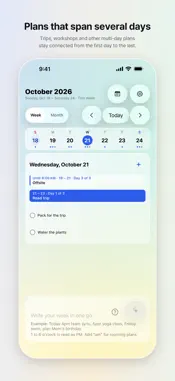
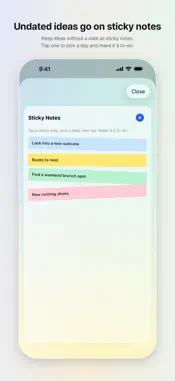
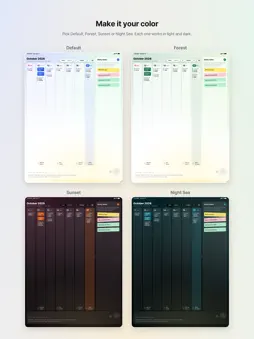
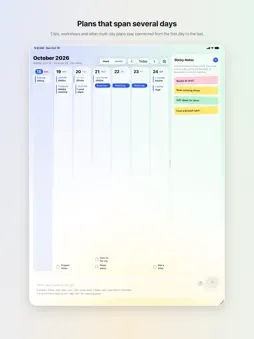
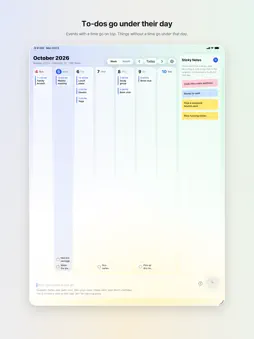
KanKan has its own week and month calendar. It has its own Home Screen widgets too. And it works with Apple Calendar: events you add in KanKan go into Apple Calendar, and events already in Apple Calendar show up in KanKan. Write your plans for the week in one go, and on-device AI sorts them for you. Events with a time go into Apple Calendar. Things without a time become a checklist under that day. Ideas without a date become sticky notes. Think of it less as an event-entry app and more as a planner that takes dictation. How it works 1. Write your week in one go, one plan per line, like "Dentist Tuesday 2pm", "Thursday 3-5pm study group", "Wednesday groceries" and "look into a new suitcase". 2. Check the confirm card. Anything KanKan had to guess is highlighted, so you only fix what's wrong. Or just rewrite it. 3. Tap Add All. Timed events go on top, untimed to-dos sit under their day, and undated ideas go on the sticky note board. What's different Its own calendar. Switch between week and month and see your Apple Calendar events and your KanKan to-dos on one screen. Saturdays are blue, Sundays and holidays are red. Its own widgets. Today, This Week, Sticky Notes and Calendar, so you can check your plans without opening the app. Works with Apple Calendar. Events go straight into Apple Calendar, so they look the same in the Calendar app. Themes. Choose Default, Forest, Sunset or Night Sea to change the background and accent color together. Dark Mode and widgets follow. Multi-day plans. Trips and workshops stay connected from the first day to the last. One go. Not one line at a time. Your whole week at once. To-dos under the day. KanKan doesn't invent a time for things that don't have one. With a time it's an event, without one it's a to-do. Sticky notes. Keep undated ideas on the board and move them onto a day when you're ready. One date per line. Write "Thursday: laundry, meal prep, call grandma" and all three go on Thursday. Weekdays are counted from today. On-device. What you write is processed on your device by Apple Intelligence. No subscription. Ads. On iPhone and iPad a small banner ad appears at the bottom of the screen. Ads are not personalized. There are no ads on Mac. Also: tap to edit, quick add, app language choice (English, 日本語, 한국어), iCloud sync, Liquid Glass design, Dark Mode. Requires: iPhone 15 Pro or iPhone 16 and later, Apple silicon Mac, iPad with M1 or later or iPad mini (A17 Pro or later), iOS 26 / iPadOS 26 / macOS 26, and Apple Intelligence turned on.
What's New
Version 2.0.6 2026-11-11
What's new in this update. • See plans together with your partner or family. In KanKan's Settings, open Shared Calendars and mark each calendar as Me, Us or So...What's new in this update. • See plans together with your partner or family. In KanKan's Settings, open Shared Calendars and mark each calendar as Me, Us or Someone Else. Their events then appear on their own above your to-dos, marked with their initial. Widgets show them the same way. • In Share with Your Partner or Family, tap Create "Us" Calendar to make a calendar in iCloud you can both use. KanKan also walks you through inviting the other person. • Write "together", as in "dinner together tomorrow", and KanKan picks your Us calendar for you. You can change it right on the confirmation card. • If the calendar you picked can't be found, KanKan now asks where to add the event instead of quietly using another calendar. Technical Analysis
Package Overview Basic metadata
Bundle ID
com.taehyeon.kankan Current Version 2.0.6
Minimum iOS 26.0
Package Size App Store Size
Package Metadata 0 / 0 version records
Detailed binary, privacy manifest, framework, and Info.plist results have not been indexed for this package yet. The verified App Store and archive metadata above remains available.
Developer Information
Known Version Records
0 version records with stored package metadata
Stored metadata does not guarantee a package is currently available to download.
| Details | Version / IDs | Version date | Action |
|---|