Preview



Description
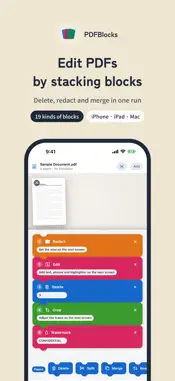
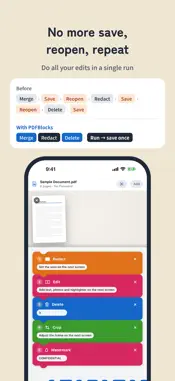
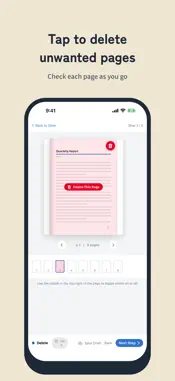
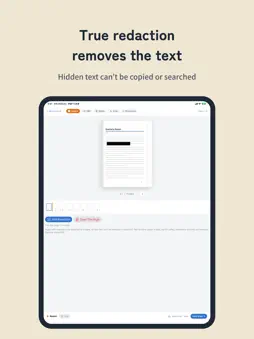
Stack up what you want to do, and clear a pile of PDF work in one run. The top half of the screen is a desk. Put a PDF on it, then stack blocks in the bottom half: remove pages, split in two, merge another file in, add page numbers, add a watermark. The blocks run from top to bottom, and the result is written as a new file. Your original is left untouched. DECIDE IT WHILE LOOKING AT THE PAGE Tap Run and each step opens as a book you can leaf through. Choose the pages to remove by tapping them; set the crop by dragging the frame with your finger. You decide "which" and "how much" by looking, not by typing numbers. WHAT YOU CAN DO - Delete — take out pages you don't need - Split — cut once after a chosen page - Merge — insert another PDF wherever you like - Reorder — drag thumbnails to change the order - Rotate — for the whole document or page by page - Crop — keep only what the frame covers - Page number — choose the position and the format - Watermark — set its position, size, color, opacity and angle - Redact — mark an area to black it out; the original text is baked into an image and can't be recovered - Edit — retype text, or add a photo or highlighter (you can choose the font) - Extract — pull out just the pages you choose - Blank page — insert a blank page wherever you like - Match page size — make every page A4 (or another size) - Margins — add space around the edges of each page - Header/Footer — add a date, page number, or label at the top or bottom - Strip metadata — remove author and other info stored in the PDF - Scan with your camera (iPhone/iPad) — capture a paper document and bring it in as a PDF, with automatic perspective correction - Rasterize — redraw pages as images - Save with a password, or save with the password removed NO NETWORK The app has no ability to connect to the internet. Nothing from your PDFs leaves your device, and there is no usage tracking, no advertising and no account to create. It works entirely offline. PICK UP WHERE YOU LEFT OFF Save a draft and resume the next time you open the app. REQUIREMENTS iPhone and iPad (iOS 17 or later) and Mac (macOS 14 or later). A one-time purchase with no in-app purchases.
What's New
Version 2.1 2026-10-27
- The finish screen may show Apple's standard App Store review prompt (no functional changes). - Updated App Store description. Technical Analysis
Package Overview Basic metadata
Bundle ID
com.nobuzaemon.pdfblocks Current Version 2.1
Minimum iOS 17.0
Package Size App Store Size
Package Metadata 0 / 0 version records
Detailed binary, privacy manifest, framework, and Info.plist results have not been indexed for this package yet. The verified App Store and archive metadata above remains available.
Known Version Records
0 version records with stored package metadata
Stored metadata does not guarantee a package is currently available to download.
| Details | Version / IDs | Version date | Action |
|---|