
Preview





Description
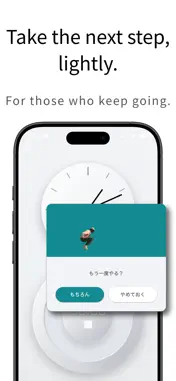
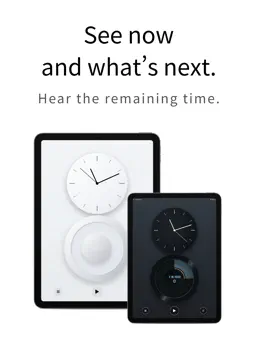
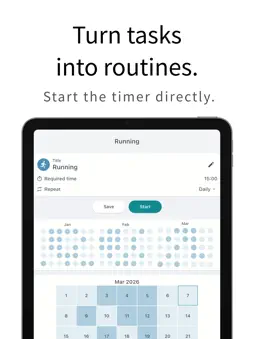
Even if you can’t do it today, you can always start again. ClockTimer is a simple app that connects clock, timer, ToDo, and routines in one place. A simple tool for time management and focus. It’s not a Pomodoro timer. And it’s not a detailed scheduler. Just add a task like a quick note, decide “I’ll do this for a few minutes,” and start the timer. When the timer ends, the app asks: “Did you do it today?” “Yes” or “Not yet.” Both are okay. If you couldn’t do it, just start the timer again. ClockTimer isn’t about perfect planning. It’s about giving you a chance to try again. ◆ What you can do with ClockTimer ◆ • See the clock and timer together Check the current time and the time you’re using on a single screen. • Quickly add tasks as they come to mind Capture ideas like notes. Set a time and start the timer instantly. • Build routines naturally Create a simple daily flow. Completed days are quietly recorded. • Voice guidance for time transitions Get gentle voice notifications for remaining time and completion. Helps you smoothly switch your focus. • Start again anytime When the timer ends, choose: “Done” or “Try again.” ◆ Recommended for people who ◆ • Struggled to keep using ToDo apps • Didn’t enjoy Pomodoro timers • Don’t like detailed scheduling • Want to build habits little by little • Just want to move forward — even imperfectly ClockTimer isn’t for people who never fail. It’s for people who can come back and try again. Reconnect your time — again and again. ◆ Pricing ◆ ClockTimer’s core features are available for free, with no account required. With ClockTimer Pro, you can unlock: • Clock design customization • Ad-free experience • Advanced customization features You can choose the plan that fits your lifestyle: • Monthly plan • Annual plan • One-time lifetime purchase Start with the free version and try it out. ◆ Contact / Bug Reports ◆ Please note that we may not be able to respond quickly to individual issues through the review section. If you encounter any problems or have suggestions, please contact us at: [email protected] ◆ Terms & Privacy Policy ◆ Terms of Use https://syncraft.dev/clocktimer/terms/ Privacy Policy https://syncraft.dev/clocktimer/privacy/
Technical Analysis
Package Overview Basic metadata
Bundle ID
dev.syncraft.clocktimer Current Version 1.0
Minimum iOS 15
Package Size App Store Size
Package Metadata 0 / 1 version records
Detailed binary, privacy manifest, framework, and Info.plist results have not been indexed for this package yet. The verified App Store and archive metadata above remains available.
Developer Information
Known Version Records
0 version records with stored package metadata • 1 known version records
Stored metadata does not guarantee a package is currently available to download.
| Details | Version / IDs | Version date | Action |
|---|---|---|---|
| Not archived | App Store ID: 881836879 | Unknown | Request Version |