Preview




Description
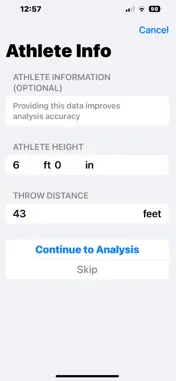
This fast, intuitive app allows you to analyze previously recorded videos with precision, providing detailed insights into your technique and performance. Simply tap the download icon in your saved videos list, select your video, and let the app handle the rest—copying it to local storage, playing it back instantly, and automatically analyzing it through advanced pose detection. With easy-to-enter athlete information such as height and throw distance, the app calibrates measurements for accurate real-world analysis. It converts pixel data into meaningful metrics like velocity, distance, and power output, all adjusted for your athlete's size. This personalized feedback helps you understand how your technique impacts performance, validate your power calculations, and make targeted improvements. Save your results to your personal library and track your progress over time. Key features include visual indicator markers for critical moments—power position and release point—highlighted with color-coded dots and labels for quick identification. The app’s handedness toggle ensures analysis accuracy whether you're a right or left-handed thrower, with arm highlights tailored to your throwing side. Frame-by-frame controls allow precise examination of critical moments, especially when combined with slow-motion playback. Share your results via an email that includes a comprehensive analysis report includes detailed metrics, coaching tips, and a video attachment, making it simple for coaches and athletes to review and implement improvements. How It Works: Tap Import Video The system photo picker appears showing only videos Select a video The app copies it to local storage and immediately opens it for playback The video is automatically analyzed using the same pose detection system Results are saved to the app's video library When importing a video, users see Athlete Info Screen: Height (feet and inches) Throw Distance (in feet) Optional - can skip if unknown How It Helps Analysis: Height calibration - Allows conversion from pixels to real-world measurements Distance context - Can correlate technique with actual performance Power validation - Verify if calculated power matches actual distance Personalized feedback - Adjust recommendations based on athlete size With this data, the app can: Calculate actual velocities Estimate real-world distances from angles and speed Compare power output to actual throw distance Provide height-adjusted feedback Validate if release angle + speed should produce the stated distance The data is saved with each video so you can track progress over time! Features: 1. Two Key Moment Visual Indicators Power Position (Blue dot) - Detected at the lowest knee angle (when athlete is maximally loaded) Release Point (Red dot) - Detected at maximum elbow extension (when the shot leaves the hand) 2. Handedness Settings Toggle between right-handed and left-handed throwers Settings persist between app sessions What Changes Based on Handedness: Analysis Focus: Uses the correct arm (right or left) for all angle calculations All technique feedback is based on the selected throwing side Settings Screen Also Shows: Share Button Located in the top-right corner of the video (upload icon) has multiple export options. Email Contents: 1. Detailed Feedback Clear section headers (RELEASE, POWER POSITION, LEG DRIVE, etc.) Specific explanations for each metric (not just pass/fail) Context for numbers - explains what the angles mean Priority indicators - "CRITICAL" flags for major issues 2. Actionable Coaching Tips 3. Advanced Metrics 4. Overall Assessment 5. Power Analysis
What's New
Version 23.0 2026-03-20
Improved the analysis, add multiple export options and addressed issues that may have cause crashes. Technical Analysis
Package Overview Basic metadata
Bundle ID
org.Neshaminy.Shot-Put-Analyzer Current Version 23.0
Minimum iOS 18.5
Package Size App Store Size
Package Metadata 1 / 4 version records
Detailed binary, privacy manifest, framework, and Info.plist results have not been indexed for this package yet. The verified App Store and archive metadata above remains available.
Known Version Records
1 version record with stored package metadata • 4 known version records
Stored metadata does not guarantee a package is currently available to download.
| Details | Version / IDs | Version date | Action |
|---|---|---|---|
| 1.48 MB | v23.0 App Store ID: 883598130Build: 23.0 | 2026-03-20 23:33:44 | Paid / Arcade |
| Not archived | App Store ID: 883425321 | Unknown | Paid / Arcade |
| Not archived | App Store ID: 882667633 | Unknown | Paid / Arcade |
| Not archived | App Store ID: 881856733 | Unknown | Paid / Arcade |