Preview




Description
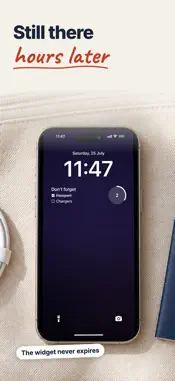
Put your shopping list or today's to-dos on your lock screen, and tick items off without unlocking your phone. You write things down and still forget them. Fridge puts the note where you cannot miss it: the first thing you see, every single time you pick up your phone. No app to open, no widget to go hunting for. YOUR LOCK SCREEN IS A FRIDGE DOOR That is the surface households already use for the note that must not be missed. Shopping list. Gym bag. Call the dentist. Stick it there and it does its job on its own. TICK THINGS OFF WITHOUT UNLOCKING Tap a checkbox straight from the lock screen. No Face ID, no app launch, and no losing five minutes to social media on the way in. IT DOES NOT DISAPPEAR The big note is a Live Activity, and iOS ends those after about eight hours. Every app in this category runs into that limit. Fridge ships a lock screen widget that never expires. Add it under your clock (setup shows you how, and checks it is there) and your note is always there. Fridge also re-arms the big note every time you open the app, tick a box or edit a line. In the worst case your note gets smaller. It does not vanish. SHARE A LIST WITH FAMILY Share a note through iCloud and the people you invite can add items and tick them off. Every phone shows the same list, lock screen included. Sharing is free; each person needs Fridge and an iCloud account. Drawings and photos stay on your phone. YOU DECIDE WHAT APPEARS WHERE • Live note, Widget only, or Off, in one tap • Hide it in the Dynamic Island, so taps meant for other apps stop landing here • Widget-only mode keeps it off your Apple Watch entirely • Fridge never sends you a notification. Not one. 264 DESIGNS, BUILT FROM THREE CHOICES Pick a paper, pick a sheet, pick a pen. 24 papers (legal pad yellow, kraft, chalkboard, blueprint, ivory, midnight, espresso) times 11 sheet types (plain, ruled, grid, dotted, legal, taped, magnet, pinned, photo corners, bulldog clip, till roll). That is 264 designs, and with 10 pens over the top, 2,640 looks. Three designs are free; Plus unlocks the rest. IT LOOKS HANDWRITTEN, BECAUSE IT IS DRAWN Checkboxes are inked boxes with a real tick through them, not a system glyph. Finished lines get a struck-through stroke that wobbles the way a pen does. Five of the ten pens are genuine handwriting faces, and every line sits on its own slightly uneven baseline. The same note always draws the same way, on the lock screen, in the widget and in the app. DRAW, AND STICK THINGS ON Pen, marker, pencil, and a proper eraser. Drop in a photo and Fridge lifts the subject out of its background automatically, on your phone. Photos stay pinned where you put them, so drawing on top never drags them around. ON YOUR HOME SCREEN TOO Small, medium and large widgets. The medium and large ones are tickable. PRIVATE BY CONSTRUCTION No account. No sign-in. No ads, no tracking: anonymous usage analytics only, and you can switch them off in Settings. Background removal runs on your device. Notes leave your phone only when you share them: a shared note goes through iCloud to the people you invite, and nowhere else. FRIDGE PLUS Try everything free for 7 days with the yearly plan, and cancel before the week ends to pay nothing. Or pay once for lifetime, or subscribe monthly. Plus unlocks all 264 designs, unlimited notes, and removes the small Fridge mark. Everything that makes Fridge work stays free: the lock screen note, the checkboxes, the widgets, sharing, and full control over what appears where. Requires iOS 18. iPhone only. Fridge Plus subscriptions renew automatically unless cancelled at least 24 hours before the end of the period. Manage or cancel anytime in your Apple Account settings. Terms of Use: https://www.apple.com/legal/internet-services/itunes/dev/stdeula/ Privacy Policy: https://sushilkumar.me/fridge/privacy
What's New
Version 1.5.2 2026-10-12
Setting up Fridge now walks you through adding the lock screen widget, which never expires, and checks that it is really there. New Fridge Plus Yearly subscrib... Technical Analysis
Package Overview Basic metadata
Bundle ID
com.sushil.Fridge Current Version 1.5.2
Minimum iOS 18.0
Package Size App Store Size
Package Metadata 0 / 0 version records
Detailed binary, privacy manifest, framework, and Info.plist results have not been indexed for this package yet. The verified App Store and archive metadata above remains available.
Developer Information
Known Version Records
0 version records with stored package metadata
Stored metadata does not guarantee a package is currently available to download.
| Details | Version / IDs | Version date | Action |
|---|