Preview




Description
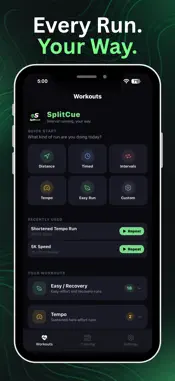
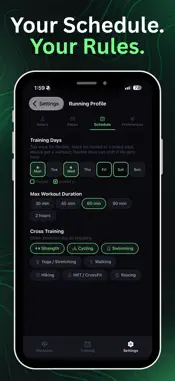
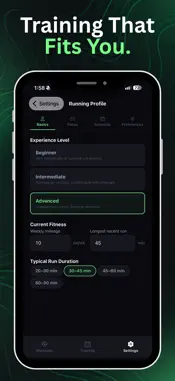
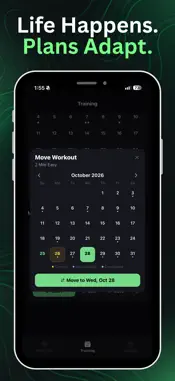
SplitCue (formerly PaceCue) is a structured interval timer built for runners. Build a workout or a full training plan, press start, and get voice and haptic cues that tell you when to speed up, slow down, warm up, and cool down — so you can leave your phone in your pocket and focus on the run. AI Training Plans Pick the race you are training for — 5K, 10K, half marathon, marathon, or a custom distance — then add a goal time, race date, and how many days a week you run. SplitCue builds the plan from your running profile and recent runs, and puts each workout on a calendar so you always know what to run today. Training phases show where you are in the build. Talk to your coach in chat, or just speak: move a long run, ease off a hard day, swap a workout, or add strides. Build any workout in seconds Stack intervals by time or by GPS distance, with repeat counts, effort levels, and target paces. A distance repeat ends when you have covered the distance. Start from 18 built-in workouts — Tempo Run, Fartlek, Pyramid, Hill Repeats, 400m Repeats, Mile Repeats, 5K and 10K runs, a half-marathon run/walk, and more — or design your own. Your library is grouped into Easy, Tempo, Intervals, Long Runs, and Race. AI Workout Builder Describe the run you want — "30-minute tempo with a warmup and strides" — and SplitCue generates a complete interval workout from your profile. Refine it in conversation or by voice, then save it and go. Real-time GPS pace Track pace, distance, and elevation through every interval. Set a target and SplitCue announces it when the interval starts, then calls out your current pace as often as you choose — from every 15 seconds up to every 2 minutes — or only on intervals that have a target. Use minutes per mile or minutes per kilometer, and pick a short or long pace average so track repeats stay quick and long runs stay steady. Audio cues that stay out of your way Choose voice, beeps, both, or silent. Pick any voice on your device, including enhanced voices. Music ducking lets cues cut through Spotify, then hands the volume back. Set countdown warnings at 3, 5, 10, 15, or 30 seconds before each transition, and keep haptics on when you want a cue you can feel. Lock Screen & Dynamic Island A Live Activity shows your current interval, the countdown, and what is next — on the Lock Screen and in the Dynamic Island. Maps, records, and history Every completed run is logged with duration, distance, and splits, including pace versus target. Open a run to see your route, an elevation profile, and your pace uphill, on the flat, and downhill. Tag how it felt, the effort, the weather, and who you ran with. Stats keep personal records — fastest mile, 5K, 10K, and half marathon, plus longest run and elevation — along with milestones and trends for pace, distance, and time. Export a backup anytime, or sign in with Apple and let cloud sync keep workouts and history on all of your devices. Share a workout Send any workout as a link friends can open in one tap. You can share a finished run the same way, splits included. Free to start The timer, presets, custom workouts, pace tracking, Live Activities, voice cues, maps, and history are free. Your first AI training plan is included, along with five AI-built workouts. SplitCue Pro is an optional subscription that unlocks unlimited AI training plans and unlimited AI-built workouts. Questions or ideas? Reach us at [email protected]. Terms of Use: www.apple.com/legal/internet-services/itunes/dev/stdeula/
What's New
Version 1.9.0 2026-11-09
Smarter Training Plans • Review a proposed plan before you start it, phase by phase. • After each run you get a short review with personalized coaching. Your pl...Smarter Training Plans • Review a proposed plan before you start it, phase by phase. • After each run you get a short review with personalized coaching. Your plan can adjust based on how you did. • Your calendar now shows the target date for your pace goal. • Swipe left or right to move between days on the Training tab. Better Runs • Pick up an unfinished workout right where you left off. • See a weather card for your upcoming run. • A Next Run card on Home suggests what to do next. • Optional run reminders help you stay consistent. • Your recent runs are now one tap away on Home. Pace & Splits • Choose miles or kilometers in Settings. Your choice applies throughout the app. • Change the split distance on any run to see your splits your way. • New "Auto" setting for when pace cues are announced. • Pace tracking is more accurate: time spent standing still before you start no longer skews your average. • Route maps now fit your whole run on screen. Workouts • New "Running 101" guide that explains each type of workout. • New "Other" category for workouts that don't fit the existing ones. • Clearer workout step names on screen and in voice cues. • "RPE" is now called "Effort." • Voice transcription is more accurate when you describe a workout out loud. Polish • Better support for VoiceOver and large text across Settings and Training. • Bug fixes and performance improvements. Technical Analysis
Package Overview Basic metadata
Bundle ID
com.toddly.runningintervals Current Version 1.9.0
Minimum iOS 16.4
Package Size App Store Size
Package Metadata 0 / 0 version records
Detailed binary, privacy manifest, framework, and Info.plist results have not been indexed for this package yet. The verified App Store and archive metadata above remains available.
Developer Information
Known Version Records
0 version records with stored package metadata
Stored metadata does not guarantee a package is currently available to download.
| Details | Version / IDs | Version date | Action |
|---|