
Preview




Description
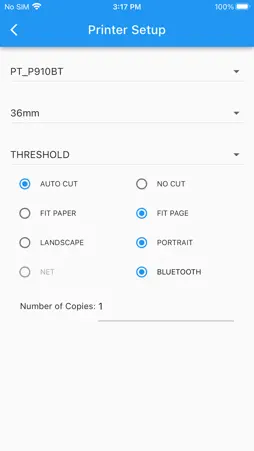
Finger Craft is a user-friendly, minimalist drawing application designed for instant creativity on a blank canvas. It offers users the ability to save their artwork to their device's photo album, ensuring privacy and security. Additionally, it facilitates sharing via email or text message and supports direct printing to any AirPrint-enabled printers or selected Brother thermal label printers. **Getting Started:** 1. Open the application. 2. Begin drawing on the white canvas; the default pen color is black. 3. Use the "undo" button to reverse your last pen stroke. 4. Change the pen color by selecting the "color" icon. 5. Adjust the pen size through the "pen" icon. 6. To clear the canvas, tap the "more" icon, then select "clear." 7. Save your artwork by tapping "more" -> "save." 8. Print your creation by selecting "more" -> "print." 9. To adjust printer settings, choose "more" -> "setup." 10. Share your artwork via AirDrop, Messages, Mail, or Save to Files by tapping "more" -> "share." **Usage Tips:** 1. Send personalized greeting images for special occasions at no cost. 2. Print unique greeting cards to add a personal touch, surpassing commercially available cards with your hand-drawn sentiments. 3. Design endlessly and freely, creating anything at any time. 4. Share notes that appear hand-written by using the app's default white background for text and images. 5. Retain full ownership of your designs, images, and notes—no AI-generated content means you hold the copyright. 6. Engage in a perfect 5-minute brain exercise during breaks, with the option to save, improve, and modify images. 7. Create and print stickers, labels, and signs in various sizes, including 3x5, 4x6, 5x7, 5x8, letter, A4, and multiple label sizes on Brother label printers. 8. Enjoy an ad-free experience with secured data privacy; we do not access your data. **Some Greeting Doodle Ideas** Birthday Thank You Sympathy Wedding Anniversary Get Well Congratulations Christmas New Year Valentine's Day Mother's Day Father's Day Easter Hanukkah Graduation Retirement New Home Baby Shower Engagement Halloween Friendship Day Good Luck Bon Voyage Apology Thinking of You Cheer Up Encouragement Farewell Welcome Back New Job Promotion Graduate School Acceptance Engagement Anniversary Pet Adoption Season's Greetings Teacher Appreciation Recovery Goodbye to a Colleague Pregnancy Announcement Soldier Deployment International Women's Day Passover Diwali Chinese New Year Ramadan St. Patrick's Day Veterans Day Cinco de Mayo Fourth of July Labor Day Thanksgiving Kwanzaa Graduation (PhD) Baptism Bar/Bat Mitzvah Quinceañera First Communion Retirement (Military) National Siblings Day Earth Day International Day of Friendship National Pet Day Pi Day Star Wars Day International Yoga Day International Men's Day Pride Month Back to School National Doctors' Day National Nurses' Day International Nurses Day Book Lovers Day World Environment Day World Teacher’s Day International Coffee Day World Smile Day World Photography Day World Health Day International Children’s Day World Poetry Day **Banter Greetings to Your Friends** Lost Without GPS Day Forgot My Password Again Day Serial Plant Killer Awareness Day Coffee Dependency Day Chronic Latecomer Appreciation Day Junk Food Connoisseur Day Master of Binge-Watching Day Perpetual Diet Starter Day Karaoke Disaster Night Anniversary Texting Typos Hall of Fame Annual Sock Loss Memorial Master Procrastinator Day Epic Fail Compilation Celebrant Sarcasm Appreciation Day ‘What’s Your Wifi Password?’ Anniversary Inventor of the 'Seen' Feature Day Horror Movie Scream Queen/King Day Annual Misadventure Day Fantasy Sports Overthinker Day Unsolicited Advice Giver Day **There are a million ways to express your appreciation to loved ones, family, friends, or anyone in need of a lift. Sending them a heartfelt greeting costs nothing, yet the joy it brings to their faces is invaluable.
Technical Analysis
Package Overview Basic metadata
Bundle ID
us.supplierrelations.FingerFlair Current Version 1.0
Minimum iOS 11.0
Package Size App Store Size
Package Metadata 1 / 1 version records
0.0 / 5.0 (0 ratings)
Detailed binary, privacy manifest, framework, and Info.plist results have not been indexed for this package yet. The verified App Store and archive metadata above remains available.
Known Version Records
1 version record with stored package metadata
Stored metadata does not guarantee a package is currently available to download.
| Details | Version / IDs | Version date | Action |
|---|---|---|---|
| 37.37 MB | v1.0 App Store ID: 864208978Build: 1.0 | 2024-03-11 18:33:08 | Paid / Arcade |