
Preview



Description
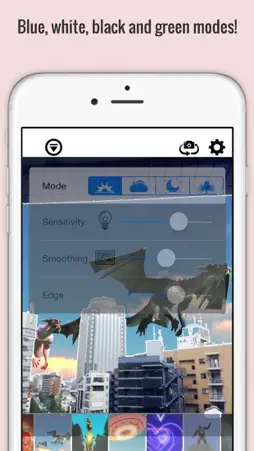
"SFX Movie Camera" is an app that allows you to create videos with special effects just by shooting from your camera You can create great scenes from buildings and natural landscapes It will also let you play your preview in real time wihout the hassle of having to edit the video! You can use the camera's background as well as the movies backround saved in your photolibrary! Enjoy creating many cool videos! You can share your the videos Youtube, Facebook and Twitter Nevertheless you can also save them in your photo library! When you want to watch some fun videos just go to "everyone's video" and you will be able to watch to see other videos shared by everyone --------------------------------- Operation Manual (Camera) --------------------------------- - Recording camera will display after operning the app. Special effects will appear from this poing - If you want to switch the desired special effects just tap on the mode button located on the bottom right. It will switch to blue, white, black and green modes depending on the place being shoot - If you want to change the brightness just do a long tap on the place where you want to adjust the brightness. To undo just do it with a single tap. When you think you can get a good scene just tap on the shutter and it will start recording! --------------------------------- Operation Manual (Landscapes) --------------------------------- - To change the landscape by tapping on the button placed on the bottom left corner * Landscapes might change from time to time. For this please allow push notifications - To choose a video from your library go to the top right from the scroll view and tap on the "+" sign *after tapping on the "+" will take take a couple minutes. --------------------------------- Operation Manual(Shooting) --------------------------------- - For more adjusting/calibrating options tap on the top left button While looking at the preview adjust the settings of your preference by using the sliders --------------------------------- Operation Manual(After Shooting) --------------------------------- - After shooting, give the app few seconds to create the video - Video will be saved in your photo library after tapping on the byutton "Finish!" If you liked your video please don't forget to upload it to Facebook, Twitter or Youtube! --------------------------------- Operation Manual(General Settings) --------------------------------- - SNS Linking Settings - Location, Weather Information and Camera Mode Settings - Troubleshooting Manual - App Introduction - Official Site's Link etc
What's New
Version 2.0 2016-02-22
Fixed a bug that crashes on startup. Technical Analysis
Package Overview Basic metadata
Bundle ID
jp.co.supersoftware.sfxcamera Current Version 2.0
Minimum iOS 7.0
Package Size Latest Recorded Package Size
Package Metadata 1 / 1 version records
Detailed binary, privacy manifest, framework, and Info.plist results have not been indexed for this package yet. The verified App Store and archive metadata above remains available.
Known Version Records
1 version record with stored package metadata
Stored metadata does not guarantee a package is currently available to download.
| Details | Version / IDs | Version date | Action |
|---|---|---|---|
 33.8 MB | v2.0 App Store ID: 841457742Build: 2.0.9 | 2021-04-16 00:05:44 | Get Version |