Preview


Description
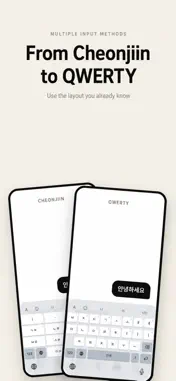
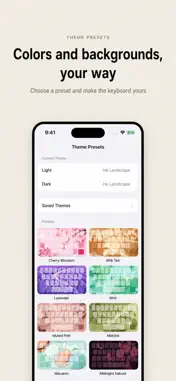
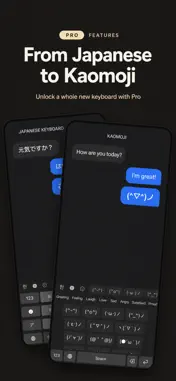
HanKey is a custom keyboard that lets you pick the Korean layout that fits your hand. Twelve Korean layouts — from Cheonjiin and Naratgeul to Danmoeum and the standard two-set — plus smart word suggestions and themes and fonts you make yourself. ■ Twelve Korean layouts • Two-set (QWERTY) · Danmoeum · Mui-Danmoeum • Cheonjiin, five ways (standard · top · bottom · plus · flick) • Naratgeul, three ways (standard · top · flick) • SKY • Five English layouts (QWERTY · QWERTZ · AZERTY · Dvorak · 10-key) • Set the order languages cycle through, and give Korean and English their own slot per layout. ■ Type faster • A suggestion bar that also predicts the next word. • Suggestions learn the words you use. • Emoji suggestions. • Shortcut keys — register the characters you use often and long-press to insert them. • Cursor control — slide along the space bar or across the keys to move the caret. • Flick distance — choose how far a flick has to travel on 10-key and Japanese flick layouts. ■ Fit it to your screen • Keyboard Size — set the height and the top, bottom, left, and right padding with a live preview. • Padding keeps the keyboard's overall height, so you can move the keys within reach of one hand. • One-handed mode (left · right · compact). • A number row on top, and a toolbar you can rearrange. ■ Make it yours • Fifteen theme presets, each with its own background illustration. • Change colours, background image, and transparency to build your own. • Export a theme to a file to share, and apply one you receive. • Twelve keyboard fonts and a size to match, with a preview. • Back up and restore themes and settings to a file or iCloud. ■ HanKey Pro (one-time purchase) • Japanese keyboard — romaji and kana flick, with kanji conversion and predictions. • Glide typing — trace across the keys without lifting your finger. • Korean/English bilingual — keep typing on the Korean layout and English words come out in English. • Typo correction — see candidates for what you mistyped and pick one. • Translation · Hanja conversion · Clipboard history. • Calculator — work it out right on the keyboard and insert the result. • AI writing tools — rewrite what you wrote as polished, polite, casual, or formal (iOS 26 with Apple Intelligence). • Kaomoji (text emoticon) keyboard. • Up to twenty word suggestions. • Five mini games. ■ Privacy • What you type is never sent to a server. • Only anonymous usage statistics are collected, to improve the app. • Haptics, word learning, and themes need "Allow Full Access". HanKey keeps growing thanks to you. You can support development from inside the app. (Support is unrelated to unlocking features.) Questions and suggestions are always welcome. Easier Korean typing, with HanKey.
What's New
Version 4.7.5 2026-10-28
Version 4.7.5 [New] • Customize every key on both symbol pages with any text, up to 100 characters per key (Secondary Keys > Symbols). • Adjust the height of t... Technical Analysis
Package Overview Basic metadata
Bundle ID
dev.letsean.hankey Current Version 4.7.5
Minimum iOS 17.0
Package Size App Store Size
Package Metadata 0 / 0 version records
Detailed binary, privacy manifest, framework, and Info.plist results have not been indexed for this package yet. The verified App Store and archive metadata above remains available.
Known Version Records
0 version records with stored package metadata
Stored metadata does not guarantee a package is currently available to download.
| Details | Version / IDs | Version date | Action |
|---|