
Preview




Description
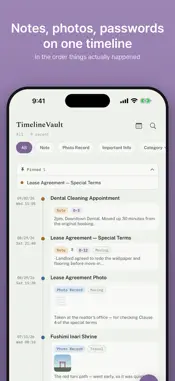
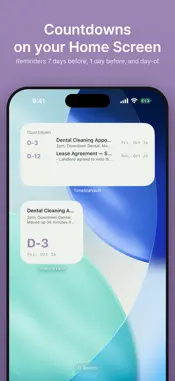
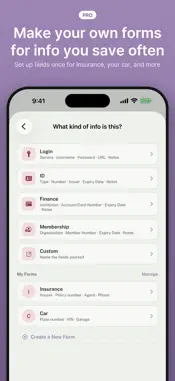
TimelineVault keeps the messy parts of life — passwords, IDs, contracts, and the photos that prove them — in one private, chronological timeline. WHY TIMELINEVAULT Most apps make you choose: a notes app for your thoughts, a photo app for your pictures, and a separate password manager for logins. TimelineVault puts all three on the same timeline, in the order they actually happened — because a lease note, the photo of the signed contract, and the account you set it up with usually belong together. WHAT YOU CAN KEEP • Notes — quick text you don't want to lose • Photo Records — pictures with the context around them, verified against tampering • Important Info — logins, IDs, cards, and memberships, protected with Face ID or your passcode BUILT FOR THINGS THAT EXPIRE Passports, ID cards, membership cards — TimelineVault reminds you before they expire, based on the date you enter (or read off an attached photo). YOUR DATA STAYS YOURS • Everything is stored only on your device — there is no server, no account, no tracking • Sensitive fields are protected by Face ID / passcode, backed by the Secure Enclave • Attached photos for Important Info are encrypted on-device • Create an encrypted backup file whenever you want, and store it wherever you like PRO — FREE TO CELEBRATE THE RELEASE All Pro features are free for now. If you're using the app now, you can keep using them for free even if Pro becomes paid later. • Search text in photos — find receipts and documents by the words in the picture • Scan documents — straightened pages, several at once • Copy to Submit — black out parts of an ID copy and mark who it is for before you send it • My Forms — save the field layouts you reuse, like insurance or vehicle details • Countdowns that repeat every year or month, and expiry dates in the widget • Color themes and app icons SIMPLE, HONEST DESIGN No dashboards, no subscriptions, no ads. Just your notes, your photos, and your passwords — kept the way you'd actually want them: together, in order, and private.
What's New
Version 1.5.2 2026-11-14
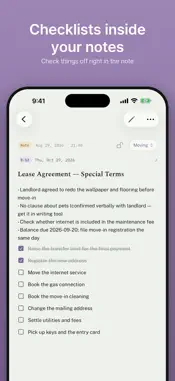
TimelineVault 1.5.2 • Notes for Each Photo: in Photo Records and Important Info, write a separate note for each photo as you swipe through them (notes in Import...TimelineVault 1.5.2 • Notes for Each Photo: in Photo Records and Important Info, write a separate note for each photo as you swipe through them (notes in Important Info are encrypted like the photos) • Groups in Notes: tap “Add Group” above the keyboard to create a named box inside a note — rename it, move it up or down, or ungroup it anytime • Highlighter: touch and hold to select text, then color it Yellow, Pink, or Sky • Choose the Record Date: when saving a Photo Record, pick “Now” or “Taken” (it starts on Now, which puts the record at the top of the timeline) • Checkboxes now respond the moment you tap them Technical Analysis
Package Overview Basic metadata
Bundle ID
kr.themes.timelinevault Current Version 1.5.2
Minimum iOS 17.0
Package Size App Store Size
Package Metadata 0 / 0 version records
Detailed binary, privacy manifest, framework, and Info.plist results have not been indexed for this package yet. The verified App Store and archive metadata above remains available.
Known Version Records
0 version records with stored package metadata
Stored metadata does not guarantee a package is currently available to download.
| Details | Version / IDs | Version date | Action |
|---|