Preview




Description
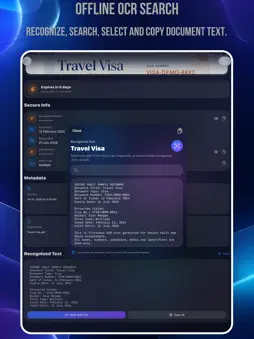
Secure Vault is a private document vault for iPhone, built for people who want to keep important documents organized, searchable, signed and protected. Store passports, IDs, driver licenses, bank cards, contracts, diplomas, certificates, insurance papers and other personal documents in one secure place. PRIVATE BY DESIGN Secure Vault is built around local-first privacy. Your documents are stored on your device and encrypted on disk. The app does not require an account, does not use its own backend, and does not collect analytics. You stay in control of your files. SCAN AND IMPORT DOCUMENTS Add documents in multiple ways: • Scan paper documents with the camera • Import PDF files from Files • Import photos from your photo library • Convert scans and images into PDF documents OCR TEXT RECOGNITION Secure Vault uses Apple Vision to recognize text from scans and PDFs directly on your device. Recognized text can be used for: • Searching documents • Viewing extracted content • Copying selected text fragments • Auto-filling document information when possible The app can help detect useful information such as document type, document number, issue date and expiration date. ORGANIZE YOUR VAULT Keep your documents structured with beautiful folders and metadata. You can organize documents by: • Folder • Document type • Tags • Title • Expiration date • Custom fields Supported document types include passports, national IDs, driver licenses, tax IDs, bank cards, contracts, diplomas, certificates, insurance documents, vehicle documents and more. CUSTOM SECURE FIELDS Different documents need different information. Secure Vault supports custom fields so you can store exactly what you need. For sensitive information, such as document numbers, card data, CVC or PIN codes, values are encrypted. SIGN PDF DOCUMENTS Create a signature once and place it on your document. You can: • Draw a signature with your finger • Type a text-based signature • Place the signature on any PDF page • Move, resize, rotate and adjust opacity • Save the signed PDF back into your vault EXPIRATION REMINDERS Secure Vault helps you stay ahead of document expiration dates. You can receive local reminders before a document expires, including: • 30 days before • 7 days before • 1 day before • On the expiration day Reminders are handled locally using iOS notifications. ENCRYPTED BACKUPS Create an encrypted backup package and save it manually to Files, iCloud Drive or another storage provider. Backup packages are encrypted locally with a backup password chosen by you. This allows you to restore your vault if you change or lose your device. IMPORTANT: Keep your backup password safe. Secure Vault cannot recover forgotten backup passwords. Secure Vault Premium unlocks: • Unlimited encrypted documents • Unlimited scans and imports • Unlimited OCR document storage • PDF signing tools • Encrypted backup packages • Expiration reminders for all documents Secure Vault is designed for personal privacy, document organization and peace of mind. Subscription Plans: - Payment will be charged to your App Store Account at confirmation of purchase. - Your subscription will automatically renew unless auto-renew is turned off at least 24 hours before the end of the current subscription period. - Your account will be charged for renewal within 24 hours prior to the end of the current subscription period. Automatic renewals will cost the same price you were originally charged for the subscription. - Manage or cancel your subscription from your user settings in the App Store at any time after purchasing. - Any unused portion of a free trial will be forfeited if you purchase a subscription. Privacy Policy: https://sunteame.com/privacy-policy/ Terms of Use: https://sunteame.com/terms-of-service/
Technical Analysis
Package Overview Basic metadata
Bundle ID
com.sunteame.securevaultdoc Current Version 1.0
Minimum iOS 17.0
Package Size App Store Size
Package Metadata 0 / 0 version records
Detailed binary, privacy manifest, framework, and Info.plist results have not been indexed for this package yet. The verified App Store and archive metadata above remains available.
Developer Information
Known Version Records
0 version records with stored package metadata
Stored metadata does not guarantee a package is currently available to download.
| Details | Version / IDs | Version date | Action |
|---|