Preview



Description
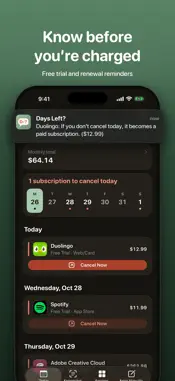
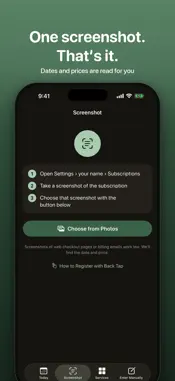
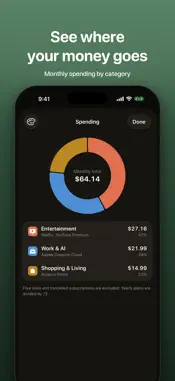
Get reminded before a free trial turns paid or a subscription renews. ■ Add with one screenshot Take a screenshot of Settings › [your name] › Subscriptions and share it. The service, date, and price are read for you. Screenshots of web checkout pages or billing emails work too. ■ Reminded before the cancellation deadline Since the exact billing time isn’t shown, the safe deadline is 2 days before the end or renewal date for App Store purchases and 1 day before for web or card payments. Free trials are reminded 3 days before and on the deadline, yearly renewals from 2 weeks before, and monthly renewals on the deadline. You can change the time and how many days ahead. ■ Every deadline at a glance See what to cancel today and what’s coming up in a timeline, calendar, or list. ■ Go straight to cancel “Cancel Now” opens the App Store subscription settings or a search for how to cancel. ■ Pick a popular service Choose from a list of popular services in your region and just enter the date. ■ Even faster with Back Tap Add the shortcut, then double-tap the back of your iPhone on a subscription screen to register it. ■ Stays on your iPhone No sign-up. Your subscriptions and screenshots are never sent to a server. No ads, no tracking. · The app does not cancel subscriptions for you. · Depending on the service, canceling early may end the trial right away. · Reading web checkout screens is more accurate on devices that support Apple Intelligence. ■ Monthly total and spending See your total monthly subscription cost and a chart of what you spend by category, such as Entertainment, Work & AI, and Shopping & Living. You can change the categories and chart colors yourself. ■ Split subscriptions too Sharing a plan with family or friends? Enter your share. Reminders show the amount charged, and monthly totals use your share.
What's New
Version 1.0.2 2026-11-09
Optimized for iPhone Duo. • On the unfolded display, your list and forms keep a comfortable reading width. • Partially folded, content moves to one side and sta...Optimized for iPhone Duo. • On the unfolded display, your list and forms keep a comfortable reading width. • Partially folded, content moves to one side and stays clear of the fold. • On the outer display, Done, Cancel and Save now sit in the side bar as icons. Home Screen widgets are here. • Upcoming Deadlines: see which subscriptions are close to their cancellation deadline and how many days are left. Also available on the Lock Screen. • Spending by Category: your monthly subscription costs, broken down by category. Tap a widget to jump straight to that subscription or your spending breakdown. Technical Analysis
Package Overview Basic metadata
Bundle ID
com.nimuseel.daysleft Current Version 1.0.2
Minimum iOS 17.0
Package Size App Store Size
Package Metadata 0 / 0 version records
Detailed binary, privacy manifest, framework, and Info.plist results have not been indexed for this package yet. The verified App Store and archive metadata above remains available.
Known Version Records
0 version records with stored package metadata
Stored metadata does not guarantee a package is currently available to download.
| Details | Version / IDs | Version date | Action |
|---|