
Preview



Description
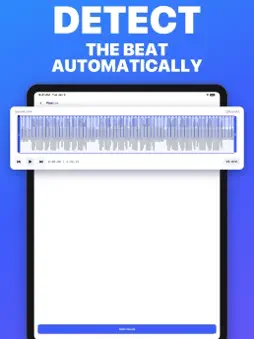
Drop music. Hit every beat. Pixocut turns a song and your photos and videos into a beat-synced edit in seconds. Pick a track, Pixocut detects the beat, and every cut, transition and motion effect lands exactly on the music. HOW IT WORKS • Pick music from your Music library, from Files, or from the Pixocut App library of tracks shared by creators. • Pixocut detects the tempo and beat grid on your device. • Add photos and videos from your gallery or Files. • Pixocut arranges your clips on the beat and builds a preview you can play right away. • Export and save to Photos or share anywhere. MAKE IT YOURS • Speed: slow, medium or fast. Choose long holds or quick cuts. • Transitions that fire on the beat. • Motion effects that move with the music while each clip holds. • Color filters for the whole clip, carried through its transitions. • Keyframes and favorites: mark the moments you want, and favorite photos show up more often. • Framing: crop and position each clip, or fit it to the frame. • Formats for stories, portrait feeds, square, classic and landscape. • Pick the part of the song your video plays over. • Tap tempo, BPM editing and beat offset for precise timing. • Voices from your clips play over the music while other clip sound stays quietly underneath. • Fade to black at the end. SHARE YOUR MUSIC Made your own track? Upload it to the App library so everyone on Pixocut can use it in their videos. Every upload is checked by a music-recognition service before it goes live, and tracks can be reported or uploaders blocked. Your projects stay on your device. Beat detection and video rendering happen on your iPhone or iPad. PIXOCUT PRO Unlock higher-resolution and higher-frame-rate exports with PixoCut Pro, available as a monthly or yearly auto-renewing subscription. • Payment is charged to your Apple Account when you confirm the purchase. • Your subscription renews automatically unless you cancel it at least 24 hours before the end of the current period. Your account is charged for renewal within 24 hours before the end of the current period. • You can manage or cancel your subscription in your Apple Account settings after purchase. • If a free trial is offered, any unused portion is forfeited when you purchase a subscription. Terms of Use (EULA): https://pixocut.com/terms/ Privacy Policy: https://pixocut.com/privacy/
What's New
Version 1.0.3 2026-10-30
Supporting more easeTypes in transitions. Technical Analysis
Package Overview Basic metadata
Bundle ID
com.sujithsimonboppi.PixoCut Current Version 1.0.3
Minimum iOS 27.0
Package Size App Store Size
Package Metadata 0 / 0 version records
Detailed binary, privacy manifest, framework, and Info.plist results have not been indexed for this package yet. The verified App Store and archive metadata above remains available.
Developer Information
Known Version Records
0 version records with stored package metadata
Stored metadata does not guarantee a package is currently available to download.
| Details | Version / IDs | Version date | Action |
|---|