Preview









Description
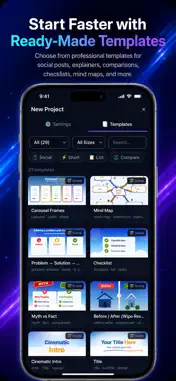
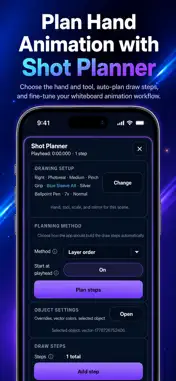
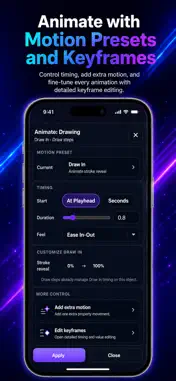
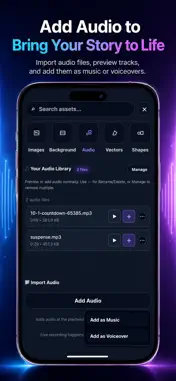
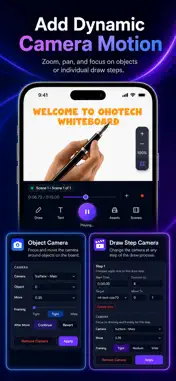
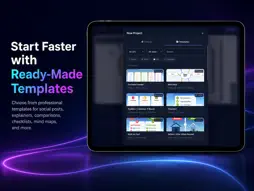
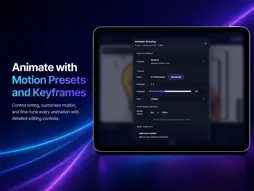
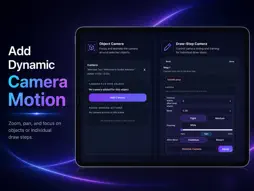
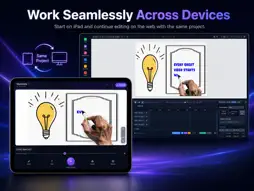
Create whiteboard animation videos with built-in, on-device AI voiceover. Download a voice model once, turn scripts into narration without cloud credits, add the audio directly to a scene, and keep creating offline. Choose built-in voices or create and reuse your own cloned voice. Preview the result, adjust speed, and add it to lessons, explainers, product demos, onboarding videos, presentations, social clips, and training content. Start with a ready-made template or build from scratch using drawings, text, SVGs, images, and backgrounds. Animate with stroke-by-stroke reveal, plan hand-drawn sequences automatically, add camera movement, and fine-tune timing with keyframes. Create on iPhone or iPad, then continue in the web editor when you want a larger workspace. KEY FEATURES • Generate offline AI voiceovers after downloading a voice model • Create narration without cloud credits or per-generation limits • Choose built-in voices or reuse your own cloned voice • Add generated narration directly to a scene • Record voiceover and import music or audio files • Animate drawings, text, SVGs, and traced images • Reveal artwork stroke by stroke • Use ready-made templates for faster creation • Browse a growing library of drawings and SVG icons • Build multi-scene projects • Plan draw steps automatically with Shot Planner • Switch between multiple hands, tools, scales, and mirrored orientations • Apply hand and tool overrides to individual objects • Add camera zooms, pans, object focus, and draw-step camera moves • Animate with a timeline, motion presets, keyframes, and curve editing • Add custom scene backgrounds and styled text • Export MP4 videos and save project files • Continue projects between mobile, tablet, and the web editor MORE CREATIVE TOOLS • Trace raster images into drawable artwork • Use Smart Line, Smart Arrow, and Smart Connector for clean diagrams • Create and manage reusable templates with authoring tools • Add multilingual text, including English, Spanish, Italian, Hindi, and RTL scripts • Customize typography, vector colors, backgrounds, hands, tools, scale, and mirroring • Save projects locally or to your account and continue editing later SUPPORTED AI VOICEOVER LANGUAGES (31 LANGUAGES) Generate on-device AI voiceover narration in 31 languages: English, Arabic, Bulgarian, Croatian, Czech, Danish, Dutch, Estonian, Finnish, French, German, Greek, Hindi, Hungarian, Indonesian, Italian, Japanese, Korean, Latvian, Lithuanian, Polish, Portuguese, Romanian, Russian, Slovak, Slovenian, Spanish, Swedish, Turkish, Ukrainian, and Vietnamese. Build mind maps, process diagrams, doodle videos, comparison scenes, checklists, onboarding flows, and presentation visuals with reusable assets and flexible scene controls. MADE FOR • Teachers creating lessons and educational explainers • Marketers building product demos, social clips, and sales videos • Founders preparing pitches, onboarding flows, and app walkthroughs • Freelancers and agencies producing client videos • Creators making YouTube content, presentations, training, and brand stories VOICE CLONING Voice cloning is intended for your own voice or voices you have permission to use. Cloned voices can be saved and reused in your narration workflow for specific languages only. SUBSCRIPTIONS Scribe Animator Pro is available as an auto-renewable subscription. • Scribe Animator Pro (Monthly) — billed monthly Price is shown at the time of purchase and may vary by region. Features included: 1080p video exports, no watermark, cloud SVG library, higher storage limits. Payment will be charged to your Apple ID account at confirmation of purchase. Subscription automatically renews unless cancelled at least 24 hours before the end of the current period. You can manage and cancel subscriptions in your Account Settings after purchase. Privacy Policy: https://scribeanimator.com/privacy/ Terms of Use (EULA): https://www.apple.com/legal/internet-services/itunes/dev/stdeula/
What's New
Version 2.2.1 2026-10-13
Explore 66 cloud-powered templates with editable text, colors and curated visuals. Improved native video export reliability and cancellation handling. Fixed mis...Explore 66 cloud-powered templates with editable text, colors and curated visuals. Improved native video export reliability and cancellation handling. Fixed missing Shapes/SVG icons. Clearer loading feedback when browsing and applying templates. Lighter visuals in the “Why Habits Feel Hard” example. Technical Analysis
Package Overview Basic metadata
Bundle ID
com.ohotech.scribeanimator Current Version 2.2.1
Minimum iOS 17.6
Package Size App Store Size
Package Metadata 1 / 6 version records
Detailed binary, privacy manifest, framework, and Info.plist results have not been indexed for this package yet. The verified App Store and archive metadata above remains available.
Developer Information
Known Version Records
1 version record with stored package metadata • 6 known version records
Stored metadata does not guarantee a package is currently available to download.
| Details | Version / IDs | Version date | Action |
|---|---|---|---|
| 122.31 MB | v2.1 App Store ID: 887308573Build: 2.1 | 2026-08-03 21:42:17 | Get Version |
| Not archived | App Store ID: 887062820 | Unknown | Request Version |
| Not archived | App Store ID: 886453832 | Unknown | Request Version |
| Not archived | App Store ID: 885642914 | Unknown | Request Version |
| Not archived | App Store ID: 883608426 | Unknown | Request Version |
| Not archived | App Store ID: 882607723 | Unknown | Request Version |