Preview





Description
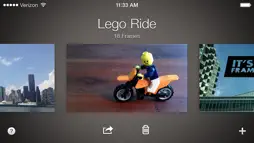
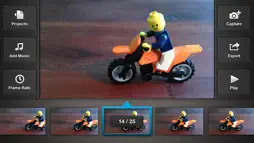
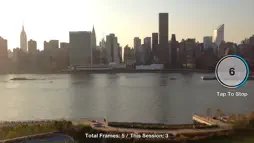
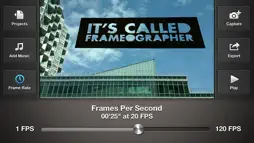
Frameographer is a simple and powerful app for making time-lapse and stop motion movies in HD. The interface is intuitive and delightful. Time-lapse and stop motion movies are both created by taking a sequence of still images and playing them back at a certain speed. Frameographer makes this process easy and fun! Features: - Capture and export in HD quality (1080p for iPhone 4S/5(sc)/6 & iPod Touch 5th Gen, 720p for all other devices). - Manual or Automatic shutter settings for making stop motion or time-lapse movies. - Exposure and Focus lock - Low-light Boost Mode (iPhone 5(sc)/6/6 Plus only) - Onion Skin - Grid - Frames Per Second adjustments - Ability to add frames to a preexisting project. - Use either the front or back camera. - Add a soundtrack with any song from your iTunes library. Requires iOS 8.0+. Compatible with: - iPhone 4 - iPhone 4S - iPhone 5(sc) - iPhone 6, Plus - iPod Touch 4th Generation - iPod Touch 5th Generation If you have any questions, comments, or bugs, let us know at [email protected].
What's New
Version 1.61 2018-12-13
Bug fixes for iOS 12 support. Version 1.6 2014-11-07
iOS 8 Support. Version 1.54 2014-10-10
iOS 7 Backwards compatibility bug fixes. Version 1.53 2014-10-08
Bug fixes for iOS 8. Version 1.52 2014-01-06
A few bug fixes. Version 1.51 2013-10-08
Fixed compatibility issues with iOS 7 and iPhone 5S Version 1.4 2012-10-15
• Optimization for iPhone 5 and iOS 6! • Tweaked and improved some graphics and animations. • Bug fixes. Version 1.31 2012-07-14
Various bug fixes. Version 1.3 2012-06-04
- Smart Zoom. On the Capture Screen, you can now pinch to zoom up to 2x, without degrading image quality. - Audible Countdown. A new option has been added to... - Smart Zoom. On the Capture Screen, you can now pinch to zoom up to 2x, without degrading image quality. - Audible Countdown. A new option has been added to the Time Lapse options menu, allowing you to hear a 3 second countdown before each image is captured. Version 1.2 2012-05-07
- 1080p! The iPhone 4S and iPad 3 now capture and export in glorious 1080p resolution. All other compatible devices will continue to capture and export at 720p... - 1080p! The iPhone 4S and iPad 3 now capture and export in glorious 1080p resolution. All other compatible devices will continue to capture and export at 720p. - Music! You can now add a soundtrack to your masterpiece, using any song from your iTunes library that is currently on your device. - Multiple Frame Deletion. We have made it easy to delete several frames at once. - Frame Duplication. It is now possible to duplicate frames. - Bug Fixes. Squashed 'em. App Store User Reviews
iehdjhdkzh 2020-04-20
Pls read
Okay so I like this app but it won’t let me add music like it said in the description and in the app the “help” thing is no help another thing is you can’t reco...Okay so I like this app but it won’t let me add music like it said in the description and in the app the “help” thing is no help another thing is you can’t record any voice to the video but overall it’s a good app but I would like to see a voice recorder on here so if you made this app and are reading this pls add a voice recorder and the reason is because it looks weird with out sounds but this is a pretty good app overall.
friscodog 2015-02-13
Handy, streamlined app
The app worked extremely well for me, and is well worth the price. I used it to spruce up the first day of class with a little hand-drawn video intro. Students...The app worked extremely well for me, and is well worth the price. I used it to spruce up the first day of class with a little hand-drawn video intro. Students loved it! There are lots of apps that aid creativity, but few that *inspire* it, in the sense of making you want to go out into the world and find ways to use them. This is one of those apps. I would’ve liked a few more post-production features, such as the ability to change the frame rate in the middle of a movie. Others have mentioned the lack of controls over audio fade-in/out, and a few other issues that I agree with. But for those things, there are programs like iMovie. What makes this app so great is that it’s totally streamlined rather than larded up with features that would just duplicate other apps.
rattlhed 2014-11-23
Amazingly powerful time lapse app
I've been using the built in iPhone time lapse feature for a while now. It's very simple to use but doesn't give you a lot of control when you want it. This app...I've been using the built in iPhone time lapse feature for a while now. It's very simple to use but doesn't give you a lot of control when you want it. This app is just as easy to use but it allows you to pick your frame rate and length of your movie which gives you a lot more flexibility. Also the app features the ability to make stop motion movies which is a ton of fun. You can also customize the frames per second in your stop motion movies. Another trick I found is that you can use your iPhone earbuds for frame capture. Just click on the volume up button on the earbuds to take a picture. That way you don't have to touch the phone and risk moving the camera from its stationary position. This app opens a world of creative ideas. Well worth for the price for all you can do with it.
mountainsofmoss 2019-01-31
It’s About Time(lapse).
I love Frameographer. So many folks seem to be reviewing this app for lack of the features it never claimed to have in the first place. This app does exactly w...I love Frameographer. So many folks seem to be reviewing this app for lack of the features it never claimed to have in the first place. This app does exactly what it says it will do, does it extremely well, and is worth every penny. The initial release predated the availability to shoot timelapse on the standard iOS camera, and Frameograph was a godsend for folks like me who had longed for the ability to create simple timelapse and stop motion without a fancy SLR, tripod, etc. It’s also great for stop motion animation. I still choose this app over the standard timelapse now available in iOS, but given the rise in portrait mode shooting because of Instagram Story, I do think adding a vertical UI and adding functionality that allows users to easily shoot in portrait mode would be an amazing update.
Frumius 2015-01-01
Fun App!
I’ve made some fun Time-lapse videos and a stop-motion with this app so far, and it’s a lot of fun. HD export is good: 1080x1920! I like that you can control t...I’ve made some fun Time-lapse videos and a stop-motion with this app so far, and it’s a lot of fun. HD export is good: 1080x1920! I like that you can control the frame capture rate on the time-lapse videos, and you can control the frame rate of the export — great features. I wish I could capture frames at a faster rate than 1 frame per second, but it’s good that you can capture frames at virtually any slower rate. Great that you can add audio, but I wish that you could control the fadeout of audio that you attach to your project. Who has a clip that’s the perfect length for a song? I want to be able to control how the audio fades out at the end. As I play with it I realize there are some things it needs: if you shoot a video vertically, you can only export it horizontally -- not good. I did a great vertical New Year's Eve timelapse that I can only view on its side. Terrible! Video purists probably think, as I tend to do, that a vertically shot video is a poor idea. But the format actually is great for viewing on any mobile device. Also, I want to be able to export specific frames to the camera roll, and to be able to select more than one at a time for the export. And when deleting frames, I'd like to be able to select more than one at a time. I wanted to delete the first 30 frames of a timelapse because of something that happened in it, but deleting them one at a time was a real pain in the neck. BUGS: 1) I encountered an export error about half the time: some parts of the the exported video had horizontal bands of video noise. Definitely watch your export to see if that happened before you delete the original. My workaround was to quit all open apps and restart, then the export was more likely to work (it did fail once after that procedure). When this error has happened, I’ve been able to get a good export by trying again. When that’s fixed, this will be great. 2) after about 1100 frames, I noticed the view on the iPhone screen stuttered with each new frame. I took about 1250 frames, no problems in the result, but that stuttering worried me. (I had 1GB space remaining on my iPhone 5S, iOS 8.1.2. when the capture was done).
JohnyBdeaf 2014-12-18
Don't destroy your ears
I just downloaded this app with the hopes of filming my entire day of driving. Little did I know my ears would be met with the loudest most piercing sound I hav...I just downloaded this app with the hopes of filming my entire day of driving. Little did I know my ears would be met with the loudest most piercing sound I have ever heard. If you have headphones on, be sure the audible countdown is disabled, unless you enjoy having audible knives slung into your ear drums.. I go through great lengths to preserve the quality of my ear response, as audio is a great love of mine. So when stuff like this happens, it really PISSES me OFF..
Richard Liquor 2016-10-06
No frills,no spills
I've been using this app for about a year now. As other people mentioned it doesn't offer a lot of control over every aspect however sometimes what you need is ...I've been using this app for about a year now. As other people mentioned it doesn't offer a lot of control over every aspect however sometimes what you need is simple. This app is powerful and capable yet has a very user-friendly interface - is simple enough for a beginner and condensed enough for getting most projects done without software hang ups. ( Keep It Stupid Simple )
Joan Proctor 2017-06-12
4 year vet
I have had this app for so freaking long I just use it whenever I'm about to animate something. This app works so well, you guys should make a mac or pc port. S...I have had this app for so freaking long I just use it whenever I'm about to animate something. This app works so well, you guys should make a mac or pc port. So very simple, yet complex in a way, because of the great explanation of controls. I recommend this to new and old animators alike
spokanister 2022-06-09
USED to work great, now on IOS 15.5 the Export features is DEAD
I have had great success with this in the past, I really liked it. But my latest videos are stuck in Projects, I can’t export them. I was able to use Finder to ...I have had great success with this in the past, I really liked it. But my latest videos are stuck in Projects, I can’t export them. I was able to use Finder to copy all the files to my iMac, but all I got was a couple of GB of still images. Which is just slightly better than nothing. They do not answer tech requests and the last update was 3 years ago. I can no longer recommend this!!!
graye 2022-07-06
Used to be great
I wish developers were required to let customers know they have abandoned an app. This used to be a fantastic app but hasn’t been updated in three years. That’s...I wish developers were required to let customers know they have abandoned an app. This used to be a fantastic app but hasn’t been updated in three years. That’s fine, developers have the right to do whatever they want with their apps, but it seems more like a scam when they keep an app up on the App Store that doesn’t really work anymore. I’m finally deleting after three years of no update :-(
Technical Analysis
Package Overview Basic metadata
Bundle ID
com.studioneat.frames Current Version 1.61
Minimum iOS 10.0
Package Size App Store Size
Package Metadata 0 / 12 version records
Detailed binary, privacy manifest, framework, and Info.plist results have not been indexed for this package yet. The verified App Store and archive metadata above remains available.
Related Apps


More by Studio Neat


Developer Information
Known Version Records
0 version records with stored package metadata • 12 known version records
Stored metadata does not guarantee a package is currently available to download.
| Details | Version / IDs | Version date | Action |
|---|---|---|---|
| Not archived | v1.61 App Store ID: 829622519Build: 1.61 | 2018-12-13 21:58:17 | Paid / Arcade |
| Not archived | v1.54 App Store ID: 741452646Build: 1.54 | 2014-10-10 16:48:18 | Paid / Arcade |
| Not archived | v1.53 App Store ID: 720962671Build: 1.53 | 2014-10-08 16:37:40 | Paid / Arcade |
| Not archived | v1.52 App Store ID: 277092660Build: 1.52 | 2014-01-06 08:53:44 | Paid / Arcade |
| Not archived | v1.51 App Store ID: 78083252Build: 1.51 | 2013-10-08 09:09:34 | Paid / Arcade |
| Not archived | v1.4 App Store ID: 11397933Build: 1.4 | 2012-10-15 15:10:02 | Paid / Arcade |
| Not archived | v1.31 App Store ID: 9146032Build: 1.31 | 2012-07-15 01:19:30 | Paid / Arcade |
| Not archived | v1.3 App Store ID: 8281264Build: 1.3 | 2012-06-04 17:27:35 | Paid / Arcade |
| Not archived | v1.2 App Store ID: 7772947Build: 1.2 | 2012-05-07 16:45:25 | Paid / Arcade |
| Not archived | v1.1 App Store ID: 7002262Build: 1.1 | 2012-03-22 14:42:40 | Paid / Arcade |
| Not archived | v1.0 App Store ID: 6736161Build: 1.0 | 2012-03-02 01:25:08 | Paid / Arcade |
| Not archived | v0.9 App Store ID: 6543503Build: 0.9 | 2012-02-22 20:24:23 | Paid / Arcade |