Preview


Description
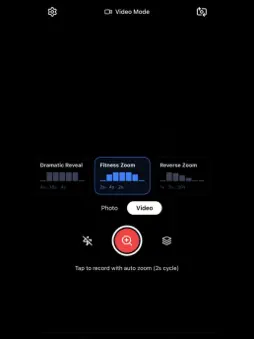
ZoomFlow turns your iPhone into a cinematic camera that zooms automatically, so you can create professional-looking videos without a camera operator. Set your zoom speed, press record, and ZoomFlow handles the movement for you. Perfect for podcasts, workouts, talking videos, timelapses, and creator content. AUTO-ZOOM VIDEO Set your zoom-in, hold, and zoom-out timing. ZoomFlow smoothly animates every phase on a loop to create dynamic, cinematic movement that keeps viewers watching. TIMELAPSE MODE Capture timelapses with built-in zoom animation. Choose your interval (1s–60s), set a shot target, and track photos captured and final video length live while recording. BUILT FOR YOUR PLATFORM One-tap presets optimised for TikTok, Instagram Reels, YouTube Shorts, LinkedIn, Podcasts, and Square formats. Each preset automatically adjusts zoom speed, framing, and aspect ratio. AI SHOT PLANNER Paste your script, choose your platform and target length, and ZoomFlow AI creates a complete shot list with zoom settings, timings, and filming suggestions. TELEPROMPTER BUILT IN Read your script while maintaining eye contact with the camera. Adjust scroll speed, font size, and opacity directly from the recording screen. MORE TOOLS FOR CREATORS • Creator Workflows for instant setup loading • Keyframe Zoom Editor for custom zoom curves • Shot History with reusable recording settings • Aspect Ratio Guides and safe zones • Shake to Capture for hands-free recording • Self-Timer with 3s, 5s, and 10s countdowns ZOOMFLOW PRO • Unlimited daily sessions • 4K video recording • No watermark • Unlimited timelapse frames • Teleprompter, AI tools, and creator workflows • Custom zoom presets Free plan includes 3 sessions per day with core zoom features included. ## How to Use ZoomFlow 1. **Choose a mode** Tap the mode label at the bottom to switch between Video, Photo, and Timelapse. 2. **Video Mode — Auto Zoom Recording** Set your Zoom In, Hold, and Zoom Out times using the sliders. Choose a preset like Soft Creator or Dramatic to load settings instantly. Press Record and ZoomFlow automatically zooms in and out on a loop until you stop recording. 3. **Timelapse Mode** Select your capture interval and total shot target. Press Record to begin. “Shots In” tracks captured photos while “Shots Out” shows the final video length live. Recording stops automatically once the target is reached. 4. **Platform Presets** Swipe through presets like TikTok, Reels, Shorts, Podcast, LinkedIn, or Square. ZoomFlow automatically adjusts aspect ratio and zoom style for each platform. 5. **Teleprompter (Pro)** Long-press the settings button to open the teleprompter. Paste your script, set scrolling speed, then toggle the teleprompter on while recording. 6. **AI Shot Planner (Pro)** Tap the AI icon, paste your script or ideas, choose your platform and video length, then generate a full shot plan with suggested zoom settings. 7. **Shot History** View past recordings and instantly reload previous settings using “Reuse Settings.” 8. **Settings & Presets** Use the gear icon to customise zoom timing, save presets, and manage your subscription. 9. **Gallery** The Gallery tab stores all saved photos and videos with filter options. 10. **Upgrade to Pro** Unlock 4K recording, unlimited sessions, no watermark, teleprompter, AI tools, advanced timelapse options, and more. https://saintclairappl.com/terms-of-service https://www.apple.com/legal/internet-services/itunes/dev/stdeula/
What's New
Version 1.5.4 2026-05-22
• Timelapse now shows Shots In and Shots Out live during capture — see exactly how many photos you've taken and how long your final video will be, updated in re... Technical Analysis
Package Overview Basic metadata
Bundle ID
com.vibecode.zoomflow.mw5xx5 Current Version 1.5.4
Minimum iOS 15.1
Package Size App Store Size
Package Metadata 0 / 9 version records
Detailed binary, privacy manifest, framework, and Info.plist results have not been indexed for this package yet. The verified App Store and archive metadata above remains available.
Developer Information
Known Version Records
0 version records with stored package metadata • 9 known version records
Stored metadata does not guarantee a package is currently available to download.
| Details | Version / IDs | Version date | Action |
|---|---|---|---|
| Not archived | App Store ID: 885991918 | Unknown | Request Version |
| Not archived | App Store ID: 885604714 | Unknown | Request Version |
| Not archived | App Store ID: 885507625 | Unknown | Request Version |
| Not archived | App Store ID: 885267910 | Unknown | Request Version |
| Not archived | App Store ID: 884941253 | Unknown | Request Version |
| Not archived | App Store ID: 884832725 | Unknown | Request Version |
| Not archived | App Store ID: 884708019 | Unknown | Request Version |
| Not archived | App Store ID: 884438448 | Unknown | Request Version |
| Not archived | App Store ID: 882263557 | Unknown | Request Version |