
Preview




Description
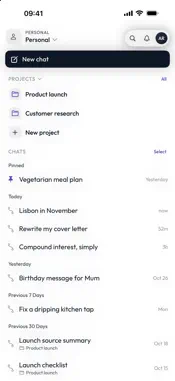
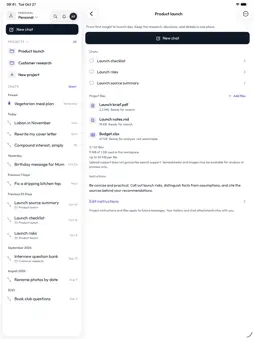
Paniris puts every frontier and sovereign AI model in one place, one conversation, one bill, routed to the best model for each message. • Auto routing — every message goes to the strongest model your workspace allows, or pin one yourself. • Frontier + sovereign — use leading models worldwide or keep work on EU-hosted, sovereign infrastructure. • Built for teams — workspaces scope your chats, models and policies; your personal space stays yours. • Tools with consent — web search and link reading run only when you allow them, with sources cited and workspace governance applied. • Projects — keep related chats and files together, with answers that cite your sources. • Schedules — let agents run recurring tasks and manage them from your phone. • Attachments — send images and documents to vision-capable models. Paniris (formerly Cudator) is the companion app for Paniris accounts. Create your account and manage your plan at paniris.ai.
What's New
Version 1.0.8 2026-11-20
Your Library is in the app. Open it from the side menu to browse everything you and your team have made — decks, documents and more — filter by kind or owner, a...Your Library is in the app. Open it from the side menu to browse everything you and your team have made — decks, documents and more — filter by kind or owner, and search. Open a creation to read it right in the app, flip between its versions, jump back to the chat it came from, or share a deck as PowerPoint or PDF. The assistant can now ask you questions. When it needs a decision, a short form rises out of the message box: pick an option, write your own answer or skip, and the reply carries on. Everything waiting on you sits in one place. Approvals, schedules to confirm, model-switch requests and questions now dock to the message box instead of appearing inside the chat, so the conversation never jumps around them. Choose a design system for each chat. Where your workspace has design systems turned on, tap + in the message box, then Design system, to pick your organisation's, your workspace's or your own — or none. Approvals got better: Allow now works for every connector, such as a Gmail draft; you can choose Always allow where it is offered, and see exactly what a connector is about to write before you allow it. Also new: charts in answers are drawn natively, you can attach images whichever model you use, a schedule that has run out can be resumed from the chat, a thumbs down lets you say what went wrong and there is a Report a problem option, and workspace admins are recognised again. Technical Analysis
Package Overview Basic metadata
Bundle ID
ai.cudator.ios Current Version 1.0.8
Minimum iOS 17.0
Package Size App Store Size
Package Metadata 0 / 0 version records
Detailed binary, privacy manifest, framework, and Info.plist results have not been indexed for this package yet. The verified App Store and archive metadata above remains available.
Developer Information
Known Version Records
0 version records with stored package metadata
Stored metadata does not guarantee a package is currently available to download.
| Details | Version / IDs | Version date | Action |
|---|