
Preview


Description
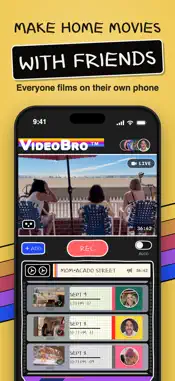
Home movies are back, and this time everyone gets to hold the camera. VideoBro is a collaborative video app that combines videos from multiple iPhones into one chronological film. Start a tape, invite the people who were there, and everyone records from their own phone. VideoBro collects every clip, keeps everything in the order it happened, and develops the tape into one finished movie. No editing timeline. No chasing people for their videos. No folder full of random clips. HOW IT WORKS 1. Start a tape for a trip, wedding, birthday, sports season, family gathering, or everyday life. 2. Tap REC to film right in VideoBro, or switch on AUTO and film with your iPhone's Camera app. Landscape clips land on the tape automatically, ordered by when they were shot and credited to whoever filmed them. 3. Invite your crew with a link or QR code, up to 8 people including you. They can add to the tape without creating an account. 4. Already have footage? Add Clips brings in horizontal videos from your camera roll and places them where they belong in the story. 5. Tap Develop. VideoBro combines everyone’s clips into one widescreen film in the cloud, and everyone on the tape gets a copy. COMBINE VIDEOS FROM MULTIPLE PHONES After a trip, party, wedding, or game, the best videos are usually scattered across everyone’s camera rolls. VideoBro gives the group one shared tape while everyone keeps using their own iPhone. Instead of collecting files later, the film builds as people record. If you want to combine videos from multiple phones, collect videos from friends, or turn scattered camera-roll clips into one movie, VideoBro does the organizing for you. ONE FILM, IN THE ORDER IT HAPPENED A shared video album collects clips. A VideoBro tape turns them into a story. Everyone’s point of view lands on the same tape in real chronological order, so you can watch the day, trip, season, or year take shape as clips come in. EDIT LESS. KEEP MORE. VideoBro keeps editing intentionally simple: Swipe to remove a clip. Press and hold to trim one. That’s it. No complicated timeline, filters, titles, or rearranging reality. Your original videos stay untouched, because making a home movie shouldn’t become another project. MAKE IT FEEL LIKE HOME VIDEO Switch on VHS Mode and choose a vintage camera look, from silent home movie reels to pocket camcorders. You see it live in the viewfinder and on every clip, and finished films get analog sound to match. Your original clips are never changed, and a finished film you download keeps the look you chose. PRIVATE BY DEFAULT Your life doesn’t need an audience. Tapes are invite-only. There’s no public profile, discovery feed, like count, or algorithm deciding who sees what. When you want to share a finished film, send a private unlisted link. Anyone you choose can watch in a browser on any device, with no app or account required. Tap Stop Sharing and the link turns off. YOUR TAPE CABINET Finished films live in your Tape Cabinet instead of disappearing into thousands of camera-roll clips. Choose covers, organize films onto shelves by person, year, or place, hide a shelf behind Face ID, save films to your camera roll, or watch your cabinet on the web. Over time, it becomes a collection of the people and places that made up your life. MADE FOR • Trips, vacations, and weekends away • Weddings, bachelor and bachelorette parties • Birthdays, holidays, and family get-togethers • Kids’ sports seasons and game days • Family videos and everyday memories • Sharing moments privately with grandparents and relatives FREE TO START Start with 2 GB of space, roughly an hour of footage, with developing included. No credit card needed. Everyone records. VideoBro puts it together. The best moments usually weren’t made for the internet. Keep them anyway.
What's New
Version 1.0.9 2026-11-02
Develop is now Finish When your tape is done, tap Finish in the bottom bar. It still turns everyone's clips into one film for the whole crew. Invite people as ...Develop is now Finish When your tape is done, tap Finish in the bottom bar. It still turns everyone's clips into one film for the whole crew. Invite people as you start After you name a new tape, VideoBro asks if you'd like to invite others. Tap INVITE PEOPLE to send links, or MAYBE LATER to start filming. Home is now NEW TAPE, ACTIVE TAPES and MY TAPES. Flip cameras mid-take Switch between the front and back cameras while you film, and it all stays one clip. Many more vintage cameras, in order by year The look strip now runs from silent film cameras to flip phones and action cams, with the year under each one. The older looks were retuned to be truer to their cameras. Looks that set a mood After the cameras, the look strip now has thirty looks that set a mood, like Golden Hour, Noir and Neon Rain, grouped by feel. Buttons above the strip jump straight to a decade or a mood, wherever you pick a look. Download in any shape Download shows a bigger preview and lets you pick a shape before you save: the film's original wide picture, square, or taller shapes for posts and stories. The look strip is the same one you use on the tape screen. Change a film's look anytime Every film in My Tapes has a VHS button. Scroll through the looks, tap USE THIS LOOK, and the film plays that way for everyone on it. A fresh tape screen Each person's clips are now a block of their own color. While you watch clips, the REC button says CAMERA and takes you back to the live picture. Also in this update: a new app icon, a redesigned Active Tapes screen with the tape in your deck up top, a simpler sign-up, a hint on empty tapes for adding videos you've already filmed, and bigger film names in My Tapes. Technical Analysis
Package Overview Basic metadata
Bundle ID
Drewy.VideoBro Current Version 1.0.9
Minimum iOS 17.0
Package Size App Store Size
Package Metadata 0 / 0 version records
Detailed binary, privacy manifest, framework, and Info.plist results have not been indexed for this package yet. The verified App Store and archive metadata above remains available.
Developer Information
Known Version Records
0 version records with stored package metadata
Stored metadata does not guarantee a package is currently available to download.
| Details | Version / IDs | Version date | Action |
|---|