
Preview






Description
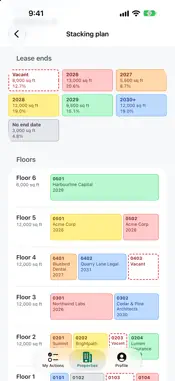
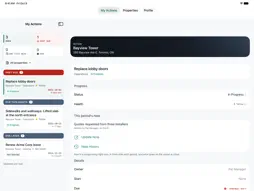
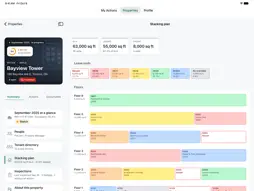
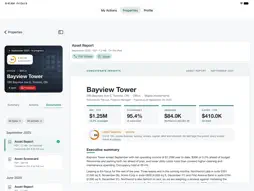
Insights is where commercial real-estate teams plan, track and report on their properties. Concatenate Insights brings it to your iPhone and iPad, so the property manager in the lobby works from the same record as the asset manager at a desk. An Insights account is required. Your organisation’s Insights administrator creates your account and decides which properties you work on. MADE FOR IPAD AND IPHONE DUO • On iPad, full screen or in a window beside your other apps, your list stays on the left while what you’ve opened fills the right. • Open the iPhone Duo flat for the same view. Half open, nothing sits on the crease. • Folded, the Duo works like any iPhone. Fold, unfold or resize mid-task and you lose nothing. MY ACTIONS • Every open action you own, across all your properties, past due first. • See at a glance what’s past due, what’s due this week and what’s rated Red. YOUR PROPERTIES • Each property opens on its photo, with the reporting period and what’s open and overdue. • Its Summary shows the period’s headline figures as Insights reports them: NOI year to date, occupancy, arrears and capital spend, with the date they’re as of. • Where your access includes them, see the property’s health score, the conditions flagged against it and the period’s executive summary. • Call or email the property manager or general manager in a tap. • Where your lease data is connected, browse the tenant directory and a stacking plan coloured by the year each lease ends. ACTIONS THAT KEEP UP WITH THE BUILDING • Add an action in seconds: choose its type and give it a name, then fill in the rest when you’re ready. • Change its status, health, due date or owner. • Write this period’s note, the one that goes on the report, and look back at earlier notes. • Decide whether an action goes on the report, comes up at the next review or stays internal. • Mark it complete when the work is done. It stays on the record, shown as complete on that period’s report. INSIGHTS AI SUGGESTIONS • Where your organisation uses Insights AI, ask it to suggest actions for a property. • It reads the period’s figures, including vacant units, expiring leases, capital projects, arrears and flagged conditions, and doesn’t suggest what’s already open. • Each suggestion shows its objective, the note it would write and why it’s suggested. Accept it, edit it first or dismiss it. PROPERTY INSPECTIONS • Walk a property with your organisation’s checklist, section by section in any order. Rate each item Good, Fair or Poor, or OK or Deficient, and see what was found last time. • For anything that needs work, record how soon, where it is and what’s wrong, and add photos. • Raise an action from a finding without leaving the walk. • Each inspection’s report lists the findings first, life safety at the top, with photos and the live status of the actions raised from them. DOCUMENTS • Open the reports Insights produced for each property, and zoom, search or share them. • Drafts are marked DRAFT, so no one mistakes one for the published report. • Documents you’ve opened stay on your device, ready to read without a signal. WORKS WITHOUT A SIGNAL • Basements and parking garages rarely have a signal. Keep working: your changes and inspection answers wait on your device and are sent when you’re back online. • Turn on Offline Mode where the signal comes and goes. Everything waiting is sent when you turn it off. NOTIFICATIONS, IF YOU WANT THEM • Know when someone assigns you an action, when Insights AI’s suggestions are ready and, on weekday mornings, when you have actions past due or due this week. • Notifications never show figures, property names or notes on your lock screen. PRIVATE AND SECURE • Sign in with your Insights account or your organisation’s Microsoft sign-in. • Lock the app with Face ID, Touch ID or your passcode. Its contents stay hidden in the app switcher. • No ads, no tracking and no third-party analytics. Signing out removes your data from the device.
What's New
Version 1.4 2026-11-16
Each property's Calendar now has Meetings: every meeting held at the property, coming up and earlier, with a filter for each kind of meeting. Each meeting now s...Each property's Calendar now has Meetings: every meeting held at the property, coming up and earlier, with a filter for each kind of meeting. Each meeting now shows its name, kind, time and place, the record it's about (such as a mortgage or a lease), and whether it's only for the people invited. A follow up on the Calendar also indicates the meeting it came from. Technical Analysis
Package Overview Basic metadata
Bundle ID
us.concatenate.insights Current Version 1.4
Minimum iOS 26.0
Package Size App Store Size
Package Metadata 0 / 0 version records
Detailed binary, privacy manifest, framework, and Info.plist results have not been indexed for this package yet. The verified App Store and archive metadata above remains available.
Developer Information
Known Version Records
0 version records with stored package metadata
Stored metadata does not guarantee a package is currently available to download.
| Details | Version / IDs | Version date | Action |
|---|