Preview










Description
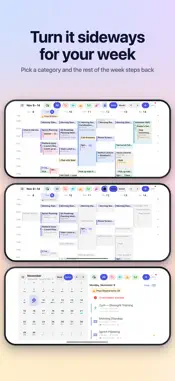
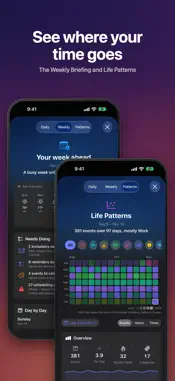
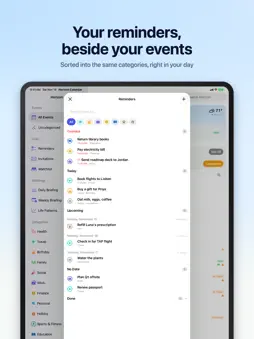
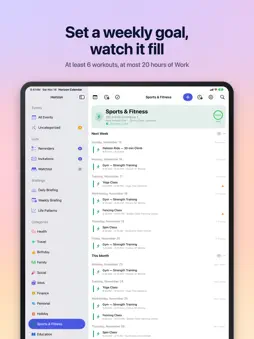
Your Apple Calendar, organized by what matters. Horizon reads the events you already have in Apple Calendar, sorts them into categories like Work, Health, Family and Travel, and brings the important ones forward: on a dashboard, in your briefings, in widgets, on Apple Watch and through Siri. There's no new calendar to keep up and no account to create. Allow calendar access and Horizon does the rest, on your device. SIX LANGUAGES Use Horizon in English, German, French, Spanish, Italian or Simplified Chinese, everywhere it appears. Events titled in any of the six land in the right category, and holidays and the Birthdays calendar are recognized in your language. SMART CATEGORIES Horizon's AI sorts every event into one of 19 categories and learns from each correction. Add your own, and Horizon shows which events it would get before you add it. QUICK ADD Tap + and type it the way you'd say it: "Lunch with Priya Friday at noon" or "Soccer every Saturday at 9 at Marina Green". Horizon fills in the day, the time, how long, where and how often, in any of the six languages, and shows you the event before you add it. Tap any free time to add something right there. A DASHBOARD THAT STARTS WITH TODAY The Today card shows the weather and what's happening now or next. Rows name the place you're going and the video call you're joining. Birthdays, holidays and trips sit in a strip above each day's events, so what you have to get to comes first. Browse by category, switch to the month, or turn your iPhone sideways for the week. DAILY & WEEKLY BRIEFINGS The Daily Briefing gives you the shape of your day: how much is on, when it starts, when you're done and where your free time is. The Weekly Briefing covers your busiest days, highlights and conflicts, and Life Patterns shows where your time really goes. WEEKLY GOALS At least 3 workouts a week, or at most 20 hours of Work. Your progress shows on the category, in your briefings and in Life Patterns. WATCHLIST Count down to what you're looking forward to: a trip, a birthday, a concert. A watched event gets a Live Activity on your Lock Screen and in the Dynamic Island, milestones a month, a week and a day out, and its own widget. FIND FREE TIME Need an hour for the gym? Horizon suggests the best openings within the hours you choose. Tap one to create the event. INVITATIONS & OVERLAPS Every invitation waiting for a reply is in one list, with a note when it overlaps something you're going to. Turn on Keep Until Answered and they stay out of your day until you reply. SIRI, SHORTCUTS & FOCUS Ask "What's on my Horizon today?" or "When am I free this week in Horizon?" Nine actions are ready in Shortcuts, Controls work in Control Center and on the Action button, and Focus filters show only the categories you choose. WIDGETS Home Screen and Lock Screen widgets for your next events, your day or your week, and your Watchlist. NOTIFICATIONS THAT FIT YOUR DAY Set notification times per category: a week ahead for a trip, the morning of for a birthday, 30 minutes before a meeting. Everything about the day ahead arrives together at your Morning Time, in the Daily Briefing or as one notification, and each notification says where and when. Reminders notify you when they're due, with Complete right on the notification, and Horizon skips anything that already has its own alert, so you're never notified twice. BUILT ON APPLE CALENDAR Horizon works with every calendar in Apple Calendar: iCloud, Google, Exchange, Outlook and CalDAV. The same meeting on two calendars shows up once. IPHONE, IPAD, IPHONE DUO & APPLE WATCH A side-by-side layout on iPad, a planner across both displays of iPhone Duo, and your whole day and your Watchlist on Apple Watch. PRIVATE BY DESIGN Categorization runs entirely on your device. Your events are never sent to a server, and there are no Horizon accounts and no tracking. Your categories and settings follow you to your other devices through your own iCloud account.
What's New
Version 2.1.2 2026-11-17
What's New in 2.1.2 Quick Add starts on the day you're looking at. Quick Add on the Day You Picked In Week, 3 Days or Month, pick a day and tap +. Anything yo...What's New in 2.1.2 Quick Add starts on the day you're looking at. Quick Add on the Day You Picked In Week, 3 Days or Month, pick a day and tap +. Anything you type without a day goes on that day, and Quick Add says so. Type a day, such as "today" or "Friday", and it goes there instead. New Event and New Reminder in the +'s menu start on that day too. Technical Analysis
Package Overview Basic metadata
Bundle ID
com.stevevillardi.Horizon Current Version 2.1.2
Minimum iOS 18.6
Package Size App Store Size
Package Metadata 0 / 10 version records
Detailed binary, privacy manifest, framework, and Info.plist results have not been indexed for this package yet. The verified App Store and archive metadata above remains available.
Price History (USA store)
2 recorded price change points. These are historical observations, not a guarantee of the current price.
| Recorded at | Price | Currency |
|---|---|---|
| 2.99 | USD | |
| 0.0 | USD |
Developer Information
Known Version Records
0 version records with stored package metadata • 10 known version records
Stored metadata does not guarantee a package is currently available to download.
| Details | Version / IDs | Version date | Action |
|---|---|---|---|
| Not archived | App Store ID: 886050127 | Unknown | Request Version |
| Not archived | App Store ID: 884480795 | Unknown | Request Version |
| Not archived | App Store ID: 884437563 | Unknown | Request Version |
| Not archived | App Store ID: 884415617 | Unknown | Request Version |
| Not archived | App Store ID: 884393185 | Unknown | Request Version |
| Not archived | App Store ID: 884349447 | Unknown | Request Version |
| Not archived | App Store ID: 884338217 | Unknown | Request Version |
| Not archived | App Store ID: 884200215 | Unknown | Request Version |
| Not archived | App Store ID: 884158751 | Unknown | Request Version |
| Not archived | App Store ID: 883763475 | Unknown | Request Version |