
Preview





Description
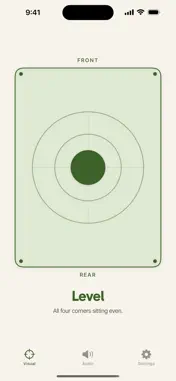
No ads. No subscription. No gadget to buy. Set your phone in the rig, see which corner is low and how much to raise — then get on with your day. Most leveling apps bury the answer under a wall of decimals — or a banner ad. FlatPad shows a top-down footprint of your RV, pools shade toward the corner that's low, and saves strong color for one thing: the instant all four corners sit level. NO ADS. NO SUBSCRIPTION. NO HARDWARE. • No banner ads — not even in the free version • No subscription — leveling is infrequent, so you pay once or not at all • No $150 Bluetooth box to mount and pair — your phone already has the sensors • Runs entirely on-device — no account, no sign-in ONE CLEAR THING ON SCREEN • A top-down plan of your trailer — the bubble drifts to the high side, a raise badge points at the low corner • Not a single number to parse • Set the phone down either way; the rig image rotates to match • Turns green the moment you're level ACCURATE CALIBRATION — FREE Every phone rests a hair off-flat because of the camera bump. FlatPad's two-read flip method measures that lean and subtracts it, so your readings are true — not off by a degree. It's the accuracy feature rivals gate behind a paywall. Here it's free. • Two quick reads, spun 180° — takes about 20 seconds • Works on any flat surface; it needn't be level • Haptic confirmation when each read lands BLOCK-HEIGHT MATH See exactly how much to raise each corner, in inches or centimeters. Heights are worked out from your rig's footprint, so calibration ends with a quick optional step to set it — and if you skip it, FlatPad tells you which default it's using instead of quietly guessing. A RIG FOR EACH RV Got more than one? Save a rig for each — its leveling method, its size, and a name you'll recognize — then pick the one you're parked in from the Visual or Audio tab. No re-entering dimensions every time you swap vehicles. • Each rig remembers its own leveling method and footprint • Switch in one tap, right where you're leveling • Name them anything — "Airstream", "the toy hauler", "Dad's fifth wheel" • One rig is free; keeping a library of them is Pro EVERYTHING YOU NEED TO LEVEL IS FREE Visual leveling, flip-method calibration, and block-height math never cost a thing — and never show an ad. FLATPAD PRO — $9.99 ONCE, NOT A SUBSCRIPTION Pro matches gear that costs $150 in hardware. One lifetime unlock, shared across all your devices: • Voice guidance — FlatPad speaks each move ("raise rear left, about an inch and a half") and waits until the rig settles before it talks again. Level from the jack stands without ever looking at the screen. • Apple Watch companion — set the phone in the rig and walk to the jack; your wrist shows the corner to raise and how much, turning green the instant you're level. No extra hardware to buy. • More leveling modes — level-by-side for paired jacks, and a stabilizer-only mode that squares you side-to-side first, then the front jack (independent-corner leveling is free) • A rig for every RV — save each vehicle's leveling method and size, and switch between them as you park (one rig is free) • Manual dark & light theme override Park it. Glance. Level.
What's New
Version 1.1 2026-08-09
Two RVs? Three? FlatPad now saves a rig for each one — its leveling method and its size — and you switch between them right from the Visual or Audio tab. No mor... Technical Analysis
Package Overview Basic metadata
Bundle ID
com.orderedlist.flatpad Current Version 1.1
Minimum iOS 17.0
Package Size App Store Size
Package Metadata 0 / 0 version records
Detailed binary, privacy manifest, framework, and Info.plist results have not been indexed for this package yet. The verified App Store and archive metadata above remains available.
Developer Information
Known Version Records
0 version records with stored package metadata
Stored metadata does not guarantee a package is currently available to download.
| Details | Version / IDs | Version date | Action |
|---|