
Preview


Description
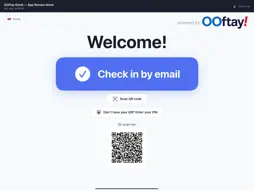
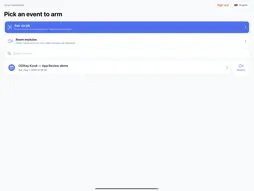
Turn an iPad into the sign-in desk at your event. OOftay! Kiosk is the venue-side companion to the OOftay! app. Stand it on the door, arm it to one event, and attendees check themselves in — by scanning their QR code, by entering the PIN from their confirmation email, or by typing their email address. Re-scanning signs them out again, so you know who is still in the room. Built for the door • One event at a time: staff arm the iPad, then hand it to the queue • A single full-screen flow with no navigation to wander into — designed to run all day in Guided Access on a dedicated iPad • The attendee in front of it can switch language for their own check-in: English, French, Dutch, German, Spanish, Italian, Greek and Arabic • Walk-ups who were never registered can be registered on the spot, with consent, and signed in Keeps working when the venue Wi-Fi does not • Recognises registered attendees from a roster held on the iPad, so a dropped network does not stop the queue • The roster holds no email addresses — only salted hashes — so a mislaid iPad gives up nothing • Sign-ins are stored on the device and sent on as soon as the connection returns — nothing is lost and nobody is turned away • Every sign-in is stamped with where the iPad is standing, so attendance carries proof it happened at the venue Works with OOftay room modules • Collects check-ins that OOftay Bluetooth room modules recorded while nobody was watching, and confirms them so the module can clear its memory • Opens a module's sign-in window straight from the kiosk An OOftay account is required. Accounts are created and managed at ooftay.com; this app signs in with one you already have. Attendance flows into the same events, registers and certificates as the rest of OOftay.
What's New
Version 1.0.2 2026-10-30
• Stays armed: if the app is force-quit or crashes, the kiosk reopens on the attendee screen. Only the exit PIN, or signing out with "Forgot the PIN?", ends kio...• Stays armed: if the app is force-quit or crashes, the kiosk reopens on the attendee screen. Only the exit PIN, or signing out with "Forgot the PIN?", ends kiosk mode. • Guided Access at arming: the kiosk now explains how to turn it on and arms by itself once it starts. • Staff actions protected: changing the exit PIN asks for the current one, and the manual override on the confirm screen asks for the exit PIN. • Safer sign-out and sign-in: signing out now ends the session on the server too, and a staff sign-in no longer trusts the iPad for 30 days, so two-factor is asked every time. The e-mail code option has been removed. • Walk-in registration asks for the fields a ticket type requires, such as a professional registration number. If ticket types fail to load, the form offers a retry and holds registration until they do. • Steadier when the server is busy: the kiosk and its offline queue now back off and retry more gently. Technical Analysis
Package Overview Basic metadata
Bundle ID
com.ooftay.kiosk Current Version 1.0.2
Minimum iOS 18.5
Package Size App Store Size
Package Metadata 0 / 0 version records
Detailed binary, privacy manifest, framework, and Info.plist results have not been indexed for this package yet. The verified App Store and archive metadata above remains available.
Developer Information
Known Version Records
0 version records with stored package metadata
Stored metadata does not guarantee a package is currently available to download.
| Details | Version / IDs | Version date | Action |
|---|