
Kan Do: Project Management App Icon

Kan Do: Project Management

Productivity • Stephen Robles
4+ v1.7.2 Recorded price: $2.99 App Store →
★★★★★
★★★★★
(20 App Store ratings)
🏆 Best: #1 Paid (CAN)
IPA Analysis
Technical Specs
Bundle ID fm.beard.KanDo
Version 1.7.2
App Store Size 65.27 MB
Minimum iOS 26.0
Devices iPhone, iPad, iPod touch
Catalog release date 2026-08-05
Latest recorded version date 2026-11-11
Features & Support
Apple Watch
Advisory 4+
Languages (1)
EN
Top In App Purchases
No In App Purchases Listed

Preview

Kan Do: Project Management screenshot 1 Kan Do: Project Management screenshot 2 Kan Do: Project Management screenshot 3 Kan Do: Project Management screenshot 4 Kan Do: Project Management screenshot 5 Kan Do: Project Management screenshot 6 Kan Do: Project Management screenshot 7 Kan Do: Project Management screenshot 8 Kan Do: Project Management screenshot 9 Kan Do: Project Management screenshot 10 Kan Do: Project Management screenshot 11 Kan Do: Project Management screenshot 12 Kan Do: Project Management screenshot 13 Kan Do: Project Management screenshot 14 Kan Do: Project Management screenshot 15

Description

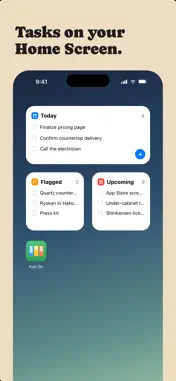
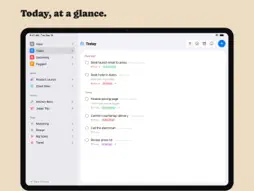
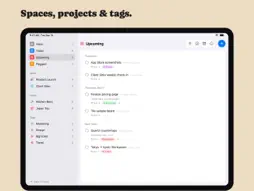
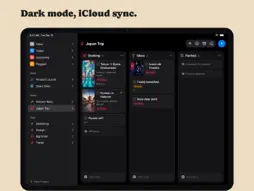
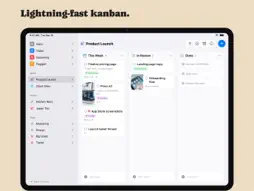
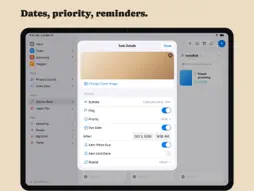
Organize your work into Spaces and Projects, then move tasks across the columns you define. Every card shows what matters at a glance: a cover image, subtitle, tags, priority, and due date. Open any task and you get a full markdown notes editor with headings, lists, checkboxes, images, and file attachments. ORGANIZE YOUR WAY • Kanban boards with drag-and-drop cards, columns, and dividers • A list view for every project, with drag to reorder • Spaces group your projects; tags cut across them • Smart lists for Inbox, Today, Upcoming, and Flagged • Archive completed work, or keep it crossed out on the board CAPTURE THE DETAILS • Rich notes on every task: headings, bold, lists, to-do checkboxes, quotes, and code • Attach images and files right in the note • Cover images, subtitles, priorities, flags, links, and due dates with reminders EVERYWHERE YOU WORK • Native on Mac, iPhone, iPad, and Apple Vision Pro • iCloud sync keeps every device up to date • Spotlight search and Shortcuts actions! • Multi-select to move, complete, or delete tasks in bulk • Light and Dark appearance, color themes, adjustable typography No accounts. No subscriptions to manage your own tasks. Your data lives in your iCloud.

What's New

Version 1.7.2 2026-11-11
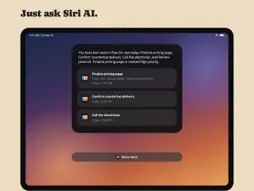
Subtasks - Show Subtasks Under Tasks: a new switch in Settings > Appearance, off by default. Turn it on and each task lists its subtasks, indented, under its c...Subtasks - Show Subtasks Under Tasks: a new switch in Settings > Appearance, off by default. Turn it on and each task lists its subtasks, indented, under its card on a board and under its row in a list. Check one off right there, and use the small arrow beside the progress pie to fold a task's list away - A dated subtask in Today, Upcoming, or a custom smart list now shows its parent task's subtitle and project, the same details the parent's own row shows Notes - Add up numbers: select a few lines with figures in them, such as a birthday budget, and the total appears at the bottom of the note. Tap the total to copy it. List numbering, dates, times, and phone numbers are left out - Notes written by an AI assistant through the MCP connector now show as formatted text (headings, bold, lists, checkboxes, links, code) instead of raw Markdown Comments - Newest first: tap the small arrow in the Comments header, or turn on Settings > Appearance > Newest Comments First, to put the latest comment at the top Sorting and search - Sort By Tag: every column, list heading, and smart list can sort by tag, A to Z or Z to A. Untagged tasks come last - Search in the app also finds a task by the words in its subtasks and its comments - Spotlight now searches the whole note, not just its first few lines Fixes - A due date an AI assistant set without a time was saved as 12:00 PM, so the task showed as past due from midday on its own due date. It is now a plain date and turns past due the next day

Technical Analysis

Package Overview Basic metadata
Bundle ID fm.beard.KanDo
Current Version 1.7.2
Minimum iOS 26.0
Package Size App Store Size
Package Metadata 0 / 0 version records
Detailed binary, privacy manifest, framework, and Info.plist results have not been indexed for this package yet. The verified App Store and archive metadata above remains available.

Developer Information

Known Version Records

0 version records with stored package metadata

Stored metadata does not guarantee a package is currently available to download.

Details Version / IDs Version date Action