
Preview




Description
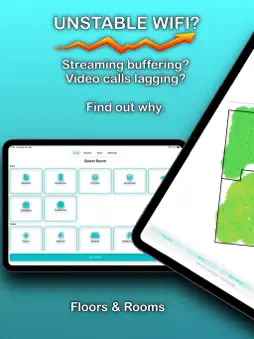
Slow Wi-Fi? Choppy streaming? Dropped video calls? Analyze your Wi-Fi across entire floors or room by room and find out where the problem really lies. A clear, color-coded heatmap instantly shows you where your network is stable and where it needs improvement. Find the cause, not just the symptom. NO MORE GUESSWORK Often the problem isn't your internet plan, but your Wi-Fi coverage. The visual heatmap shows you at a glance where dead zones occur, whether your router is optimally placed, where streaming stutters, where video calls drop, which rooms are suitable for working from home or gaming. No flood of numbers, just a clear, easy-to-understand view. ANALYZE ROOMS AND ENTIRE FLOORS Scan individual rooms or analyze Wi-Fi coverage across an entire floor. Get structured results and real insights. Ideal: when moving or in a new home, with a new router, after rearranging furniture, when working from home, when you have Wi-Fi problems, for before-and-after comparisons. REGULAR WI-FI QUALITY CHECK Your Wi-Fi is constantly affected by walls, furniture and devices. A regular check helps you detect problems early, keep streaming stable, optimize your router's position, make your Wi-Fi reliable in the long run. A quick scan every few weeks is all it takes. SIMPLE FOR EVERYONE. PRECISE FOR ADVANCED USERS. The app explains your Wi-Fi visually and clearly. If you want to dig deeper, you also get: signal strength in dBm, ping/latency, jitter. Ready to use for beginners, meaningful for advanced users. NETWORK TOOLS Test and check your network right in the app: internet speed, local network latency, packet loss and stability, DNS performance, network devices, traceroute, advanced Wi-Fi details. Quickly find out whether the problem lies with your provider or your Wi-Fi. No additional app needed. ONE SYSTEM ACROSS ALL DEVICES Scan your Wi-Fi with your iPhone or iPad. Analyze and compare your measurements on all your devices. On Mac, you benefit from a larger view, a better overview and enhanced comparison options. PREMIUM Premium is available as a subscription or a lifetime purchase. Monthly: 1.99 EUR Yearly: 12.99 EUR Lifetime: 29.99 EUR (one-time payment) Premium includes ad-free use, unlimited room scans, export as PDF, CSV or image, iCloud sync and advanced statistics. The core analysis features are free to use. The subscription renews automatically unless it is canceled at least 24 hours before the end of the current period. You can manage and cancel it via your Apple ID in Settings. PRIVACY Measurement data stays local on your device by default. When iCloud sync is enabled, it is synced encrypted via your Apple account. No data is shared with third parties or external third-party servers. TERMS OF USE [https://www.apple.com/legal/internet-services/itunes/dev/stdeula/](https://www.apple.com/legal/internet-services/itunes/dev/stdeula/) PRIVACY POLICY https://stapppro.de/wlan_optimizer/privacy_policy.html
What's New
Version 1.11 2026-10-21
WLAN Optimizer 1.11 – our biggest update yet Walk through your home once – and your measurement points become a floor plan of your entire floor. With walls, do...WLAN Optimizer 1.11 – our biggest update yet Walk through your home once – and your measurement points become a floor plan of your entire floor. With walls, doors and a coverage area that shows how well your Wi-Fi reaches every room. So you see not only where it's weak, but also why. GPS measurements in gardens and parks are now shown on the map with pinpoint accuracy. 1. AREAS INSTEAD OF DOTS As you scan, a continuous area grows with every step. In the results, it's colored by signal quality. On devices with LiDAR, the color stops at the wall instead of bleeding into the next room. 2. A FLOOR PLAN FROM YOUR WALK Walls appear above the area – even without LiDAR. Solid means measured, dotted means inferred, dashed means derived. Gaps stay gaps: that's where your doors are. 3. TRANSPARENT DOWN TO THE DETAIL The map shows you what it's based on: "with depth data" or "from your walking path", plus the quality of the floor plan. So you can put every result in context. Tip: A thorough walk gives you the most accurate floor plan. 4. OUTDOORS ON A REAL MAP Garden, patio, yard: your path is recorded on the Apple map, and every measurement point sits at its real position. Your path and measurement points now also appear on the map in the results. ALSO NEW - Four map layers you can toggle on and off - Full-screen view - Floors right on the home screen - Area and floor plan in the report - Guidance on holding your device correctly before scanning - Alert when your iCloud storage is full - More robust scanning - Fixed: On weak Wi-Fi, your iPhone silently switched to cellular data – making a dead spot look healthy. Technical Analysis
Package Overview Basic metadata
Bundle ID
com.STApp-Professional.WLAN-Optimizer Current Version 1.11
Minimum iOS 17.6
Package Size App Store Size
Package Metadata 1 / 10 version records
Detailed binary, privacy manifest, framework, and Info.plist results have not been indexed for this package yet. The verified App Store and archive metadata above remains available.
Developer Information
Known Version Records
1 version record with stored package metadata • 10 known version records
Stored metadata does not guarantee a package is currently available to download.
| Details | Version / IDs | Version date | Action |
|---|---|---|---|
| Not archived | App Store ID: 890060813 | Unknown | Request Version |
| Not archived | App Store ID: 889433379 | Unknown | Request Version |
| Not archived | App Store ID: 889118619 | Unknown | Request Version |
| 15.74 MB | v1.9 App Store ID: 886159793Build: 1.9 | 2026-09-10 17:10:52 | Get Version |
| Not archived | App Store ID: 885822268 | Unknown | Request Version |
| Not archived | App Store ID: 884403822 | Unknown | Request Version |
| Not archived | App Store ID: 883367565 | Unknown | Request Version |
| Not archived | App Store ID: 881981657 | Unknown | Request Version |
| Not archived | App Store ID: 881196544 | Unknown | Request Version |
| Not archived | App Store ID: 880317260 | Unknown | Request Version |