
Preview






Description
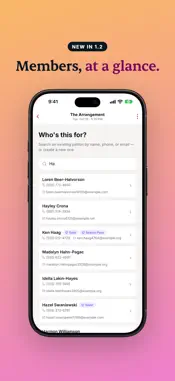
Stageworks is the all-in-one check-in app for theaters, performing arts venues, and live event organizers. Streamline your door operations, track attendance in real time, and give your front-of-house team the tools they need to deliver a smooth guest experience from the moment doors open. FAST, FLEXIBLE CHECK-IN Check guests in the way that works best for your venue. Scan QR codes from digital or printed tickets using your device's camera, with instant audio and haptic feedback confirming each scan. Or tap through the guest list to check in patrons manually — perfect for will-call and walk-up situations. For patrons with multiple tickets, select exactly which tickets to check in or check them all in at once. LIVE GUEST LIST Browse your full guest list with powerful search and filtering. Find any patron instantly by name, email, or phone number. Filter by check-in status to see who's still expected, who's arrived, and who's partially checked in. Every ticket shows its type, seat assignment, pricing tier, and guest name. REAL-TIME SYNC ACROSS DEVICES Every check-in, every update, every metric syncs instantly across all devices at your venue. When one staff member checks in a guest at the front door, every other device sees it immediately. A connection status indicator keeps your team informed so there are never any surprises. AT-A-GLANCE EVENT METRICS Monitor your event as it unfolds. Visual progress indicators show sales against capacity and check-ins against tickets sold. See sold-out and low-stock warnings at a glance. Pull-to-refresh keeps everything current. SIMPLE ACCESS FOR EVERY TEAM MEMBER Not everyone on your team needs a full admin account. Share access codes with volunteers and seasonal staff so they can check in guests without needing organization credentials. Administrators sign in with Google and can switch between multiple organizations seamlessly. PATRON DETAILS AT YOUR FINGERTIPS Tap any guest to see their full profile — contact information, ticket details, guest names, and check-in history. Call or email a patron directly from the app. Edit guest names on the fly and toggle individual ticket check-ins with a swipe. BUILT FOR THE VENUE ENVIRONMENT Designed for the realities of live events. Built-in flashlight control for scanning in dark lobbies. Scan cooldowns prevent duplicate check-ins. Optimistic updates keep the interface snappy even on slower connections. Audio cues and haptic feedback let staff confirm scans without looking at the screen. Automatically adapts to your device's light or dark mode setting — easy on the eyes during evening performances. MANAGE MULTIPLE EVENTS & ORGANIZATIONS View all your upcoming events in one place with venue, date, time, and sales information on every card. Administrators managing multiple venues or theater companies can switch between organizations instantly. Stageworks is built by and for the performing arts community. Whether you're running a 50-seat black box or a 2,000-seat concert hall, Stageworks helps your team work faster, stay in sync, and focus on what matters — welcoming your audience.
What's New
Version 1.2.0 2026-10-14
- Find any event. Search your events and scroll through everything that's coming up, not just the first 50. - Check in at shared events. Door staff can check gu... Technical Analysis
Package Overview Basic metadata
Bundle ID
com.stageworks.mobile Current Version 1.2.0
Minimum iOS 15.1
Package Size App Store Size
Package Metadata 0 / 2 version records
Detailed binary, privacy manifest, framework, and Info.plist results have not been indexed for this package yet. The verified App Store and archive metadata above remains available.
Developer Information
Known Version Records
0 version records with stored package metadata • 2 known version records
Stored metadata does not guarantee a package is currently available to download.
| Details | Version / IDs | Version date | Action |
|---|---|---|---|
| Not archived | App Store ID: 884938938 | Unknown | Request Version |
| Not archived | App Store ID: 883724830 | Unknown | Request Version |