
Preview



Description
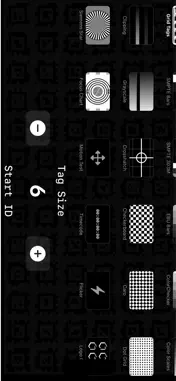
Grid Professional Test Patterns for Camera Calibration Turn your iPad, iPhone, or Apple TV into a precision test pattern generator for camera and lens analysis. Lens Pattern displays pixel-accurate test charts directly on your device screen — no printed charts, no extra hardware. Perfect for camera calibration, lens quality testing, color grading verification, and production monitoring. INCLUDED TEST PATTERNS: Markers & Calibration • Grid Tags — AprilTag marker grid with adjustable tag size and start ID, ideal for camera calibration and spatial tracking Color & Exposure • SMPTE Bars — Standard SMPTE EG-1-1990 color bars • SMPTE 303M — HD color bars with PLUGE and Y-ramp zones • EBU Bars — EBU Tech 3325 color bars (75% and 100%) • ColorChecker — Classic 24-patch color reference chart • Color Scales — R/G/B/C/M/Y/W gradient ramps with percentage markers • Clipping — Shadow and highlight clipping test (1% steps) with stepped ramp • Grayscale — 21-step grayscale ramp with percentage labels Geometry & Focus • Crosshatch — Grid pattern for distortion analysis • Checkerboard — Black/white checkerboard for resolution testing • Caro — Diamond pattern (45° rotated checkerboard) • Dot Grid — Uniform dot array for distortion measurement • Siemens Star — Resolution target for sharpness evaluation • Focus Chart — Comprehensive focus and resolution target Timing & Animation • Motion Test — Moving bars for rolling shutter and motion blur analysis • Timecode — Real-time HH:MM:SS:FF display at 60fps • Flicker — Adjustable frequency flicker (0.5–30 Hz) KEY FEATURES: • Full-screen, pixel-perfect rendering on any screen size • Physical dimensions in millimeters displayed on iOS devices
What's New
Version 1.2 2026-04-15
disable Screensaver during display pattern Technical Analysis
Package Overview Basic metadata
Bundle ID
com.stageprecision.lenspattern Current Version 1.2
Minimum iOS 18.6
Package Size App Store Size
Package Metadata 0 / 2 version records
Detailed binary, privacy manifest, framework, and Info.plist results have not been indexed for this package yet. The verified App Store and archive metadata above remains available.
Developer Information
Known Version Records
0 version records with stored package metadata • 2 known version records
Stored metadata does not guarantee a package is currently available to download.
| Details | Version / IDs | Version date | Action |
|---|---|---|---|
| Not archived | App Store ID: 884542820 | Unknown | Request Version |
| Not archived | App Store ID: 883945043 | Unknown | Request Version |