
Preview






Description
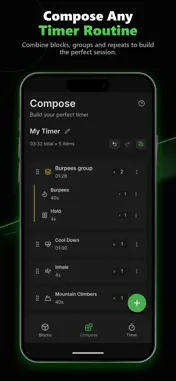
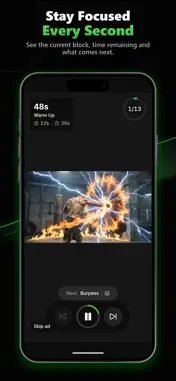
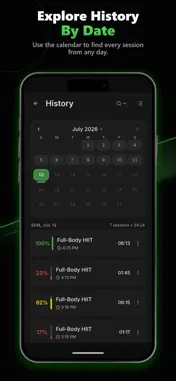
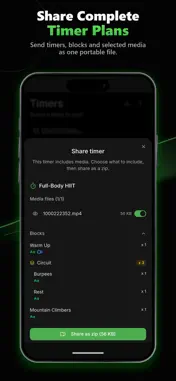
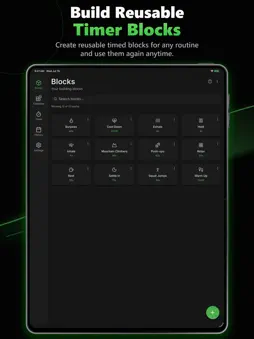
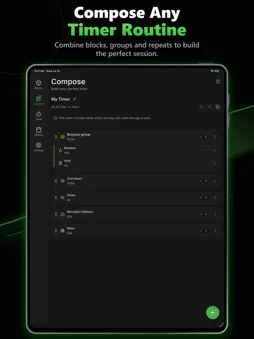
Timber is a customizable interval timer and routine builder. Whether you're crushing a HIIT workout, sinking into a deep focus session, or perfecting your morning schedule, Timber lets you build your routine, your way. Create simple countdowns or advanced multi-step routines with reusable blocks, groups, repeats, nested timers, media cues, and background playback. Stop switching between separate apps for HIIT, Tabata, Pomodoro, meditation, stretching, coaching, and cooking. Timber lets you build the exact routine you need. BUILD ONCE, REUSE ANYWHERE Create simple or highly advanced timers using our flexible block-based system. • Create reusable timer blocks • Group blocks into circuits, sets, and rounds • Repeat blocks, groups, or full timers • Nest timers inside other timers • Merge blocks into groups or split them apart • Edit linked blocks once to update them everywhere, or unlink for a custom version • Duplicate timers and blocks for easy modification GUIDE EVERY STEP WITH RICH MEDIA CUES Don't just watch the clock. Attach rich media to any timer step so you know exactly what to do and when to do it: • Add YouTube, Vimeo, and Dailymotion video demos • Attach local video, audio, image, recording, and text prompts • Use text-to-speech voice cues for hands-free guidance • Add music, countdown sounds, and instructions to individual timer steps • Keep cues running with native background playback ONE TIMER FOR EVERY ACTIVITY • Workouts & Training: HIIT, Tabata, EMOM, boxing rounds, circuit training, stretching, and mobility. Add exercise demo videos right into your rest and work intervals. • Focus & Productivity: Pomodoro, deep work, studying, reading, and work sprints • Mindfulness: yoga, breathwork, meditation, and guided practice • Daily life: morning routines, cooking steps, speaking practice, and coaching plans TRACK YOUR PROGRESS See how consistently you’re completing your routines. • View weekly timer time, completed sessions, and streaks • Explore seven-day activity bars and a monthly heatmap • See per-timer stats including times run, total time, and average completion • Review completed, skipped, and unplayed sections of each session SHARE AND IMPORT COMPLETE TIMERS • Share lightweight timers with a QR code • Share media-rich timers as a Timber zip file • Choose which media files to include before sharing • Preview media before exporting or importing • Scan QR codes from another phone or from a saved image • Review, rename, and confirm shared timers before adding them • Imported timers stay clearly marked so you know where they came from RELIABLE BACKGROUND PLAYBACK Run timers with a focused, distraction-free display or continue while using other apps. Timber keeps your countdown, audio cues, TTS prompts, and notifications moving in the background. • Use a focused full-screen playback view • Follow and control timers with Live Activities on the Lock Screen and Dynamic Island • Keep timers and supported media cues running in the background FULL BACKUP & RESTORE Keep a portable copy of your Timber data. • Back up timers, blocks, history, media, and your theme preference • Export everything as a .timber.zip file • Preview a backup before restoring it • Choose individual timers to restore • Restore nested timers and their required media automatically PRIVATE & OFFLINE-FIRST Your data belongs to you. Timers, blocks, history, and local media are stored on your device. You decide when to export, share, back up, or restore them. No account required, no forced logins WHY CHOOSE TIMBER? • Replaces basic countdown timers, stopwatches, and routine apps • Reusable blocks make advanced timers faster to build • Rich media cues help you know exactly what to do next • QR and zip sharing make it easy to move routines between devices • Flexible enough for simple tasks and complex schedules Create once. Reuse anywhere with Timber. Terms of Use (EULA): https://www.apple.com/legal/internet-services/itunes/dev/stdeula/
What's New
Version 1.12.2 2026-10-22
• Hear what’s next — Timber can announce “Next up,” followed by the upcoming block’s name. • Personalize blocks with an emoji, a colored icon, or your own photo... Technical Analysis
Package Overview Basic metadata
Bundle ID
com.spcfdoho.timber.app Current Version 1.12.2
Minimum iOS 16.2
Package Size App Store Size
Package Metadata 0 / 0 version records
Detailed binary, privacy manifest, framework, and Info.plist results have not been indexed for this package yet. The verified App Store and archive metadata above remains available.
Developer Information
Known Version Records
0 version records with stored package metadata
Stored metadata does not guarantee a package is currently available to download.
| Details | Version / IDs | Version date | Action |
|---|