
Preview



Description
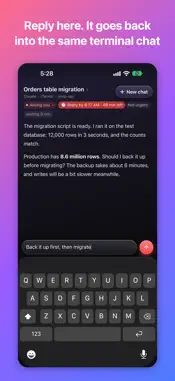
Miao turns the AI coding chats in your Mac's terminal (Claude Code, Codex, Grok) into cards whenever one is waiting on you. Go through them one at a time on your iPhone or iPad and reply on the card. Your reply is typed into the original terminal chat, and the agent carries on. Miao has two parts. The Mac app reads your terminals and types your replies; it's a free download from our website. This app is the iPhone and iPad part, and it works after you pair it with a Mac running Miao. No Mac at hand? Tap "Try the Demo" on the first screen to look around with built-in sample data. CONNECTING Open Miao on your Mac and go to Settings > iPhone & iPad to show a QR code. Scan it with this app once; after that it reconnects by itself. On the same Wi-Fi it connects over your local network. Away from home it connects to your Mac through a relay server. The app picks the route and shows which one it's using. WHAT YOU CAN DO - Cards are sorted into Asking you, Done, and Error, and show the last thing the agent said. If it gave a deadline, the card shows the time left. - Reply on the card and attach images, or interrupt the agent and tell it to do something else. - Answer multiple-choice prompts with a tap. - Open a chat and read it from the start. - Waiting lists chats on a timer, running a background task, or waiting for another chat. All lists every chat open on your Mac. - Start a new chat from your phone, or resume one you just closed. NOTIFICATIONS When an agent stops and waits for you while you're not in the app, you get a notification that opens that card. The Lock Screen and Dynamic Island keep the most urgent chat in view: what it asked and how long you have, with the next few a long-press away. Answer a multiple-choice prompt, dismiss a finished report, or tell a stopped agent to continue right from the Lock Screen. After you reply on your phone, the Dynamic Island shows how long the agent has been working. ENCRYPTION Everything between your phone and your Mac is end-to-end encrypted, and only paired devices can connect or read it. The relay server forwards data it can't decrypt and doesn't store your chats. Notification text is encrypted before it's handed to Apple's push service and decrypted on your phone. NO ACCOUNT NEEDED Scan the QR code on your Mac once and you're connected. No sign-up, no login. REQUIREMENTS - A Mac running Miao (macOS 14 or later), with Claude Code, Codex, or Grok used in a terminal - iPhone or iPad with iOS 17 or later Privacy Policy: https://miao.letsplat.com/privacy?lang=en
What's New
Version 1.2.1 2026-11-10
Miao 1.2.1 brings these improvements: • Faster away from home: When your iPhone or iPad reaches your Mac through the relay (away from your home Wi-Fi), what yo... Technical Analysis
Package Overview Basic metadata
Bundle ID
com.splat.miao Current Version 1.2.1
Minimum iOS 17.0
Package Size App Store Size
Package Metadata 0 / 0 version records
Detailed binary, privacy manifest, framework, and Info.plist results have not been indexed for this package yet. The verified App Store and archive metadata above remains available.
Developer Information
Known Version Records
0 version records with stored package metadata
Stored metadata does not guarantee a package is currently available to download.
| Details | Version / IDs | Version date | Action |
|---|