
Preview




Description
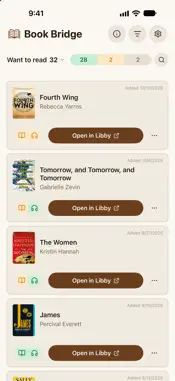
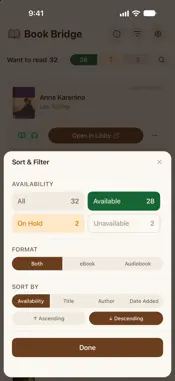
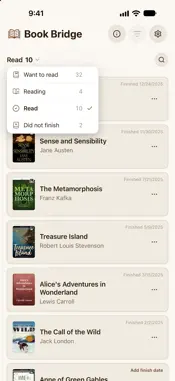
Stop wondering if your library has it. Book Bridge connects your Goodreads shelves to your local Libby libraries, so you can see at a glance which books you can borrow right now, which have a holds queue, and which aren't in yet. WANT TO READ, READING, READ, DID NOT FINISH All four of your Goodreads shelves, in one place. Switch between them with a tap. Every book shows its cover, author, and the date you added, started, or finished it. Missing a date? Add it from the book's card. AVAILABILITY FOR EVERY LIBRARY YOU BELONG TO Add each of your Libby libraries. Book Bridge checks eBook and audiobook availability at every one of them, so you know not just whether a title is available but where. Green means borrow now, yellow means a holds queue, gray means not available yet. One tap opens the book in Libby. TWO-WAY GOODREADS SYNC Finished a book? Mark it as read in Book Bridge and it moves on your Goodreads shelf too. Start one and mark it as currently reading, or set one aside as did not finish. Dates you add are saved to Goodreads, and changes you make on Goodreads show up in Book Bridge on the next sync. SORT, FILTER, AND SEARCH Sort your Want to Read list by availability, title, author, or date added. Filter to just the books that are available or on hold. Search any shelf by title or author. FREE AND PRO Book Bridge is free to use with one library, and it checks availability for the 3 newest books on your Want to Read list. Book Bridge Pro checks every library you use and your whole list. Pro is an annual subscription with a 7-day free trial, and you can cancel anytime. No more searching title by title. No more library website tab-hopping. Just your shelves, your libraries, and what's free to read today. Terms of Use: https://bookbridge.dev/terms Privacy Policy: https://bookbridge.dev/privacy
What's New
Version 2.3.0 2026-11-03
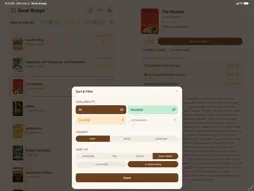
Now made for iPad. Turn it sideways and your list sits beside the book you picked, with its availability at every library and everything you can do with it in o...Now made for iPad. Turn it sideways and your list sits beside the book you picked, with its availability at every library and everything you can do with it in one place. Libraries shows the libraries you use beside the search for a new one. Book Bridge now taps back: a light tap when you move a book or pull to refresh, a tick when you switch lists or change a sort or filter, and a confirmation when a Goodreads sync finishes. Technical Analysis
Package Overview Basic metadata
Bundle ID
com.spencerking.bookbridge Current Version 2.3.0
Minimum iOS 16.4
Package Size App Store Size
Package Metadata 0 / 0 version records
Detailed binary, privacy manifest, framework, and Info.plist results have not been indexed for this package yet. The verified App Store and archive metadata above remains available.
Known Version Records
0 version records with stored package metadata
Stored metadata does not guarantee a package is currently available to download.
| Details | Version / IDs | Version date | Action |
|---|