
Preview


Description
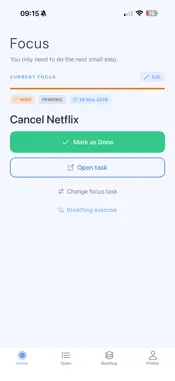
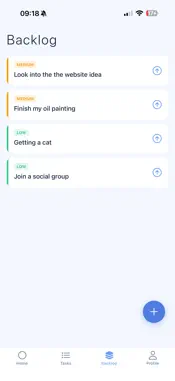
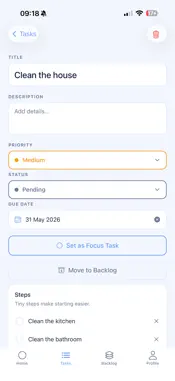
FocusSnap is a calm, ADHD-friendly productivity app for people who feel overwhelmed by traditional task managers. Instead of endless lists and complicated systems, FocusSnap helps you choose one focus task, break it into manageable steps and keep moving without unnecessary pressure. FocusSnap can help with task paralysis, overwhelm, executive-function challenges, time blindness, losing focus, switching between priorities and difficulty getting started. FOCUS ON THE NEXT STEP • Choose one task as your current focus • Break tasks into simple checklist steps • Add priorities, deadlines, notes and repeat schedules • Set reminders and “Nag until done” alerts • Keep your active task list intentionally manageable • Move later ideas into the Backlog • Archive completed tasks without losing them ROUTINES AND PROGRESS • Create reusable task templates • Turn templates into tasks and checklists • Use routine packs for study, home, work, planning and getting unstuck • View active tasks on a visual Task Map • Earn stars and celebrate completed work • Review recent progress in Reflection • Check priorities and older unfinished tasks PLAN YOUR WEEK WITH FOCUSSNAP PLUS • Build a seven-day plan around the time you actually have • Set daily focus budgets and days off • Choose up to three priorities per day • Add time estimates, notes and preferred start times • Receive deadline-aware schedule suggestions • Identify overloaded days before committing • Rebalance work across days with available capacity • Recover unfinished priorities from recent plans • Compare planned time with completed focus time • Keep previous plans and history available PERSONALISED GUIDANCE • Check in with your available time and energy • Receive suggestions based on deadlines, priorities, current focus and unfinished steps • See why each task was recommended • Get a smaller starting action when a task feels difficult • Review tasks that may need attention GUIDED FOCUS SESSIONS • Use built-in focus and break rhythms • Create custom routines • Associate sessions with a task • Pause, resume or finish early • Continue accurately when the app is backgrounded • Save session summaries and detailed history • Set a weekly focus-time goal • View seven-day and 30-day progress CALENDAR PLANNING • Connect an Apple or iCloud calendar • View calendar events alongside daily plans • Add planned tasks as timed calendar events • Synchronise task names, dates and durations on demand SOUNDS AND PERSONALISATION • Use offline rain, ocean, brown-noise and night-garden soundscapes • Adjust volume and preview sounds • Choose additional Plus colour themes • Enable optional session notifications MEDICATION ORGANISATION • Create daily, selected-day or as-needed schedules • Add multiple reminder times • Record taken, skipped and as-needed doses • Snooze reminders for ten minutes • Review and undo records in private history • Track remaining supply and refill thresholds • Keep medication names and doses out of notification text Medication features are organisational tools only and do not provide medical advice. ONLINE OR LOCAL-ONLY Use an online account for task synchronisation or choose a separate local-only workspace without creating an account. Local-only mode works offline and keeps tasks, plans, routines, session history, medication records and preferences on your device. Local information is not uploaded or merged into an online account. Online tasks also support offline-friendly actions with clear pending-sync indicators. FOCUSBAP PLUS MEMBERSHIP FocusSnap Plus is available through monthly or yearly auto-renewing subscriptions. Localised prices are shown before purchase. Subscriptions can be restored and managed through your App Store account. Your tasks, steps, Backlog and archives remain available without Plus. Saved Plus plans and history remain readable if your subscription ends. Terms of Use (EULA): https://www.apple.com/legal/internet-services/itunes/dev/stdeula/
What's New
Version 26.10.00 2026-10-18
What’s New in FocusSnap This is our biggest FocusSnap update yet. Introducing FocusSnap Plus: • Personalised, on-device guidance based on your priorities, deadl...What’s New in FocusSnap This is our biggest FocusSnap update yet. Introducing FocusSnap Plus: • Personalised, on-device guidance based on your priorities, deadlines, available time, energy and current focus • A new weekly planner with daily time budgets and days off • Deadline-aware schedule suggestions with up to three priorities per day • Workload balancing to move tasks away from overloaded days • Plan recovery for unfinished priorities from recent weeks • Weekly reviews comparing planned time with completed focus sessions • Saved daily plans with notes, time estimates and custom ordering • Guided focus sessions with work and break cycles • Three built-in focus rhythms and custom routines • Seven-day and 30-day progress charts, session history and weekly goals • Practical routine packs for study, home, work, planning and getting unstuck • Offline soundscapes including rain, ocean, brown noise and night garden • Additional colour themes and optional session alerts • Monthly and yearly subscription options with purchase restoration Calendar planning: • Connect an Apple or iCloud calendar • Add planned tasks to your calendar as timed events • See existing calendar events alongside your daily plans • Synchronise task names, dates and durations between FocusSnap and your calendar • Detect conflicting edits and choose which version to keep New local-only workspace: • Use FocusSnap without creating an account • Keep tasks, plans, routines, sessions and preferences entirely on your device • Continue working without an internet connection • Optional Face ID or Touch ID protection • Local-only information is kept separate from online accounts Medication organisation: • Create daily, selected-day or as-needed medication schedules • Record taken and skipped doses • Snooze reminders for ten minutes • Maintain a private dose history • Track remaining supply and refill thresholds • Medication names and doses are never included in notification text • Medication information remains stored locally on your device Also included: • Improved offline behaviour and safer synchronisation • Better handling of interrupted actions and account switching • More reliable timers when the app is in the background • Improved notification scheduling • Better support for daylight-saving and time-zone changes • Accessibility, layout, performance and stability improvements Your existing tasks, backlog, focus tools and archives remain available for free. Saved Plus plans and history remain readable if a subscription ends. Technical Analysis
Package Overview Basic metadata
Bundle ID
com.focussnap.focussnap Current Version 26.10.00
Minimum iOS 16.4
Package Size App Store Size
Package Metadata 0 / 3 version records
Detailed binary, privacy manifest, framework, and Info.plist results have not been indexed for this package yet. The verified App Store and archive metadata above remains available.
Developer Information
Known Version Records
0 version records with stored package metadata • 3 known version records
Stored metadata does not guarantee a package is currently available to download.
| Details | Version / IDs | Version date | Action |
|---|---|---|---|
| Not archived | App Store ID: 887743834 | Unknown | Request Version |
| Not archived | App Store ID: 886719046 | Unknown | Request Version |
| Not archived | App Store ID: 886159996 | Unknown | Request Version |