
Preview



Description
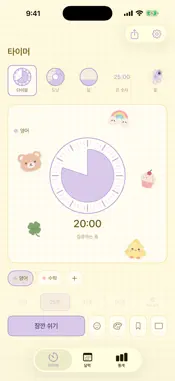
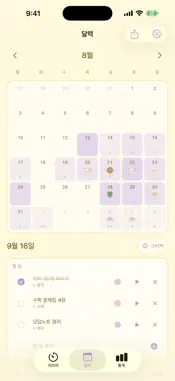
Pick a timer. Decorate it. Focus. Pochi is a focus timer you decorate with stickers. When the timer on your screen is one you made cute yourself, it's a little easier to stay with your work. ■ Pick your timer Dial, Donut, Moon, Flower, Berry Milk, Heart, Stars, Hourglass, Candle, Cat, Flip, and Big Numbers. Each of the 12 timers shows time passing in its own way. Choose 15, 25, 45, or 50 minutes, or set any time you like. Flip and Big Numbers fill the whole screen — perfect for study-with-me videos. ■ Decorate it with stickers Place stickers on your timer board, then move, resize, and rotate them however you like. 94 stickers: animals, snacks, plants, weather, stationery, study, and feelings, plus hand-drawn crayon sets for exams and celebrations. You can also change the background, main color, paper (Plain, Grid, Dot, Check, Cork, Lined), and border (Clean, Crayon, Colored Pencil). ■ Save your looks Everyday, exam week, birthday week… Save a decorated timer as a look and bring it back anytime. ■ Share it as a card Put today's decorated timer, your focus time, and time per tag on a single card. Pick 1:1, 3:4, or 9:16, then share it right away or save it to Photos. You can make a card of this month's calendar, too. ■ Your days fill the calendar Every session you finish lands on that day's calendar. Put stickers on the days, too, and decorate your month. Add to-dos for each day and tap ▶ to start a timer for that tag right away. Leave a one-line note after a session, or add a record you forgot to time. ■ See your progress at a glance How much you focused each day, where your time went, and how consistent you've been — shown as bars, a breakdown by tag, and a 5-week heatmap. ■ Make it yours Add your nickname and your timer's title becomes "Joy's timer". Studying past midnight? Move the start of your day later. You can also keep the screen on while the timer runs. Use Pochi in English or Korean — switch anytime in Settings. ■ Your records stay on your phone No sign-up, no login. Everything is stored only on your device and never sent anywhere. Export your data from Settings before you switch phones. ■ Free and Pochi Plus Focusing and keeping records are never limited in the free version. · Free: 4 timers (Dial, Donut, Moon, Big Numbers), 41 stickers, 4 color combinations, 2 papers, 2 board shapes, 2 saved looks, weekly stats · Pochi Plus: all 12 timers, 94 stickers, 36 color themes, 6 papers, 3 board shapes, crayon and colored-pencil borders, 12 saved looks, monthly stats and heatmap ■ About subscriptions Pochi Plus Monthly — renews automatically every month Pochi Plus Yearly — renews automatically every year (7-day free trial) Pochi Plus Lifetime — one-time purchase, no renewal Payment is charged to your Apple Account when you confirm your purchase. Subscriptions renew automatically at the same price unless you cancel at least 24 hours before the end of the current period. You can manage or cancel anytime in Settings > Apple Account > Subscriptions. If you cancel during the free trial, you won't be charged. Terms of Use (EULA): https://www.apple.com/legal/internet-services/itunes/dev/stdeula/ Pochi Terms: https://pochi-three.vercel.app/terms Privacy Policy: https://pochi-three.vercel.app/privacy
What's New
Version 1.5 2026-09-30
• See the time left on your Lock Screen and in the Dynamic Island. • A home screen widget shows today's focus time and this week's record. • The distraction-fre... Technical Analysis
Package Overview Basic metadata
Bundle ID
com.soyoung.pochi Current Version 1.5
Minimum iOS 17.0
Package Size App Store Size
Package Metadata 0 / 0 version records
Detailed binary, privacy manifest, framework, and Info.plist results have not been indexed for this package yet. The verified App Store and archive metadata above remains available.
Known Version Records
0 version records with stored package metadata
Stored metadata does not guarantee a package is currently available to download.
| Details | Version / IDs | Version date | Action |
|---|