
Preview





Description
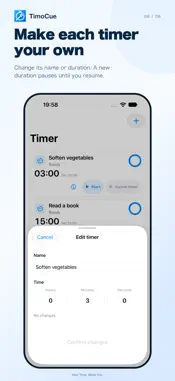
Turn a time you find on a web page into a timer with a tap. TimoCue lets you browse and manage multiple countdowns in one app. Use it for recipes, study sessions, exercise breaks, DIY waiting times, and steps at work. Spend less effort remembering a duration and entering it again, and keep each task moving at your own pace. FROM PAGE TO TIMER IN THREE STEPS 1. Open a page from search or Favorites. 2. Turn on Select time, tap a highlighted duration, then check the time and name before adding it. 3. Tap Start once when you are ready. Adding a timer leaves it waiting. You choose when the countdown begins, and an alarm lets you know when time is up. MANAGE MULTIPLE COUNTDOWNS Name each timer and start, pause, or resume it individually. Keep separate tasks and waiting times together in one list. SET A TIMER MANUALLY If a page's time cannot be captured, use + Add to enter a name and duration. Manual entry also works for tasks that do not involve a web page. EDIT NAMES AND DURATIONS Changing only a timer's name keeps its countdown running. Changing the duration of a running or paused timer pauses it at the new duration. Tap Resume when you want to continue. KEEP USEFUL PAGES CLOSE Save page names and URLs in Favorites and open them from Home. Choose your search engine in Settings. HELP WHEN YOU NEED IT A three-page introduction explains the basics. Reopen it from Settings, or use the help contents to jump to a specific topic. The interface and web time recognition support 11 languages. Time recognition runs on your device. Page structure, text in images, and unclear expressions can prevent capture; use manual entry when needed. End alarms require alarm permission on your iPhone. For iPhone and iPhone Duo running iOS 26 or later. Terms of Use: https://timocue.poige.net/en/terms/ Privacy Policy: https://timocue.poige.net/en/privacy/
What's New
Version 1.0.2 2026-10-21
Added support for display on iPhone Duo. Added a banner ad slot to the Home screen. Technical Analysis
Package Overview Basic metadata
Bundle ID
com.soryuken.TimoCue Current Version 1.0.2
Minimum iOS 26.0
Package Size App Store Size
Package Metadata 0 / 0 version records
Detailed binary, privacy manifest, framework, and Info.plist results have not been indexed for this package yet. The verified App Store and archive metadata above remains available.
Developer Information
Known Version Records
0 version records with stored package metadata
Stored metadata does not guarantee a package is currently available to download.
| Details | Version / IDs | Version date | Action |
|---|