Preview




Description
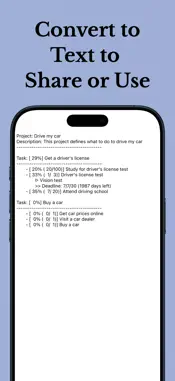
The app was initially developed to manage personal lifestyle projects managed as a simple to-do list with just a few inputs. There was also a strong focus on effectively managing the personal aspects of large-scale projects. Since its initial development, it has been improved by adding convenience and professional functions, such as the function list at the bottom, to enable easy and detailed project management. It will help you keep track of and manage your overall progress rather than simply managing it as a to-do list. With the concept of a project, we can define many things in our daily life as a project. As a simple example, you could create a project called 'Drive my car'. To drive your own car, you can create a task called 'get a driver's license' and a task called 'buy a car'. To the task called 'get a driver's license', you can add to-do lists such as 'Study for driver's license test', 'Driver's license test', and 'Attend driving school'. For a to-do called 'Driver's license test', you can break the to-do down into small lists that include the driver's license test steps. You can also put a to-do list for the task called ‘Buy a Car’, such as ‘Get Car Prices Online’, ‘Visit a Car Dealer’, ‘Buy a Car’, etc. If you have a deadline, such as a license exam, you can also set a deadline and, if necessary, set an alarm to notify you 30 minutes in advance. For tasks that have a fixed number of times, such as going to a driving school, you can manage the progress conveniently by setting the maximum progress to the number of times. For tasks, it automatically calculates and displays progress based on the progress of the to-dos. As you proceed with the project, you may leave a project log saying, “I need to get used to using the accelerator pedal because driving is too slow at the driving school test site.” We do not do just one project in our daily life, such as ‘driving a car’. This app allows you to create and manage as many projects as you want. You can convert your project to text and share it, edit it with other programs, or back it up. This example is for a lifestyle project. This can also be applied to private parts of your organization's projects. This is an offline app that stores all your data on your device. Many features have been updated based on user reviews. If you feel any inconvenience or lack of functionality, please leave a review. Features and Convenience List - Organize tasks by to-dos - Automatically calculates task progress and importance - Support for task completion - Break down your to-do list into smaller lists - Support for assigning order between tasks - Task graph that allows you to see the order between tasks at a glance, like a Gantt chart - Setting the project period and managing progress - Record and share project logs - Alarms, widgets, search and sharing support for deadline - Share project-related content - PDF report support - Dark mode support - Color theme support - Supports iCloud backup and restore on a per-project basis - Widget support for deadlines and project progress status - Supports csv export to process data in Apple Numbers or MS Excel - Change task order, to-do order, and project order by dragging and dropping - Supports continuous input of tasks or to-dos - Supports multiple moves, deletes or completions - Task card border color selection - To-do filtering by priority - Supports automatic recording of to-do completion times and viewing of completed to-do lists - Dedicated views for Completed, In Progress, Planned, and Stopped to-do lists
What's New
Version 1.39.0 2026-08-06
- Fixed a UI bug. >> Fixed an issue where the task progress slider did not respond on devices running iOS versions earlier than iOS 26. >> We apologize fo...- Fixed a UI bug. >> Fixed an issue where the task progress slider did not respond on devices running iOS versions earlier than iOS 26. >> We apologize for the inconvenience. Since we primarily tested on newer devices, we overlooked this issue on older iOS versions. We'll make sure to test more thoroughly on older devices in future updates. - Added a view to display all In Progress to-dos. - Added a view to display all Planned to-dos. - Starting with this version, newly created to-dos display their creation time. - Added a view to display all Stopped to-dos. - If you encounter any bugs or have suggestions for improvements, please leave us a review. We greatly appreciate your feedback and will continue improving the app. Technical Analysis
Package Overview Basic metadata
Bundle ID
com.GOSAE.MyOwnProject Current Version 1.39.0
Minimum iOS 15.5
Package Size App Store Size
Package Metadata 0 / 25 version records
Detailed binary, privacy manifest, framework, and Info.plist results have not been indexed for this package yet. The verified App Store and archive metadata above remains available.
Developer Information
Known Version Records
0 version records with stored package metadata • 25 known version records
Stored metadata does not guarantee a package is currently available to download.
| Details | Version / IDs | Version date | Action |
|---|---|---|---|
| Not archived | App Store ID: 888123508 | Unknown | Request Version |
| Not archived | App Store ID: 886066510 | Unknown | Request Version |
| Not archived | App Store ID: 880335957 | Unknown | Request Version |
| Not archived | App Store ID: 878186628 | Unknown | Request Version |
| Not archived | App Store ID: 876919888 | Unknown | Request Version |
| Not archived | App Store ID: 875272095 | Unknown | Request Version |
| Not archived | App Store ID: 874448648 | Unknown | Request Version |
| Not archived | App Store ID: 873584975 | Unknown | Request Version |
| Not archived | App Store ID: 872069245 | Unknown | Request Version |
| Not archived | App Store ID: 872034121 | Unknown | Request Version |
| Not archived | App Store ID: 871468152 | Unknown | Request Version |
| Not archived | App Store ID: 864079175 | Unknown | Request Version |
| Not archived | App Store ID: 862693053 | Unknown | Request Version |
| Not archived | App Store ID: 861615448 | Unknown | Request Version |
| Not archived | App Store ID: 860514239 | Unknown | Request Version |
| Not archived | App Store ID: 858972084 | Unknown | Request Version |
| Not archived | App Store ID: 856223629 | Unknown | Request Version |
| Not archived | App Store ID: 855313032 | Unknown | Request Version |
| Not archived | App Store ID: 854736949 | Unknown | Request Version |
| Not archived | App Store ID: 854587117 | Unknown | Request Version |
| Not archived | App Store ID: 854541106 | Unknown | Request Version |
| Not archived | App Store ID: 854331397 | Unknown | Request Version |
| Not archived | App Store ID: 854315419 | Unknown | Request Version |
| Not archived | App Store ID: 852835311 | Unknown | Request Version |
| Not archived | App Store ID: 852511471 | Unknown | Request Version |