Preview



Description
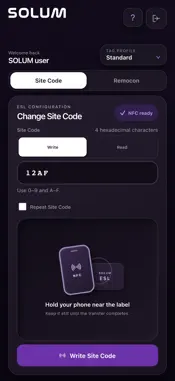
Configure compatible SOLUM electronic shelf labels from your NFC-enabled iPhone. Solum Remocon combines Site Code configuration and remote label control. Sign in with your SOLUM account, choose the correct tag profile, select an action, and hold your iPhone near the label. SITE CODE Read an existing Site Code or write a four-digit hexadecimal Site Code to a compatible label. REMOCON Send Page Up, Page Down, First Page, Last Page, Refresh Display, Normal Mode, Reset, or Shut Down. Read a compatible label's Label Code through NFC and copy the result. STANDARD PROFILES Select the command profile appropriate for your label installation. CLEAR GUIDANCE Light and dark appearance follow your iPhone's theme. The app shows action selection and operation results. iOS presents its native NFC scanning sheet during a tag session; hold your iPhone near the label until the operation finishes. HOSTED SOLUM SIGN-IN Your password is entered on the hosted SOLUM authentication page, not in the app's own interface. An authorized SOLUM account, a compatible NFC-capable iPhone, and supported SOLUM ESL hardware are required. Compatible labels use NFC-A or FeliCa; supported operations depend on label model, firmware, and the selected profile. This app is a label configuration tool, not a general NFC reader or a camera-based barcode scanner. Reset and Shut Down affect the tapped label and should only be used when authorized.
What's New
Version 1.1 2026-11-06
1. UI enhancements and improvements throughout the app. Technical Analysis
Package Overview Basic metadata
Bundle ID
com.solum.eslremocon Current Version 1.1
Minimum iOS 15.0
Package Size App Store Size
Package Metadata 0 / 0 version records
Detailed binary, privacy manifest, framework, and Info.plist results have not been indexed for this package yet. The verified App Store and archive metadata above remains available.
Known Version Records
0 version records with stored package metadata
Stored metadata does not guarantee a package is currently available to download.
| Details | Version / IDs | Version date | Action |
|---|