
Preview



Description
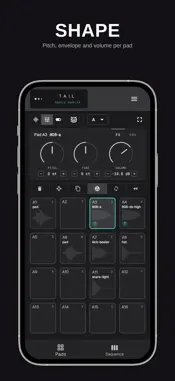
Record a sound. Chop it. Spread it across 128 pads and sequence it into a beat. All of it with no noticeable lag. TAIL Sampler is a one-time purchase. No subscription, no ads, no account, no feature locked behind a second payment. WHAT YOU CAN DO • Record anything — your voice, an instrument, a record, a field recording, any sound around you. • Chop and slice — trim on the waveform and drag the markers to where the hit actually starts. • 128 pads — 16 per bank, eight banks from A to H. Switching banks never cuts off a sound that is still playing. • Step sequencer — 16 tracks, 16 steps, with swing. Kicks, snares, hats and percussion, and a groove going in seconds. • Tune every pad — pitch, fine tune, attack and envelope, per pad. • Play it live — trigger with your fingers or from an external MIDI controller. • Bounce and export — render a sequence to WAV, or export your pads as WAV with the pitch baked in. • Save your projects — close the app, come back, pick up where you stopped. • Background audio — keep the sound running while you switch apps. Built on a low-latency audio engine, and touch-first: not a desktop interface squeezed onto a small screen. GET STARTED IN SECONDS 1. Record or import a sound. 2. Assign it to a pad. 3. Play. No project setup, no sign-in, no tutorial to sit through. FOR EVERY KIND OF MAKER • Beatmakers — build grooves from your own one-shots and loops. • Producers — capture raw ideas anywhere and refine them later. • Sound designers — record and reshape real-world audio. • Performers — trigger samples live with MIDI. Whether you are sketching on the train, capturing a field recording or playing live, TAIL keeps the workflow short so you stay in the idea.
What's New
Version 1.0.5 2026-10-27
minor fixes Technical Analysis
Package Overview Basic metadata
Bundle ID
com.tailsampler.phone Current Version 1.0.5
Minimum iOS 16.3
Package Size App Store Size
Package Metadata 0 / 0 version records
Detailed binary, privacy manifest, framework, and Info.plist results have not been indexed for this package yet. The verified App Store and archive metadata above remains available.
Developer Information
Known Version Records
0 version records with stored package metadata
Stored metadata does not guarantee a package is currently available to download.
| Details | Version / IDs | Version date | Action |
|---|