Preview





Description
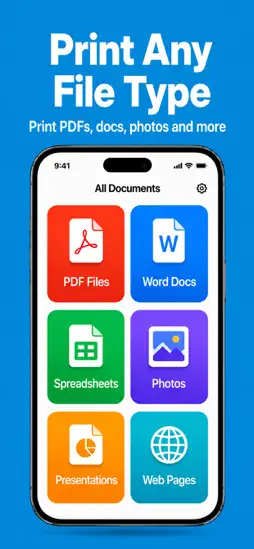
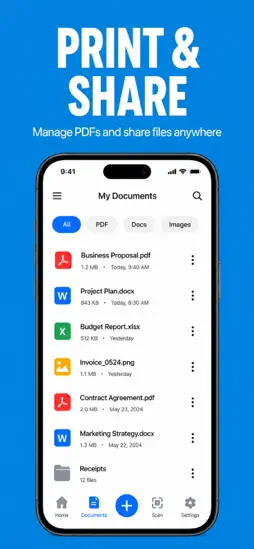
Print anything from anywhere. Printer is the simplest way to put your phone, tablet, and ideas on paper. 24 quick tools, every paper variant, every printer you own — no account, no cables, no fuss. WHY PEOPLE LOVE IT • 24 tools, one tap each • Connects automatically to any printer • Live preview before you print — see your exact layout, tiles, and pages • Print whole files or just the pages you need • Works offline once your printer is paired • No sign-up, no email, no cloud upload 24 QUICK TOOLS Photo Print · Document · Image Collage · ID Card · Poster · Sticker Sheet · T-Shirt Transfer · Business Card · Calendar · Greeting Card · Booklet · Resume · PDF · Web Page · Email · Note · QR Code · Barcode · Label · Envelope · Wallet Photos · Banner · Receipt · Letterhead EVERY PAPER, EVERY SIZE A4, A3, A5, Letter, Legal, 4×6 photo, 5×7 photo, square, custom — preview live, then print at draft, standard, or photo quality. THE COLLAGE TOOL Add up to 6 photos and choose from 5 layouts (2×2, 3×2, 1+3, 2+1, mosaic). Tap an empty slot to drop a photo into that exact spot, tap any photo to swap it, then fine-tune spacing, border, and background. Done in under a minute. WORKS WITH ANY PRINTER Connects via Wi-Fi, AirPrint, or Bluetooth — HP, Epson, Brother, Canon, and most current models. Auto-discovers nearby printers in seconds. PRIVACY-FIRST No account required. Your photos and documents stay on your device until they reach the printer. We don't upload, sync, or analyze anything. DESIGNED IN SECONDS A clean, paper-warm interface inspired by the materials it works with. Made for people who'd rather get the print done than fight with a printer dialog. https://sites.google.com/view/zkterms
What's New
Version 1.0.6 2026-06-04
This update focuses on stability and a smoother printing experience. Fixes • Fixed a crash when adding lots of pages in the Photo print editor • Fixed a crash ...This update focuses on stability and a smoother printing experience. Fixes • Fixed a crash when adding lots of pages in the Photo print editor • Fixed a crash when printing documents after making edits • ID Card preview now lays out your cards correctly at every size (1×, 2×, 4×, 6×) • Calendar preview now shows the full page exactly as it prints New & Improved • Custom page range — print just the pages you need (e.g. 1-5, 8, 11-13) • Collage — tap + on any empty space to drop a photo into that exact spot • Poster — see the tiling grid, margins, and crop marks update live as you adjust • ID & Business Cards — clearer “Cards per sheet,” and each card prints front + back • Premium unlocks reliably right at launch Thanks for printing with us! Have feedback or hit a snag? We’d love to hear from you. Version 1.0.5 2026-05-20
Better tools. Sharper prints. This release rebuilds the toolkit from the ground up. Photo Editor — completely new. Crop to any aspect ratio, rotate, flip hori...Better tools. Sharper prints. This release rebuilds the toolkit from the ground up. Photo Editor — completely new. Crop to any aspect ratio, rotate, flip horizontally or vertically, drop in one of eight filters (Mono, Noir, Tonal, Chrome, Fade, Process, Instant), and fine-tune with six adjustments — Brightness, Contrast, Saturation, Warmth, Sharpness, and Vignette. Every change previews live. Tools that finally do what they say: • Calendar — generate a printable month or full-year calendar for any year. • Note — type a quick note, hit print. • Email — compose a letter (From / To / Subject / Body) and send it straight to paper. • Receipt — enter line items and tax, get a clean monospaced receipt. • Web Page — paste a URL, we capture the page, you print it. • Wallet Photos — four wallet-sized prints on one sheet with cut guides. Polished Premium screen. Plans stay pinned to the bottom, no more scrolling to find them. Rate Printer from Settings. Tap About → Rate Printer whenever you want — no nagging required. Thanks for printing with us. Version 1.0.4 2026-05-13
Maintenance and Fixes Version 1.0.3 2026-05-11
Themes & dark mode • Five built-in themes: HP, Classic, Sepia, Ocean, and Midnight (true dark mode). • Pick during onboarding or swap any time from Settings — e...Themes & dark mode • Five built-in themes: HP, Classic, Sepia, Ocean, and Midnight (true dark mode). • Pick during onboarding or swap any time from Settings — every screen, every tool updates instantly. • HP brand blue is now the colour of primary buttons and toggles in HP theme. Smarter printing across all 24 tools • Poster A0 / A1 / A2 / A3 selections now pre-select that paper in the AirPrint dialog. • Wallet Photos defaults to 4×6 with 4 prints per sheet. • T-Shirt automatically mirrors the image so iron-on transfers come out the right way around. • Greeting Card, Calendar, Letterhead, Resume, Receipt and Booklet now use sensible default paper. • Two-sided print preference in Settings flows through to every job. • Grayscale and copies are forwarded to AirPrint so you don't reset them on every print. Notifications • Get a system notification when each print job is sent — togglable per type in Settings. Auto-reconnect • Your saved printer is restored and re-pinged the moment you open the app, including when returning from the background. • The printer chip shows the saved name immediately, instead of "Selected printer" until first contact. Polish • Sharper contrast in every theme — no more white-on-white text in Midnight. • Live theme preview while you pick — see the new colours apply across the whole app before committing. • Print-ink colours stay true black on paper, regardless of which theme you've chosen on screen. • Smoother modal transitions and a smaller, faster splash. • Many small fixes to layout, taps, and accessibility. Version 1.0.2 2026-05-08
Maintenance and Fixes Version 1.0.1 2026-05-02
maintenance and fixes Version 1.0 2026-04-29
App Store User Reviews
Frankdoggie 2026-06-08
HP Smart Printer the Best!
5/5 Stars – The HP Smart Printer Isn’t Just a Printer… It’s a Productivity Superhero! Let me start by saying: I never thought I’d gush about a printer. But t...5/5 Stars – The HP Smart Printer Isn’t Just a Printer… It’s a Productivity Superhero! Let me start by saying: I never thought I’d gush about a printer. But the HP Smart Printer? It’s redefined what I thought a printer could be—and it’s become the unsung hero of my home and work life. First, setup was ridiculously easy. I’m not the most tech-savvy person, but in 5 minutes flat, I connected it to my Wi-Fi, downloaded the HP Smart app, and was printing a colorful photo of my dog (it looked stunning, by the way). No confusing cables, no endless troubleshooting—just seamless, intuitive magic. The print quality? Mind-blowing. Text documents are crisp, sharp, and professional—perfect for work reports that need to make a good impression. Color prints? Vibrant, true-to-life, and rich, whether I’m printing kid’s art, vacation photos, or marketing materials. And the best part? It’s fast. No waiting around for pages to trickle out—this printer churns out documents like it’s on a mission to save me time. But the real game-changer is the HP Smart app. I can print, scan, and copy from my phone, laptop, or even my tablet—from anywhere. Forgot to print a presentation before leaving the house? No problem! I sent it from my phone on the train, and it was waiting for me on my desk when I walked in. Scanning is just as effortless: snap a photo of a receipt or handwritten note, and the app converts it into a clear, editable PDF in seconds. Oh, and the automatic two-sided printing? It’s saved me a fortune in paper and helped me cut down on waste—win-win! I also love how compact and sleek it is. It fits perfectly on my home office desk without taking over, and the modern design looks great next to my laptop. And let’s talk about reliability: I’ve had this printer for 6 months, and it’s never jammed, never glitched, never let me down. Even when I’m printing 50-page reports or a stack of holiday cards, it handles it like a champ. The ink efficiency is another huge plus. The high-yield cartridges last forever, and the app alerts me when I’m running low so I can order more with one tap—no last-minute trips to the store. And HP’s eco-friendly initiatives? They make me feel good about using this printer, knowing I’m reducing my carbon footprint. If you’re on the fence about buying a new printer, do yourself a favor and get this one. It’s not just a tool—it’s a partner in productivity, creativity, and convenience. I’ve recommended it to everyone I know, and every single person has thanked me. HP didn’t just make a smart printer—they made a life-changing one. 10/10 would (and have!) buy again. Thank you, HP, for turning a mundane task into a joy! 🎉
Technical Analysis
Package Overview Basic metadata
Bundle ID
smart.printer.app.hp Current Version 1.0.6
Minimum iOS 15.0
Package Size App Store Size
Package Metadata 0 / 7 version records
Detailed binary, privacy manifest, framework, and Info.plist results have not been indexed for this package yet. The verified App Store and archive metadata above remains available.
Related Apps


More by Softery LLC

Developer Information
Known Version Records
0 version records with stored package metadata • 7 known version records
Stored metadata does not guarantee a package is currently available to download.
| Details | Version / IDs | Version date | Action |
|---|---|---|---|
| Not archived | v1.0.6 App Store ID: 885961598Build: 1.0.6 | 2026-06-04 20:52:53 | Request Version |
| Not archived | v1.0.5 App Store ID: 885906545Build: 1.0.5 | 2026-05-20 22:56:25 | Request Version |
| Not archived | v1.0.4 App Store ID: 885525452Build: 1.0.4 | 2026-05-13 20:55:11 | Request Version |
| Not archived | v1.0.3 App Store ID: 885464428Build: 1.0.3 | 2026-05-11 14:17:48 | Request Version |
| Not archived | v1.0.2 App Store ID: 885314656Build: 1.0.2 | 2026-05-08 14:47:06 | Request Version |
| Not archived | v1.0.1 App Store ID: 885080915Build: 1.0.1 | 2026-05-02 04:21:59 | Request Version |
| Not archived | v1.0 App Store ID: 885063461Build: 1.0 | 2026-04-29 16:06:08 | Request Version |