
Preview


Description
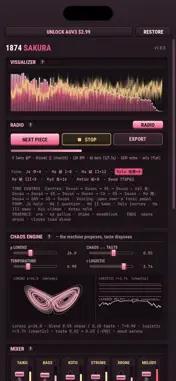
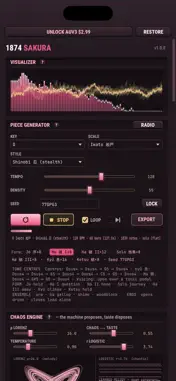
1874 Sakura writes complete pieces of Japanese and Chinese music and plays them on koto, guzheng, shakuhachi, erhu and a taiko ensemble. Press generate and you get a whole piece in jo-ha-kyū form, the shape of nearly every Japanese performing art: a slow opening called by a temple bell, a development, a still centre where a flute plays alone over the shō, a rapid finish where the whole ensemble converges on the melody, and a closing that thins back to nothing. One melody carries each piece. It is stated, slowed down alone over the drone and lifted an octave for the finish, so you can hum it back after one listen. The harmony works the way this music does: no chord changes, but a tone centre that moves by fourth or fifth over a tonic the shō never leaves. Every instrument is synthesised from how it makes sound. Plucked strings — koto, guzheng, shamisen, biwa, pipa — are modelled as vibrating strings, with the koto's pressed-string bend. Flutes — shakuhachi, dizi, xiao, hichiriki — are mostly air, with the pitch arriving from underneath. The erhu slides and sings. The taiko ensemble plays from real recordings, or switch them off and every drum is modelled. The pieces come from chaos maths. A Lorenz attractor picks the melody's rhythm and shape and then its notes; a logistic map drives the percussion. A small model learns as it writes, rewarded for the fourths, fifths and steps this music is built on. The CHAOS / TASTE slider decides how much say each one gets. Twelve styles. Eight traditional — Sakura folk, Gagaku court music, Guzheng, a Taiko ensemble, Zen meditation, Silk Road, Kabuki theatre and Neo-Tokyo fusion — and four fast action styles built for games: Samurai, Shinobi, Wuxia and Cyber Edo. Twelve pentatonic and Chinese scales, from hirajōshi and in-sen to gong and yu. Every piece is built from its seed. Write the seed down and you can have that exact piece again, note for note. You can play over it, too. The pads are the notes of the piece's scale rather than a piano keyboard, so nothing you touch is wrong, and the sixteen-step lane follows the piece and your host. Both play the melody or any part of the ensemble. Make it yours. Set the tone centres for each part of the piece, or play them in from a MIDI channel or as Tone Packets: REC records them into the piece, LIVE makes it follow them, changing on the next bar. Put the sections in any order and length, tap one to jump to it, or hold one with SECTION. A chord track and Tone Packets go out over MIDI, and the Generate Piece button, SECTION and the ensemble can all be automated from your host. Turn on RADIO and it keeps playing, picking a new style, key, scale and tempo for every piece. You also get: • 12 styles, 12 scales, 12 keys, tempo and density • 24 instruments and 13 one-click ensembles • A full instrument editor: string, breath, bell, vibrato, filter and envelopes • Sampled or synthesised taiko, switchable • Six-part mixer with a meter on every part • Temple reverb, tempo-synced echo, ensemble width and a filter sweep • MIDI in, so your keyboard plays whichever part you have selected • Export a MIDI file, a WAV mix, or stems — one WAV per part (in the app; in a host you record the audio there) • A note and a MIDI channel for every drum Two Audio Units, an instrument and a MIDI processor. Each part sends on its own MIDI channel and every drum has a note and a channel of its own, so one instance can drive a rack of your own sounds. The MIDI version passes your keyboard through. Both follow your host's tempo and transport, and one install registers both. The app is free and nothing in it is held back. Using the Audio Units inside other apps is a one-time purchase, and each AUv3 session plays for two minutes first so you can try them properly. No account, no ads, no subscription. Works offline.
What's New
Version 1.1.0 2026-11-22
New in 1.1 - chords and arrangement. • CHORDS: set the tone centres for each part of the piece. Every part follows them. • Play chords in: hold them on a MID...New in 1.1 - chords and arrangement. • CHORDS: set the tone centres for each part of the piece. Every part follows them. • Play chords in: hold them on a MIDI channel, or send them by name as Tone Packets. REC records them into the piece as it plays; LIVE makes the piece follow them, changing on the next bar. • ARRANGEMENT: put the sections in any order, at any length, as often as you like. • Tap a section in the arrangement line and playback jumps there on the next bar. • SECTION holds playback in one kind of section until you pick another - made for live sets. • A chord track: the harmony on its own MIDI channel, and in MIDI exports. • Tone Packets out: the chords sent by name, for apps that follow them. • Automate the Generate Piece button, SECTION and the ensemble from your host. • PLAY OVER: play a part yourself and the generated one makes way. REPLACE hands you the part; TAKEOVER only while you play. • An improved PLAY panel, with more ways to write and edit your lanes. • Every panel except the generator folds away, and stays the way you left it. • With LOOP and AUTO-NEXT off, the piece plays once and stops. • Bug fixes and improvements. Technical Analysis
Package Overview Basic metadata
Bundle ID
com.liquiduslabs.sakura1874 Current Version 1.1.0
Minimum iOS 15.0
Package Size App Store Size
Package Metadata 0 / 0 version records
Detailed binary, privacy manifest, framework, and Info.plist results have not been indexed for this package yet. The verified App Store and archive metadata above remains available.
Developer Information
Known Version Records
0 version records with stored package metadata
Stored metadata does not guarantee a package is currently available to download.
| Details | Version / IDs | Version date | Action |
|---|